


Windows 10 reached EOS (end of support) on October 14, 2025. If you are on Windows 10, see this article.

Søg i Support

Avoid support scams. We will never ask you to call or text a phone number or share personal information. Please report suspicious activity using the “Report Abuse” option.

Læs mere

Firefox Not Showing Pages in Search

  • 1 svar
  • 0 har dette problem
  • 170 visninger
  • Seneste svar af Denys
  • Arkiveret

This is a subtle problem. I used to be able to have pages listed in my search history. Now I can only have a search for that page listed. So I have to click on the search result in "Search Facebook" on desktop, click the search for the page in the search history and then click the page in the search results to get to the page. I don't have to do this for groups. Pages have a magnifying glass beside them which they never had before. When I click on any of these, I just get a list of results of searches for posts related to these pages, not the page itself. If I click a group, I go straight to the group with no list of posts. I logged out, cleared the cache and cookie but that didn't solve the issue.
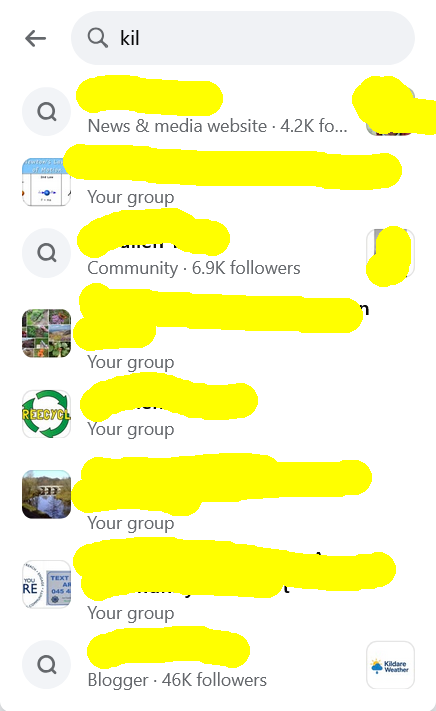
This is a subtle problem. I used to be able to have pages listed in my search history. Now I can only have a search for that page listed. So I have to click on the search result in "Search Facebook" on desktop, click the search for the page in the search history and then click the page in the search results to get to the page. I don't have to do this for groups. Pages have a magnifying glass beside them which they never had before. When I click on any of these, I just get a list of results of searches for posts related to these pages, not the page itself. If I click a group, I go straight to the group with no list of posts. I logged out, cleared the cache and cookie but that didn't solve the issue.
Vedhæftede skærmbilleder

Alle svar (1)

Hi,

This forum is intended to help users with Mozilla products, such as Firefox. As a moderator, I'm going to mark this thread as off-topic and lock the thread since it is not a subject covered in the support forum. Please see Mozilla Support rules and guidelines.