


i can't get the tab group thing to work
i tried the new group coloed tab thing can't get it to work..tried right click nothing there to help tried overlay nothing there
Alle svar (8)

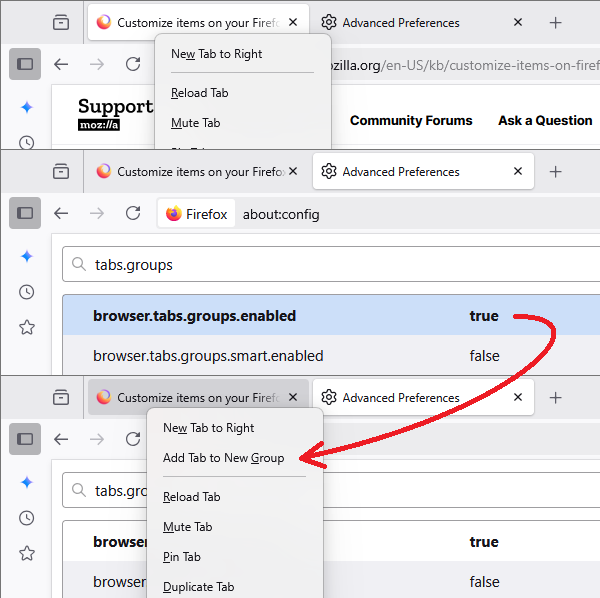
- Go to about:config, then accept the risk and continue
- Type in browser.tabs.groups.enable
- Double click the bar so that it is set to true
- Close firefox and reopen
WARNING from the moderator team: Changing Firefox preferences from the about:config page can sometimes break Firefox or cause strange behavior. You should only do this if you know what you're doing. Please read Firefox advanced customization and configuration options to learn more.
Ændret af Paul den
still won't work
Hi Gail, how far did you get? The first step (above ) should give you the right-click context menu allowing you to add a tab to a new group. Screenshot attached for illustration.
More info: Tab groups in Firefox

Worker for me. Thanks, jscher2000

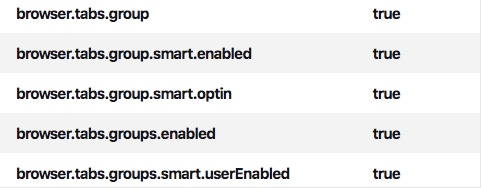
It still hasn't worked for me. I've turned these to true in config and restarted Firefox.
Angie White said
It still hasn't worked for me. I've turned these to true in config and restarted Firefox.
Hi Angie, you only need to modify the first preference. The others appear to be for future updates in testing.
Is the right-click context menu item missing, or is it not working?
still hasn't worked tried everything you said to do
Hi Gail
What version number of Firefox are you using?
Do you have any add-ons installed in Firefox?
Please can you reset any about:config prefs back to their defaults.