Windows 10 reached EOS (end of support) on October 14, 2025. If you are on Windows 10, see this article.

Søg i Support

Avoid support scams. We will never ask you to call or text a phone number or share personal information. Please report suspicious activity using the “Report Abuse” option.

Læs mere

Denne tråd blev lukket og arkiveret. Stil et nyt spørgsmål, hvis du har brug for hjælp.

Firefox wanted to be restarted and promised to open previous tabs - unfortunately it didn't

  • 1 svar
  • 0 har dette problem
  • 103 visninger
  • Seneste svar af SuMo Bot
  • Låst

It's frustrating. Ubuntu machine, everything updated. Every time Firefox updates itself in the background, it requests a restart in a new tab, promising to restore everything. Unfortunately, it doesn't. Having usually dozens of tabs at work open after such a restart, I get an empty tab. An annoying massacre. These are not private bookmarks. There is nothing. All sessions in tabs are lost.

It's frustrating. Ubuntu machine, everything updated. Every time Firefox updates itself in the background, it requests a restart in a new tab, promising to restore everything. Unfortunately, it doesn't. Having usually dozens of tabs at work open after such a restart, I get an empty tab. An annoying massacre. These are not private bookmarks. There is nothing. All sessions in tabs are lost.

Alle svar (2)

This is why I run multiple versions of Firefox so that my data is not just in one browser. see screenshots My data is synced on different versions of Firefox on my current laptop (ZBook 17 G4) and other laptops. Try downloading Firefox from Mozilla, unzip, and run firefox-bin from the folder and see if you have the same issue. https://www.mozilla.org/en-US/firefox/all/#product-desktop-release

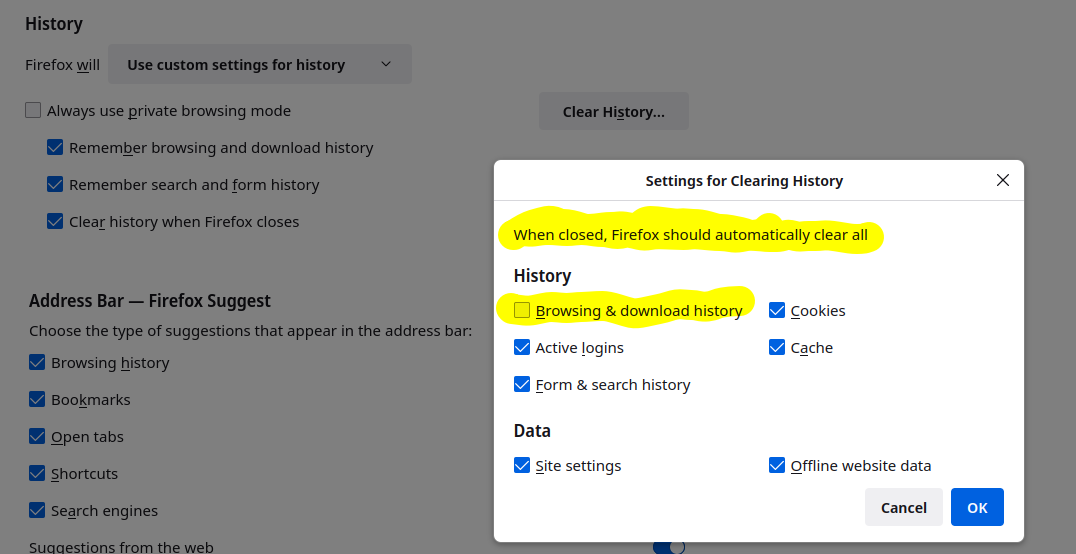
I assume you have Firefox set to restore your last session, but what history setting when you close Firefox?


This question has been locked because the original author has deleted their account. While you can no longer post new replies, the existing content remains available for reference.