Windows 10 reached EOS (end of support) on October 14, 2025. If you are on Windows 10, see this article.

Søg i Support

Avoid support scams. We will never ask you to call or text a phone number or share personal information. Please report suspicious activity using the “Report Abuse” option.

Læs mere
Arkiveret

Label Printing Issue

grampp1 replied
grampp1

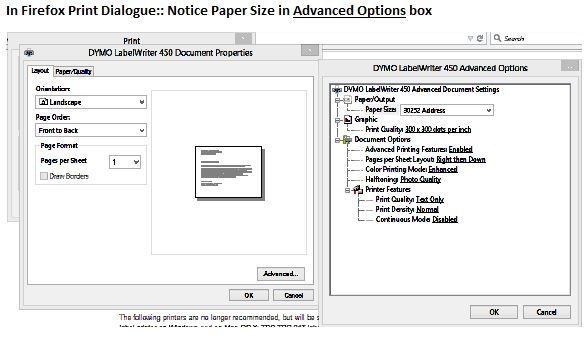
I am trying to print to a Dymo LabelWriter 450 Label printer and Firefox is not remembering the label size that I specified in Printer properties and set as default. Ie: I have set labels 30857 Badge Labels as default, but Firefox reverts back to 30252 Address Labels, so the "name tags" do not print correctly. If I change this in the Print Dialogue properties in Firefox, it's good for 1 printing, then reverts back.

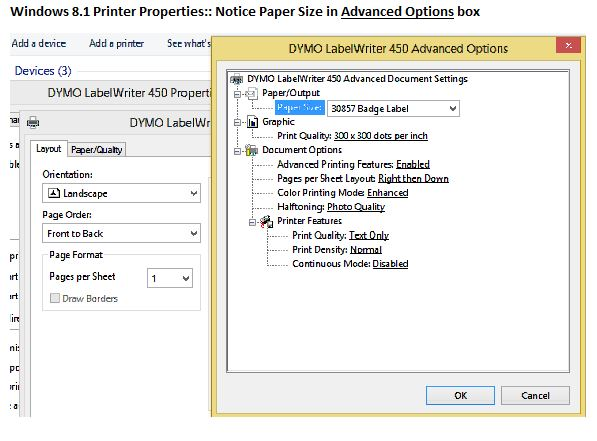
I am using Windows 8.1 and have changed my paper size for Printer Preference and Printer Properties via Control Panel. And an FYI, I have been through the Fix printing issues in Firefox solution already without success in any of the recommended steps.

Any insight would be greatly appreciated!!

I am trying to print to a Dymo LabelWriter 450 Label printer and Firefox is not remembering the label size that I specified in Printer properties and set as default. Ie: I have set labels 30857 Badge Labels as default, but Firefox reverts back to 30252 Address Labels, so the "name tags" do not print correctly. If I change this in the Print Dialogue properties in Firefox, it's good for 1 printing, then reverts back. I am using Windows 8.1 and have changed my paper size for Printer Preference and Printer Properties via Control Panel. And an FYI, I have been through the Fix printing issues in Firefox solution already without success in any of the recommended steps. Any insight would be greatly appreciated!!

Alle svar (1)

Here are a couple of pics of the Properties setup as it appears in Firefox and as it appears in the Windows dialogue/setup