


Website of No.2 of Swiss Banks cannot be navigated anymore with Firefox 158.0

Dear Mozilla Team
Unfortunately I cannot browse the website of the second largest Swiss banking group anymore since the latest browser update. The navigation and hyperlinks, buttons etc. cannot be clicked anymore:
I am an enthusiastic firefox user and have repeatedly donated money to the mozilla foundation. I would be very sad, if due to the problem with accessing my bank, I would have to switch to the chrome browser. For the time being I have to use chrome for accessing my bank account, but I hope that you can investigate and find the compatibility problem, so that I am not forced to switch to chrome permanently.
Kind regards Andy
All Replies (2)
Hi, I can't reproduce this issue. I clicked everything on that website and everything is OK.
Try Firefox Troubleshoot Mode to see if the problem goes away. Firefox Troubleshoot Mode is a special diagnostic mode that temporarily turns off hardware acceleration, disables add-ons (extensions and themes) and resets some settings. See the Use Troubleshoot Mode in Firefox article for details.
If Firefox is open, you can restart in Firefox Troubleshoot Mode from the Help menu:
- Click the menu button
 , click Help, select Troubleshoot Mode and click Restart in the "Restart Firefox in Troubleshoot Mode?" dialog that opens.
When the Firefox Troubleshoot Mode window appears, select "Open".
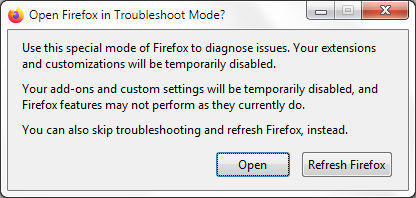
If the issue is not present in Firefox Troubleshoot Mode, your problem is probably caused by an extension, theme or hardware acceleration. Please follow the steps in the Troubleshoot extensions, themes and hardware acceleration issues to solve common Firefox problems article to find the cause.
To exit Firefox Troubleshoot Mode, just close Firefox and wait a few seconds before opening Firefox for normal use again.
When you figure out what's causing your issues, please let us know. It might help others with the same problem.
Hallo Andy, I don't see any reports for the site in general, and clicking around seems to look alright to me: streamable.com/45ygzi 🎥 — is this what you're struggling with, or I should check some other part of the site?