


Why is my email arriving with the text covered by emojis?

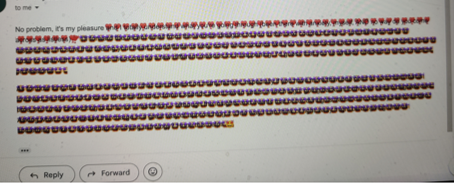
I use emojis in email, but recipients report that the text of the email arrives covered with emojis. I thought it was a problem with the receiver until a second person just reported the same issue with an email I sent them. Both are gmail accounts . . .
All Replies (3)

Does this still happen when you restart Thunderbird in Troubleshoot Mode? (See <Help | Troubleshoot Mode>.) If not, this could implicate a misbehaving add-on.
I've never seen this symptom before so I don't have a guaranteed solution, but the first thing I'd do would be to check my font settings at <Settings | Composition | HTML Style> and reset them to the default settings. I believe that if you specify a font that the recipient doesn't have, their system may try to substitute something else, with unpredictable results.
Another thing to check would be if you have any language packs installed. They can be found at <Tools | Add-Ons & Themes>. I doubt this is part of the problem, though.
Lin said
Does this still happen when you restart Thunderbird in Troubleshoot Mode? (See <Help | Troubleshoot Mode>.) If not, this could implicate a misbehaving add-on. I've never seen this symptom before so I don't have a guaranteed solution, but the first thing I'd do would be to check my font settings at <Settings | Composition | HTML Style> and reset them to the default settings. I believe that if you specify a font that the recipient doesn't have, their system may try to substitute something else, with unpredictable results. Another thing to check would be if you have any language packs installed. They can be found at <Tools | Add-Ons & Themes>. I doubt this is part of the problem, though.
Thanks for replying, Lin. This is an issue reported to me of recipients of a couple of my emails -- not something I am experiencing -- they are (coincidentally?) both GMail users. My language is set to English and the default font is Calibri . . . I suppose it could be that they don't have Calibri, but the weird thing is that they have gotten emails from me just fine before. In this case, the first few words of the message are not covered and the other ones are kinda visible behind the emojis, if the image is enlarged. The emojis covering the text were copied in from Messenger and are appearing over the text after the insertion point. Sue
I think your default font choice may be the problem. When you compose a message and specify your local font, and the recipient doesn't have that particular font installed, their system will have to substitute another one, with possibly unpredictable results. That may be what's going on here. It's safest to stick with the generic "Variable Width" and "Fixed Width", which gives the receiving system the chance to use their default fonts of that type. Next safest would be "Helvetica, Arial" (variable, sans-serif), "Times" (variable, serif), or "Courier" (fixed, serif). Most or all systems have these fonts or know how to substitute a very similar one.
So, try changing the Composition font to something more generic and see if that looks better to them. Also, if you copy&paste text from other sources, like web pages or formatted documents, be prepared for the recipient to see something other than the original. One way to avoid the problem is to, when you're pasting the text, right-click and use the "Paste Without Formatting" option.