


I have lost the ability to reply to and send emails, there is no toolbar or send key. Please help!!
Have lost the ability to reply to and send emails. The toolbar and send keys have disappeared and we cannot figure out how to get them back.
All Replies (4)
Odabrano rješenje
have you also lost the menu bar and toolbar in that window.
If you have neither;
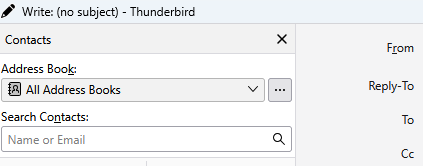
Press the alt key on your keyboard and menu bar will appear.
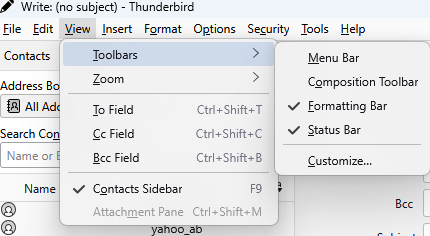
Select both the menu bar and the composition toolbar entries. By default you only have the composition toolbar, but there is much more you can do with the menu and it's full suite of composition and sending options (send later for instance)
Another possibility is that Thunderbird has gone into an offline mode. So if your send button has been replaced with a send later button, this is probably what has happened.
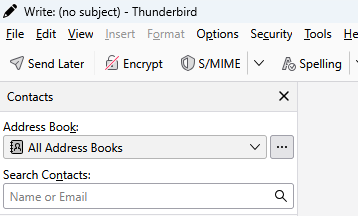
If this is the case check at the bottom of the main window for the online status.  Indicates you are offline. Clicking that image in Thunderbird will stitch to online more and the image will change to
  and the send later should revert to send
Note that if you are having issues connecting to the internet it may be that Thunderbird can not get into or stay in online mode.
Thank You a Thousand Times ! Problem solved. This problem was on my wife's Laptop. It showed of after an update was installed. She followed Your instructions to a tee. Wallah all is well now.
Hi - I am having this problem also. I have the latest version. Running Windows 11 Pro - Version 26H2. I have no bar that says formatting bar. I have a menu bar, a composition bar and a status bar. I DO HAVE the Send button in the menu bar I have no bar between the address/subject - etc where I could change font, color and insert a picture or a table. No bar there at all. I thought the composition bar would be the one to use but seems not. I have reset the composition bar but it still has none of those on it. I read your reply but didn't seem right for what I'm wanting.
Any help is appreciated.
Regards Loopy
Loopy said
Hi - I am having this problem also. I have the latest version. Running Windows 11 Pro - Version 26H2.
Clearly it is not the same problem, or the instructions here would have fixed them for you. Simple as that really. When your basic assumption as to similarity is false everything that is built on that assumption of equally questionable.
I have no bar that says formatting bar. I have a menu bar, a composition bar and a status bar.
Generally that entry in the menu is missing when you have selected to compose mail in plain text. There is nothing to format when plain text is the content.
I DO HAVE the Send button in the menu bar I have no bar between the address/subject - etc where I could change font, color and insert a picture or a table. No bar there at all. I thought the composition bar would be the one to use but seems not. I have reset the composition bar but it still has none of those on it. I read your reply but didn't seem right for what I'm wanting.
No it is not because your issue is completely different.
Hold the shift key while clicking reply or compose/ New Message. Holding shift overrides the selected composition method, so if you chose plain text it forces HTML of you chose HTML it forces plain text. It isd a quick way of checking what composition method you are using and if your assumed issue is that your chose to compose messages in the wrong format.
Does that formatting bar appear when you do hold the shift key to select new massage?
.
Izmjenjeno od strane Matt