


Windows 10 reached EOS (end of support) on October 14, 2025. For more information, see this article.

Search Support

Avoid support scams. We will never ask you to call or text a phone number or share personal information. Please report suspicious activity using the “Report Abuse” option.

Learn More

ChromeOS and firefox

  • 2 odgovori
  • 0 ima ovaj problem
  • 2 views
  • Posljednji odgovor poslao hessian13

[https://support.mozilla.org/en-US/kb/.../run-firefox-chromeos?utm_source=www.firefox.com&utm_medium=referral&utm_campaign=desktop-browsers-chromebook&utm_content=seo]

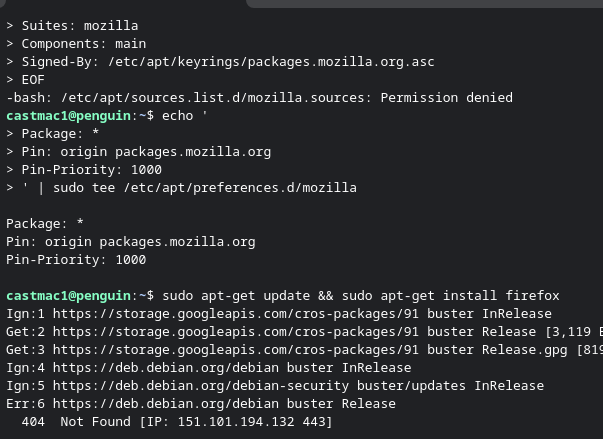
I am trying to follow the guide linked to install Firefox on an older Chromebook. It looks like the device should be supported, as running the command cat /etc/os-release returns that it is version 10. When I get to step 4 and try and run that I get a permission denied error and later steps do not work.

I did try the Google play option on the Chromebook, it says the device is not supported.

[[https://support.mozilla.org/en-US/kb/run-firefox-chromeos?utm_source=www.firefox.com&utm_medium=referral&utm_campaign=desktop-browsers-chromebook&utm_content=seo|https://support.mozilla.org/en-US/kb/run-firefox-chromeos?utm_source=www.firefox.com&utm_medium=referral&utm_campaign=desktop-browsers-chromebook&utm_content=seo]] I am trying to follow the guide linked to install Firefox on an older Chromebook. It looks like the device should be supported, as running the command cat /etc/os-release returns that it is version 10. When I get to step 4 and try and run that I get a permission denied error and later steps do not work. I did try the Google play option on the Chromebook, it says the device is not supported.

All Replies (2)

Hi,

Step 4 just creates a text file. If you get a permission denied error, try selecting a more privileged user or adjust directory permissions. Either way, this error shouldn't be related to Firefox.

When I copy and paste step 4 is when I get the error. If I manually type it all in without adding newlines and hit enter I get a ">" "cat <<EOF > /etc/apt/sources.list.d/mozilla.sources Types: deb URIs: https://packages.mozilla.org/apt Suites: mozilla Components: main Signed-By: /etc/apt/keyrings/packages.mozilla.org.asc EOF "

If I try and skip to step 6 it also gives me a bunch of 404. It looks like only a terminal is installed, so I do not know how to translate the lines in step 4 to make it into the file.
Postavite pitanje

You must log in to your account to reply to posts. Please start a new question, if you do not have an account yet.