

Ova tema je arhivirana.
Pitajte drugo pitanje ako vam je potrebna pomoć.

Riješeno
Arhivirano
Make menus higher
Hello,
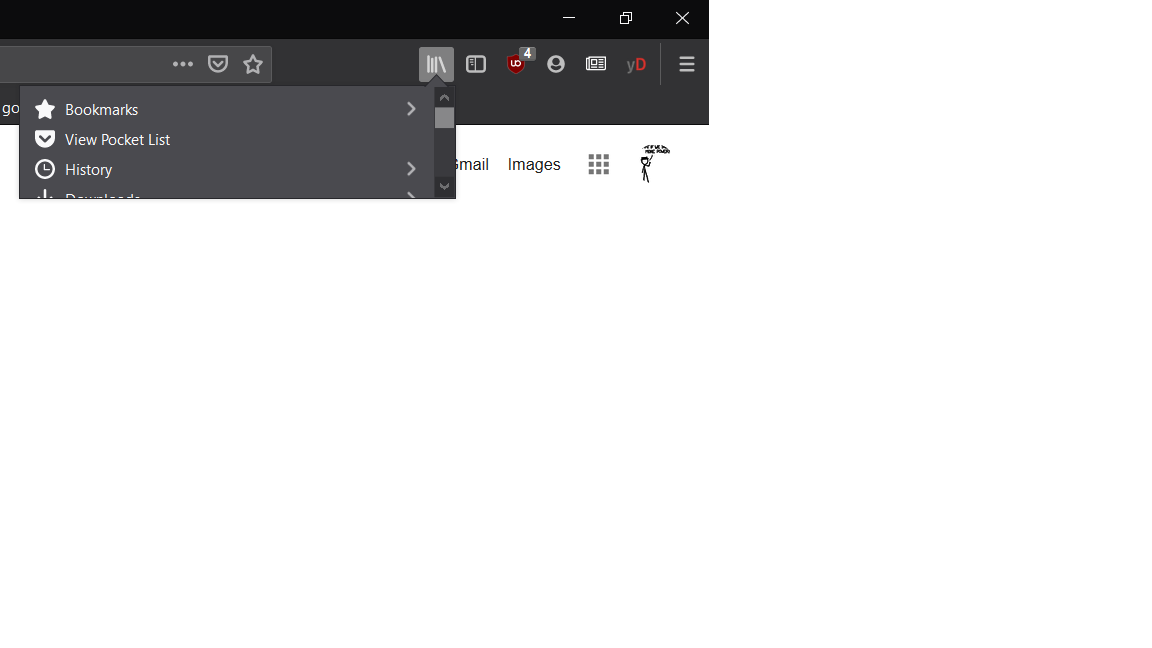
All the menus (library, extensions, "general" menu, firefox account) that can be open on the top right corner of my browser are too small (see attachment).
I could not find in the support pages how to change/reset it to a more normal height.
Do you know how to do that ?
Thanks.
Hello,
All the menus (library, extensions, "general" menu, firefox account) that can be open on the top right corner of my browser are too small (see attachment).
I could not find in the support pages how to change/reset it to a more normal height.
Do you know how to do that ?
Thanks.
All Replies (3)
Hi edern.haumont, please ignore the spam message with a phone number -- that's not official and we don't know what they will do to your system if you engage.
Odabrano rješenje
Ignore tobipix619's post, It's spam.
Hello,
- Type about:config in URL bar and press enter.
- Ignore the warning and click on Accept the Risk and Continue.
- Search for devp in Preferences.
- You will see layout.css.devPixelsPerPx with default value -1.25.
- Change it with 1.25.
- Click on tick icon.
- And, Restart the browser.
It will surely work. Thank You.
Izmjenjeno od strane Shashank Shekhar
Thank you ! It was -1 but setting it to 1.25 solved it.