Showing questions for topic:

How secure is Thunderbird Filelink really?

Thunderbird Filelink uses end-to-end encryption and files are only encrypted/decrypted locally but unless the code running on your system is reviewed and validated you do… (read more)

Thunderbird Filelink uses end-to-end encryption and files are only encrypted/decrypted locally but unless the code running on your system is reviewed and validated you don't really know what it does. I would think that every time recipients click on the link and use the web interface to download a file, their browser is sent a script that does the decoding. Similarly, if you use the web interface of a Send instance to send a file, your browser is sent a script for encoding.

If the above is correct, how do we know these scripts are always the open source scripts that have been independently validated? Isn't it conceivable that a Send instance may send you a customized script for encryption/decryption that compromises encryption? This could be done with selected targets to avoid attracting attention too.

Archived 2 120

I received notifications that I had a unsecure Certificate

I received 2 notifications stating that 1) The certificate for imap.gmail.com does not come from a Trusted Source and 2) You are about to override how Thunderbird Identif… (read more)

I received 2 notifications stating that 1) The certificate for imap.gmail.com does not come from a Trusted Source and 2) You are about to override how Thunderbird Identifies this site. Legitimate banks, stores and other public sites will not ask you to do this. This site attempts to identify itself with invalid information. The certificate is not trusted because it hasn't been verified as issued by a trusted authority using a secure Signature. I have been with Thunderbird for around 20 years and have contributed to it twice, so please help me!

Archived 1 110

importing pgp keys from Thunderbird on Linux to Thunderbird on Windows 11 produces error

On my Linux machine, I exported the public key for an email address in Thunderbird 140.8.0esr (64-bit) into a file. I transferred the file to my Windows 11 machine via Wa… (read more)

On my Linux machine, I exported the public key for an email address in Thunderbird 140.8.0esr (64-bit) into a file. I transferred the file to my Windows 11 machine via Warpinator.

On the Windows machine I am running Thunderbird 148.0.1 (64-bit). In Account settings>End-to-End encryption, I click Add Key>Import an existing OpenPGP key>Select File to import, and then I select the file.

I get an error message: Error! Failed to import file.

I'm surprised. I would think that going from one installation of Thunderbird to another would work this way. I am concerned that I won't be able to read incoming encrypted emails without the key working.

Can someone help me?

Solved Archived 7 200

problem with certicate

I receive a lot of Thunderbird messages with this text (in French) : "Le certificat pour imap.gmail.com ne provient pas d’une source sûre." What I have to do please Thnx … (read more)

I receive a lot of Thunderbird messages with this text (in French) :

"Le certificat pour imap.gmail.com ne provient pas d’une source sûre."

What I have to do please Thnx

Solved Archived 1 150

Repeated gmail problem with error message: "The certificate for imap.gmail.com:993 does not come from a trusted source"

I have problems every time I try to fetch my imap gmail, with Thunderbird complaining that: "The certificate for imap.gmail.com:993 does not come from a trusted source". … (read more)

I have problems every time I try to fetch my imap gmail, with Thunderbird complaining that: "The certificate for imap.gmail.com:993 does not come from a trusted source".

As near as I can tell, imap.gmail.com:993 is still the recommended setting for

Version is Thunderbird 148.0.1 (64-bit). Adding an exception for the missing certificate does not seem to make a bit of difference.

I do not know if the use of Bitdefender as my security and vpn software is a factor. I notice that the certificate (exception certificate?) shown when I click on View Certificate in my gmail account settings appears to mention Bitdefender, so perhaps that's a factor. That certificate looks as follows:

Certificate Subject Name Common Name imap.gmail.com Issuer Name Country US Organizational Unit IDS Organization Bitdefender Common Name Untrusted Bitdefender CA Validity Not Before Mon, 02 Feb 2026 08:37:57 GMT Not After Mon, 27 Apr 2026 08:37:56 GMT Subject Alt Names DNS Name imap.gmail.com Public Key Info Algorithm Elliptic Curve Key Size 256 Public Value 04:2D:20:DA:19:33:1D:AC:28:91:52:02:EB:B8:7E:33:C0:B7:E4:F3:5E:4E:88:92:E5:7E:BB:30:0C:6C:E4:84:A8:3D:D7:49:9B:22:C8:C0:BB:01:80:4B:84:30:3A:3B:73:70:8F:AB:EB:C0:F0:D5:7B:8B:0B:64:1B:DC:76:67:41 Miscellaneous Serial Number 1A:50:ED:15:50:A1:A7:93:5D:05:8A:CD:85:A5:15:FD Signature Algorithm ECDSA with SHA-256 Version 3 Download PEM (cert)PEM (chain) Fingerprints SHA-256 12:8A:58:44:DF:B5:E1:E4:EF:CC:F7:35:09:BA:6E:88:86:16:15:78:F9:28:52:23:FC:0E:E9:69:D1:AF:21:86 SHA-1 A3:30:CB:65:39:51:46:9B:3B:BC:0B:B9:09:DD:26:40:A8:52:25:3D

Archived 4 120

The certificate for imap.googlemail.com does not come from trusted source

Running Thunderbird 140.8.0esr 64bit Windows 11 Home, v25H2 932GB storage 32GB ram i7-13700k Recently, I've started getting the following message every time I launch T… (read more)

Running Thunderbird 140.8.0esr 64bit Windows 11 Home, v25H2 932GB storage 32GB ram i7-13700k

Recently, I've started getting the following message every time I launch Thunderbird: "The certificate for imap.googlemail.com does not come from a trusted source."

Digging into details I get: "you are about to override how Thunderbird identifies this site" "Location: imap.googlemail.com:993" "This site attempts to identify itself with invalid information" "Unknown Identity. The certificate is not trusted because it hasn't been verified as issued by a trusted authority using a secure signature."


Digging deeper into the certificate I find the issuer is Bitdefender who I use for antivirus and VPN. However, the VPN shows no effect when enabled or disabled. The validity period is 2 Feb 2026 to 27 Apr 2026

l can get email, but cant send it. Is Bitdefender at fault?

I'm stumped. What should I do???

Solved Archived 1 324

certificate for imap <edited>@peternedsmith.co.uk is not valid

certificate for imap <edited>@peternedsmith.co.uk is not valid, someone could be trying to impersonate the server and you should not continue, on clicking the more … (read more)

certificate for imap <edited>@peternedsmith.co.uk is not valid, someone could be trying to impersonate the server and you should not continue, on clicking the more info, on the panel that comes up, if I click on get certificate, the selections below get greyed out and nothing happens, I have viewed the certificate, and it appears to be from the US, I have taken a screenshot of the top part of it, which is below. Regards Peter Smith

Archived 1 130

Thunderbird Beta and Release: External GnuPG Keys Not Working with GnuPG 2.5.x

DEUTSCH (English see below(: Hallo zudammen, Konfiguration: - Window11 25H2 (aktuell) - Thunderbird Beta-6 (BuildID=20260213180051) - gpg2.5.17 (Gpg4Win 5.0.1); siehe au… (read more)

DEUTSCH (English see below(:

Hallo zudammen,

Konfiguration: - Window11 25H2 (aktuell) - Thunderbird Beta-6 (BuildID=20260213180051) - gpg2.5.17 (Gpg4Win 5.0.1); siehe auch: <https://www.gpg4win.de/>

Der bisherige und standarmärige Installationspfad von "Gpg4Win": "C:\Progam Diles (x86)\Gpg4Win\" wurde softwareseitig auf: "C:\Progam Diles\Gpg4Win\" geändert!

Bug 1967121 (Closed) => thunderbird148 --- fixed! <https://bugzilla.mozilla.org/show_bug.cgi?id=1967121>

Zur Zeit verfolge ich die Änderungen bezüglich der externen Schlüsselverwaltung in Thunderbird-Beta, da das Arbeiten mit externen Schlüsseln in der esr- und in der relesease-Version von Thunderbird seit der offiziellen Herausgabe von gpg2.5.x absolut nicht mehr möglich ist! Die geheimen Schlüssel für das Entschlüsseln und Signieren werden mit gpg2.5.x nicht mehr gefunden!

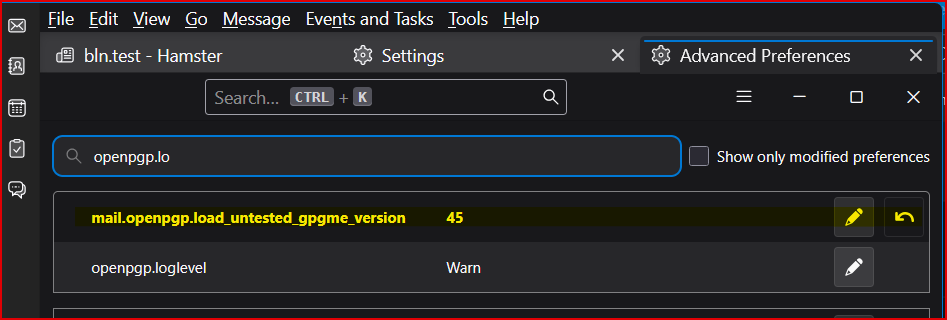
In der Schlüsselverwaltung von TB-Beta befinden sich meine öffentlichen Schlüssel und alle öffentlichen Schlüssel meiner Kommunikationspartner. Extern sind meine geheimen Schlüssel gelagert. Folgende Präferenz wurde aufgrund von gpg2.5.x hinzugefügt:

https://assets-prod.sumo.prod.webservices.mozgcp.net/media/uploads/images/2026-02-26-10-04-58-df59be.png

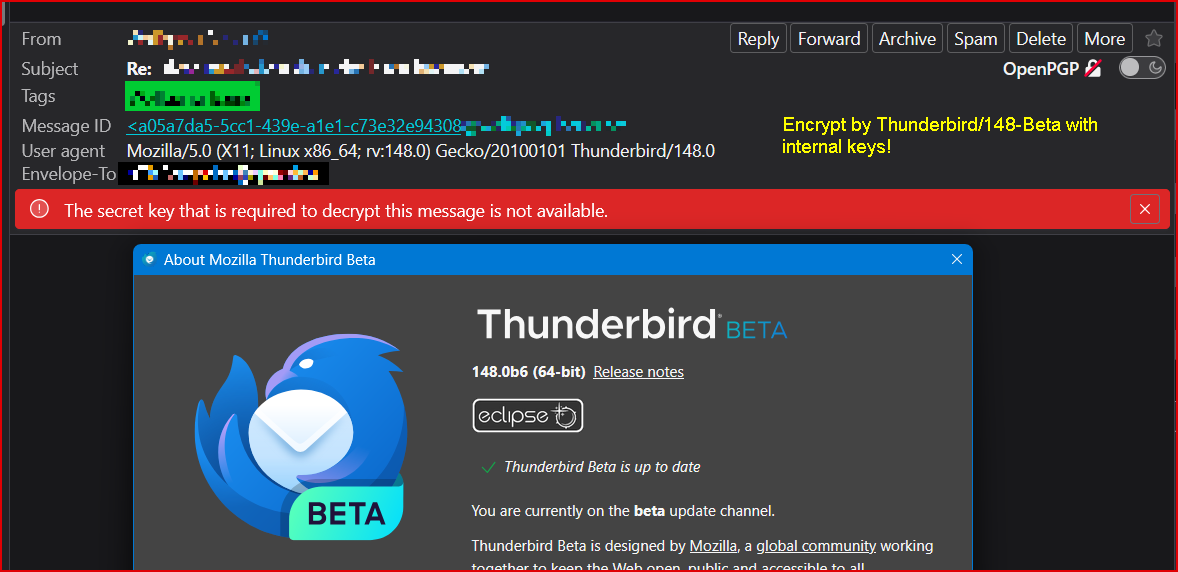
Allerdings erscheint nach all diesen Maßnahmen die Fehlermeldung: "The secret key that's required to decrypt this message is not availlable."

https://assets-prod.sumo.prod.webservices.mozgcp.net/media/uploads/images/2026-02-26-10-05-45-d8280e.png

Mit Herausgabe von Thunderbird/148.0 (release) sind dort die gleichen Probleme mit der externen Schlüsselverwaltung zu bepbachten!

Mit Versionen gpg < 2.5 funktioniert unter Windows alles problemlos!

UNTER LINUX haben hier Änderungen an der Präferenz: "mail.openpgp.load_untested_gpgme_version" nachweislich keinerlei Auswirkungen!

Was übersehe ich?

++++++++++++++++++++++++++++++++++++++++++++++++++++++++++++++++++++++++

ENGLISH:

Hello,

Configuration: - Window11 25H2 (current status) - Thunderbird Beta-6 (BuildID=20260213180051) - gpg2.5.17 (Gpg4Win 5.0.1); see also: <https://www.gpg4win.de/>

The previous and default installation path of "Gpg4Win": "C:\Program Files (x86)\Gpg4Win\" has been changed by the software to: "C:\Program Files\Gpg4Win\"!

Bug 1967121 (Closed) => thunderbird148 --- fixed! <https://bugzilla.mozilla.org/show_bug.cgi?id=1967121>

At the moment, I’m following the changes regarding external key management in Thunderbird Beta, because working with external keys in the ESR and release versions of Thunderbird has become absolutely impossible since the official release of gpg 2.5.x! The secret keys required for decryption and signing are no longer found when using gpg 2.5.x!

In Thunderbird Beta’s key manager, my public keys and all public keys of my communication partners are present. My secret keys are stored externally. The following preference was added because of gpg 2.5.x:

https://assets-prod.sumo.prod.webservices.mozgcp.net/media/uploads/images/2026-02-26-10-04-58-df59be.png

However, even after all these measures, the following error message appears: **"The secret key that's required to decrypt this message is not available."**

https://assets-prod.sumo.prod.webservices.mozgcp.net/media/uploads/images/2026-02-26-10-05-45-d8280e.png

With the release of Thunderbird 148.0 (release), the same problems with external key management can be observed there as well!

With gpg versions **older than 2.5**, everything works flawlessly under Windows!

    • UNDER LINUX**, changes to the preference

"mail.openpgp.load_untested_gpgme_version" have demonstrably no effect at all!

What am I missing?

Archived 6 190

PKCS # 12 operation failed for unknown reason when importing an S/MIME client certificate

I successfully imported the self-signed CA certificate into thunderbird. Then I tried to import the p12 S/MIME client certificate and this error message popped up (cf. sc… (read more)

I successfully imported the self-signed CA certificate into thunderbird. Then I tried to import the p12 S/MIME client certificate and this error message popped up (cf. screenshot below).

However, I checked the client certificate and it seems fine:

  1. openssl pkcs12 -in smime-client-certificate.p12 -info -noout

Enter Import Password: MAC: sha256, Iteration 2048 MAC length: 32, salt length: 8 PKCS7 Encrypted data: PBES2, PBKDF2, AES-256-CBC, Iteration 2048, PRF hmacWithSHA256 Certificate bag PKCS7 Data Shrouded Keybag: PBES2, PBKDF2, AES-256-CBC, Iteration 2048, PRF hmacWithSHA256

  1. pk12util -l smime-client-certificate.p12

Enter password for PKCS12 file: Certificate(has private key):

   Data:
       Version: 3 (0x2)
       Serial Number: 1 (0x1)
       Signature Algorithm: PKCS #1 SHA-256 With RSA Encryption
       Issuer: "..."
       Validity:
           Not Before: Thu Feb 19 13:32:18 2026
           Not After : Sun Feb 17 13:32:18 2036
       Subject: "E=user@example.com,CN=user@example.com,
           O=example.com,ST=...,C=..."
       Subject Public Key Info:
           Public Key Algorithm: X9.62 elliptic edwards curve public key
       unknown SPKI algorithm type
       Raw:
           69:58:ee:5d:45:3f:10:d9:bb:8c:a3:b6:a5:c6:16:a6:
           53:78:65:77:73:5d:e0:6f:60:df:2c:32:f3:c2:e2:58
       Signed Extensions:
           Name: Certificate Basic Constraints
           Data: Is not a CA.
           Name: Certificate Key Usage
           Usages: Digital Signature
                   Non-Repudiation
                   Key Encipherment
           Name: Extended Key Usage
               E-Mail Protection Certificate
           Name: Certificate Subject Key ID
           Data:
               99:8a:6d:e4:ec:3a:25:5d:ad:26:a0:36:e1:da:a2:ea:
               bc:88:79:50
           Name: Certificate Authority Key Identifier
           Key ID:
               f5:6c:37:9a:37:d1:81:43:d3:54:3f:b9:33:23:85:c1:
               7e:17:73:88
           Name: Certificate Subject Alt Name
           RFC822 Name: "user@example.com"
   Signature Algorithm: PKCS #1 SHA-256 With RSA Encryption
   Signature:
       44:3a:5e:d7:44:51:f1:3c:a3:80:d8:54:f4:9c:d8:0b:
       ...
   Fingerprint (SHA-256):
       88:95:7A:DF:A5:7C:D1:E8:A5:55:A8:18:BD:BD:7D:92:1F:7D:6E:17:26:68:39:84:26:F3:F6:F3:4A:5C:56:90
   Fingerprint (SHA1):
       72:83:D0:13:C9:C9:AD:46:CA:C3:73:66:9E:79:5B:5C:3B:2E:81:47

Key(shrouded):

   Encryption algorithm: PKCS #5 Password Based Encryption v2 
       Encryption:
           KDF: PKCS #5 Password Based Key Derive Function v2 
               Parameters:
                   Salt:
                       dc:f9:bf:4a:80:e1:7c:4a:b4:f5:52:6b:9b:d5:75:ad
                   Iteration Count: 2048 (0x800)
                   KDF algorithm: HMAC SHA-256
           Cipher: AES-256-CBC
               Args:
                   04:10:0d:a4:96:03:00:2a:d5:a6:fe:d3:6c:a5:d0:12:
                   67:b3

What is going on and how to troubleshoot this issue as there is no logging about this matter into /var/log/syslog?

Environment: - Ubuntu 25.10 - thunderbird 2:1snap1-0ubuntu3

Archived 3 311

"Reply with Template" always uses encryption, resulting in corrupted e-mail reply

When my message filter uses the "Reply with Template" action, the reply e-mail is always PGP encrypted, even when I do not have any public key for the recipient e-mail ad… (read more)

When my message filter uses the "Reply with Template" action, the reply e-mail is always PGP encrypted, even when I do not have any public key for the recipient e-mail address. As a result, the reply e-mail is always corrupted.

I am using Thunderbird 140.7.1esr on Windows 10.

I have attached a screenshot of what the reply e-mail always looks like.

In the Template that I am using, the "encrypt" button is not selected, and in the OpenPGP menu of the Template, the "Encrypt" menu item does not have a checkmark next to it.

Does anyone know how I can get Thunderbird to send reply e-mails without using encryption?

Archived 9 361

www.mozilla.org uses an invalid security certificate

Hi, With new version 1.143 all accounts are gone, need to re-create my existing mails accoutns (outlook, yahoo, gmail) but all fail on error message "www.mozilla.org uses… (read more)

Hi, With new version 1.143 all accounts are gone, need to re-create my existing mails accoutns (outlook, yahoo, gmail) but all fail on error message "www.mozilla.org uses an invalid security certificate" How to resolve ? Grtz, Jane

Archived 1 120

How to export PGP keys from thunderbird?

Thunderbird 140.7.0esr allows me to e-mail my OpenPGP public key to myself, but it doesn't seem to have any way for me to get access to my private key. I was wondering h… (read more)

Thunderbird 140.7.0esr allows me to e-mail my OpenPGP public key to myself, but it doesn't seem to have any way for me to get access to my private key. I was wondering how to export keys? Thanks!

Solved Archived 2 160

Peer's certificate has expired

Hi. I'm using Thunderbird for my POP account and it has stopped sending messages. It just says, Sending of the message failed. Peer's certificate has expired. The config… (read more)

Hi. I'm using Thunderbird for my POP account and it has stopped sending messages. It just says, Sending of the message failed. Peer's certificate has expired. The configuration related to (my server name) must be corrected. What am I to do?

Archived 1 141

Thunderbird, smtp server certificate

Hello, My SMTP server uses Let's Encrypt certificate. The website with the same domain has no certificate. Thunderbird refuses to connect to my SMTP server. Test connecti… (read more)

Hello, My SMTP server uses Let's Encrypt certificate. The website with the same domain has no certificate. Thunderbird refuses to connect to my SMTP server. Test connection to the server (STARTTLS) in account settings sais "The secure connection to the server failed" (or similar. I see bg localization). Another server with Let's Encrypt certificate. Test pases. Clicking View certificate shows webserver cert (from DigiCert Inc).

I can't send emails! :)

Regards! Valentin

Archived 8 322

Certificate Error keeps popping up

I keep getting a certificate error on my Thunderbird. The certificate refers to an email account i no longer have (Personal domain) and i have removed the account in thun… (read more)

I keep getting a certificate error on my Thunderbird. The certificate refers to an email account i no longer have (Personal domain) and i have removed the account in thunderbird, and also removed previous certificate exceptions.

I have been through all menus and settings, and cannot find anywhere where it refers to that domain (and subdomain) I have also removed one entry with that FQDN in the outgoing server section.

What to do?

Archived 3 180

How do I use the 'Add Exception' option on the Servers tab of the Certificate Manager

While debugging issues related to a self-signed certificate, I came across the Certificate Manager pop-up. This can be accessed in the Settings, under Privacy & Secu… (read more)

While debugging issues related to a self-signed certificate, I came across the Certificate Manager pop-up. This can be accessed in the Settings, under Privacy & Security, by clicking on the Manage Certificates button.

The Servers tab had a button for 'Add Exception'. I tried to add an exception, but it wasn't clear how this is supposed to work. I tried entering a location in form that is shown by existing exceptions and clicking on the Get Certificate button, but this resulted in a response of "No Information Available ... Unable to obtain identification status for this site." Is there any documentation or hints on how this is supposed to work?

Archived 2 271

CERTIFICATE ERROR

On Monday, 17 November 2025 the Security Certificate expired and I stopped receiving emails both on my computer and Andriod Device. As a result I am not receiving any ema… (read more)

On Monday, 17 November 2025 the Security Certificate expired and I stopped receiving emails both on my computer and Andriod Device. As a result I am not receiving any emails through Thunderbird, but I can go to email host site to view them.

I logged in my computer tonight and clicked here and clicked there and the error message: "The certificate for mail.homebizmall.net is not valid for that server. Someone could be trying to impersonate the server. Create an exception but this could mean that someone has stolen your certificate and may be able to impersonate you."

So it seems the POP server and the SMTP server certificates were only valid for 3 months and I was FORCED to create the exception for both servers. Now I am worried the security has been breached.

By clicking here and clicking there, I stumbled on a few people who seem to have this problem, but each with their own limitations. My operating System is Windows 10 without the option to upgrade. I have not extended the security updates because I don't understand if it is just the operating system uploading to the cloud or everything on my computer and I am not prepared to do the latter.

Is it safe to leave the band aid on that I have used for the moment? Can I create an exception for the phone? Or is there a glitch that someone needs to walk me through fixing?

Thanking you in advance

Clinton

Archived 4 281

Certificate error

I am getting an error for an outdated certificate on my mail smtp server and when I try to add a security exception Thunderbird does absolutely nothing when i click the … (read more)

I am getting an error for an outdated certificate on my mail smtp server and when I try to add a security exception Thunderbird does absolutely nothing when i click the button to add a security exception where I can send mail. I end up having to cancel the window and discard my email. It will also not go view the certificate and if you ask it to check it just hangs up forever in and endless loop of checking.

Archived 2 282