


Open
Blank Firefox-looking window briefly opens over webpages while browsing (Windows 11)

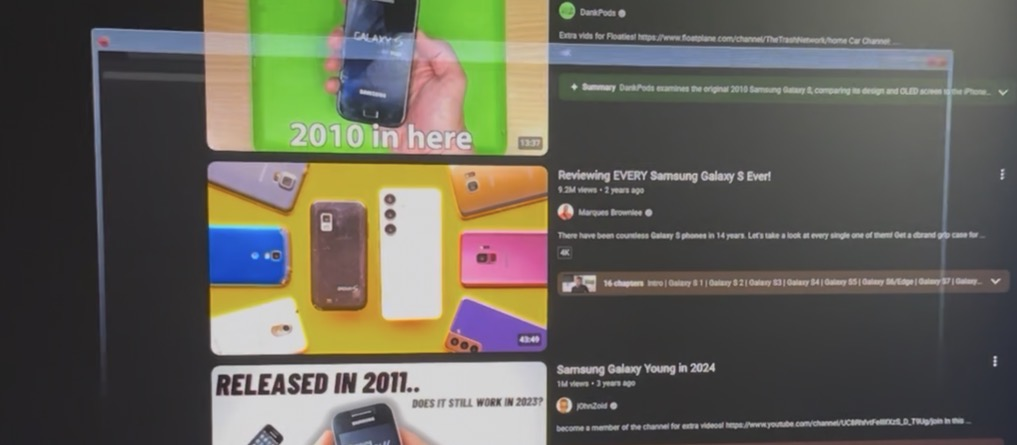
I’m experiencing a strange issue on Firefox where a separate blank/dark window briefly appears over the browser while I’m browsing, then disappears.
The window appears to have the Firefox icon in the top-left and what looks like a Firefox tab/address-bar interface, but there is no visible text or error message.
It happens randomly while Firefox is open, including while watching YouTube. It does not appear when Firefox is closed.
Troubleshooting already performed:
- Windows 11 cloud reinstall using Remove everything
- New Microsoft account
- Defender Offline scan clean
- Multiple malware scanners clean
- Malwarebytes Premium installed
- uBlock Origin (only extension i use) removed/tested, but the issue remained
I took a picture showing the window appearing. Is this a known Firefox issue, background Firefox process, or something else?
I’m experiencing a strange issue on Firefox where a separate blank/dark window briefly appears over the browser while I’m browsing, then disappears.
The window appears to have the Firefox icon in the top-left and what looks like a Firefox tab/address-bar interface, but there is no visible text or error message.
It happens randomly while Firefox is open, including while watching YouTube. It does not appear when Firefox is closed.
Troubleshooting already performed:
* Windows 11 cloud reinstall using Remove everything
* New Microsoft account
* Defender Offline scan clean
* Multiple malware scanners clean
* Malwarebytes Premium installed
* uBlock Origin (only extension i use) removed/tested, but the issue remained
I took a picture showing the window appearing. Is this a known Firefox issue, background Firefox process, or something else?
All Replies (1)
Update: This is fixed if I only use one monitor. I’d like to not give up my dual monitor set up though