


I need Thunderbird 115.18 for mac os 15.10.7

When I charge what is supposed to be Thunderbird 115.18 for mac os 15.10.7 on the site of all the versions, I only get Thunderbird 147 for mac and it doesn't work correctly as my messages desappear. Where can I really find the dmg I need that is to say: Thunderbird 115.18 for mac (and not the 147).
All Replies (5)
It should be here: https://ftp.mozilla.org/pub/thunderbird/releases/115.18.0/mac/ are you saying this is not 115.18?
Tb 116.0 and later works on macOS 10.15 (ten.fifteen) or later.
It is the EOL macOS 10.12, 10.13, 10.14 that can use the old Tb 115.18.0esr as the latest they can run.
Thanks David but unfortunately the adress 115.18.0 leads to pub. I tried to join the image but it shuts the page.
Monique Sibi said
When I charge what is supposed to be Thunderbird 115.18 for mac os 15.10.7.....Do you mean macOS 10.15.7 Catalina or macOS 15.xx.x Sequoia ?Monique Sibi said
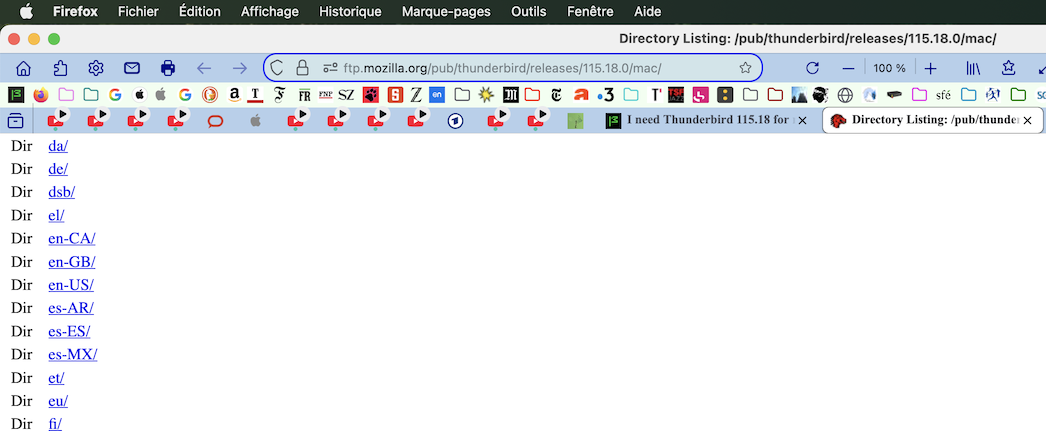
Thanks David but unfortunately the adress 115.18.0 leads to pubDavid's link doesn't lead to pub(licity) but to an official Mozilla download page for Thunderbird release versions (see image)
Monique Sibi said
Thanks David but unfortunately the adress 115.18.0 leads to pub. I tried to join the image but it shuts the page.
The link leads to the Thunderbird 115.18.0.dmg to download it.
Actually Mozilla prefers we use archive.mozilla.org instead so https://archive.mozilla.org/pub/thunderbird/releases/115.18.0/mac/
Just click on the folder for language you want then download the Thunderbird 115.18.0.dmg
It will likely be one of these three English locals. en-CA/ en-GB/ en-US/
These links are basically as if you were downloading with FTP as there used to be ftp://ftp.mozilla.org until Mozilla turned off the ftp:// protocol on their servers back on August 5th, 2015.