


Upper Right-Hand Corner is Weird
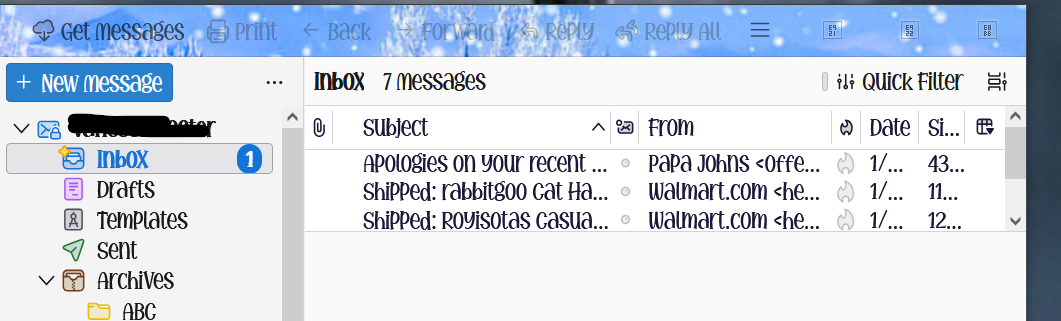
I posted this question some time back but didn't receive any helpful answers and don't know where my post is. In the upper right-hand corner there is suppose to be 3 symbols. One to lower the app, one to make the app full screen or partial and one with an X. I have jumbled symbols where the 3 good ones are. It does it in trouble shoot mode. I tried disabling addons but I can't get the normal symbols back. Here's what it looks like... Thank you for any help.
I posted this question some time back but didn't receive any helpful answers and don't know where my post is.
In the upper right-hand corner there is suppose to be 3 symbols. One to lower the app, one to make the app full screen or partial and one with an X.
I have jumbled symbols where the 3 good ones are. It does it in trouble shoot mode. I tried disabling addons but I can't get the normal symbols back.
Here's what it looks like...
Thank you for any help.
All Replies (2)
I'm quite new to Thunderbird myself, but at a guess it is probably because of the font (or addon) you are using for the menus etc, which maybe cannot display the symbols used for minimize, maximize and close. Sorry I don't know any more, I'm still learning myself.