


Yahoo IMAP shows both “Draft” and “Drafts” in Thunderbird and can’t remove one

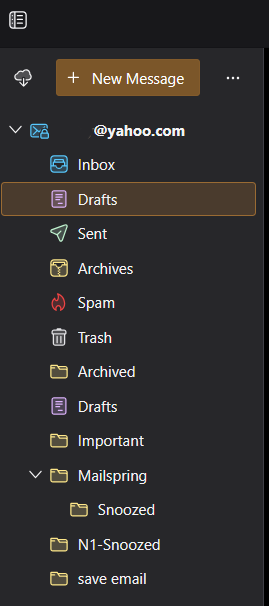
Hi, I’m using Thunderbird with a Yahoo Mail account and I’m seeing two Draft folders in the left pane:
Drafts Draft
Their IMAP locations are different: imap://…/Drafts imap://…/Draft
Thunderbird only saves drafts into the Drafts folder (plural). The Draft folder stays empty, but it always shows up.
What I tried so far: • Account settings → Subscribe Unchecked “Draft” there, but it doesn’t save. After reopening Subscribe, it’s checked again and the folder is still visible. • Restarted Thunderbird multiple times. • Server Settings → disabled “Show only subscribed folders”. • Checked folder Properties, but there are no options to hide it or control visibility, so it looks hard locked by Yahoo.
Conclusion so far: Yahoo seems to force both system folders via IMAP and ignores unsubscribe, so Thunderbird can’t hide or remove “Draft”.
Is there any supported way in Thunderbird to permanently hide or ignore the extra Draft folder for Yahoo accounts, or is this a known Yahoo IMAP limitation?
Thanks
All Replies (4)
re : I’m seeing two Draft folders in the left pane: Drafts, Draft
The image you posted does not agree with you - i can see two folders and both called 'Drafts'. The one closer to the Inbox is likely to be the correct one.
Their IMAP locations are different: imap://…/Drafts imap://…/Draft
Right click on Folder and select 'Properties' would offer the correct imap folder as used on server. You would need to logon to webmail account to identify which is the server default - is it 'Drafts' I suspect it is or 'Draft'? You should be able to remove/delete the incorrect Draft folder off the server because it's not the default on server.
In Thunderbird the incorrect Draft folder has been set a 'Draft' flag which means it cannot be deleted. The flag would need to be removed first. But because of the current code it would get reset very quickly.
Please note, there has been a lot of problems and issues recently because the developers tried to force all default folders to follow a specific set of folder name regardless of what they were called on server and this has caused problems including setting flags and duplicate foldernames.
Now they have come up with a sort of fix which allows users to switch off the localisation of names and return them to using what the server says to use. I'm not sure what version you are using at the moment but the release version 147.0 has the following:
- Settings > General
- scroll to very bottom and click on 'Config Editor' button
- It opens in a new tab.
- use the search type: useLoc
- located this preference: 'mail.useLocalizedFolderNames'
- Set pref to false
Toad-Hall said
I followed your suggestion and set mail.useLocalizedFolderNames = false. After restarting Thunderbird, I now clearly see both folders separately as:
Drafts Draft
I also verified via Yahoo webmail that there is only one server-side folder: “Drafts” (plural). There is no “Draft” folder on the Yahoo server at all.
- Thunderbird correctly saves drafts only to Drafts - The Draft folder remains empty - Unsubscribing “Draft” does not persist, it is re-subscribed automatically - The folder cannot be deleted (likely due to the Draft flag being reapplied)
So in this case, the extra “Draft” folder does not appear to exist on the server and seems to be recreated locally by Thunderbird due to special-folder flagging, even with localization disabled.
Is there a supported way to prevent Thunderbird from auto-assigning or re-creating the Draft flag for Yahoo accounts, or is this a known Thunderbird + Yahoo IMAP issue with no clean workaround?
Thanks.
Modified by Tibi
You could see if this addon works on the version you have installed. https://services.addons.thunderbird.net/En-uS/thunderbird/addon/folderflags/
here are two ways to install an addon, so I've offered instructions for both below.
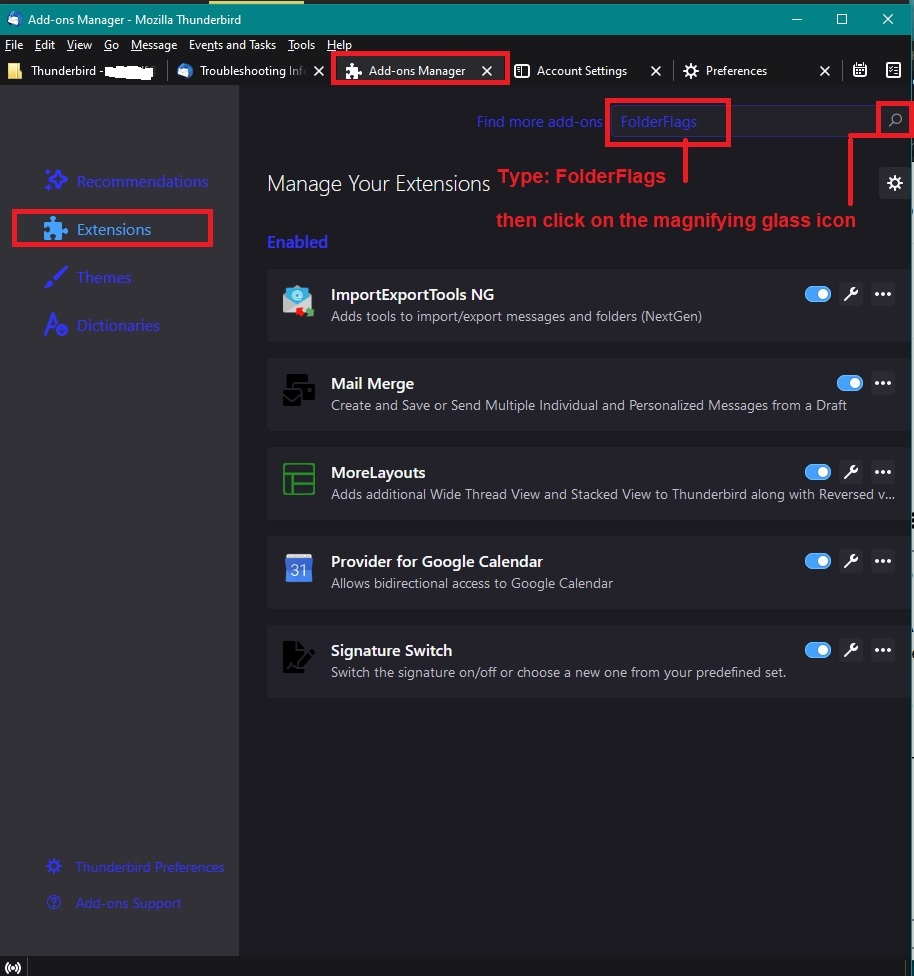
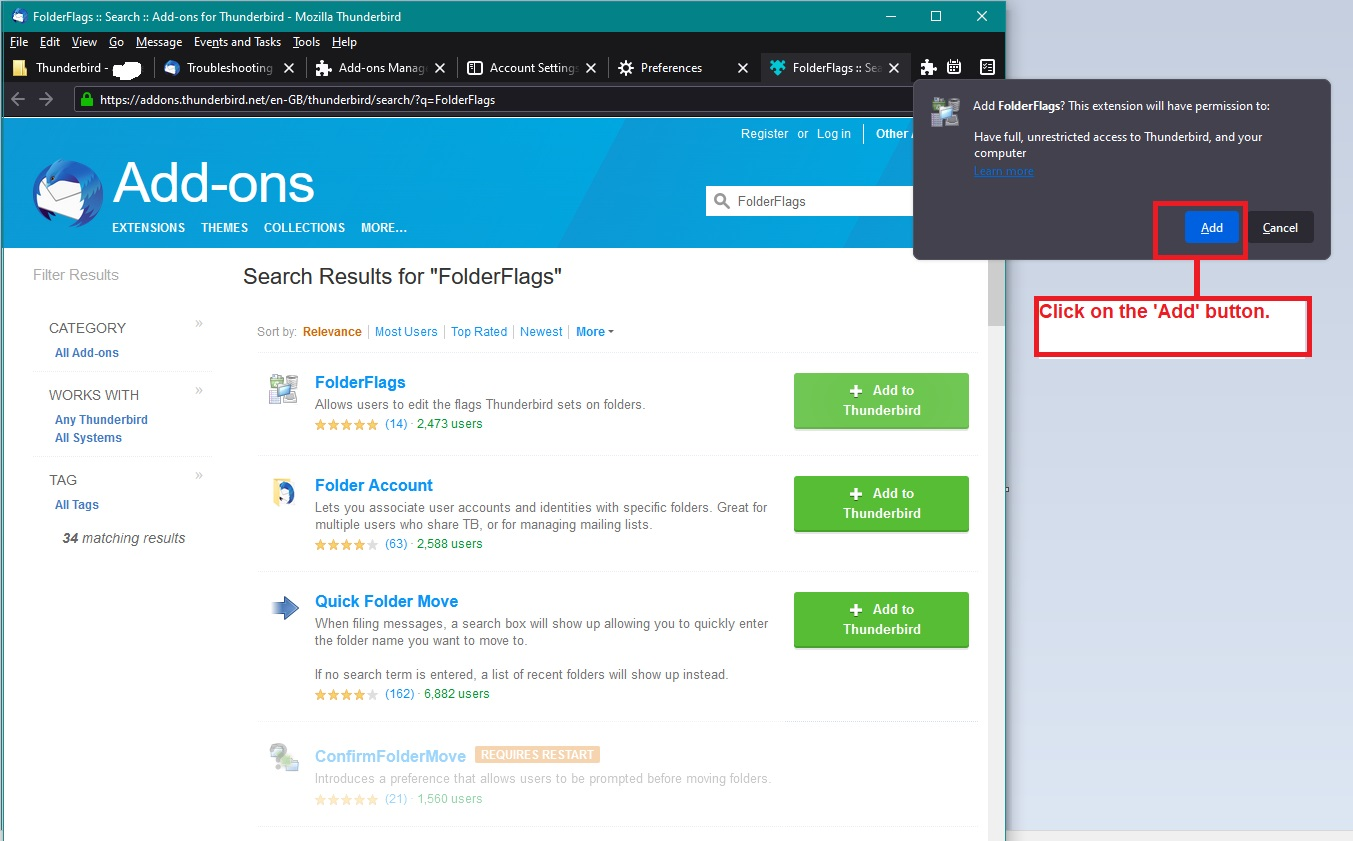
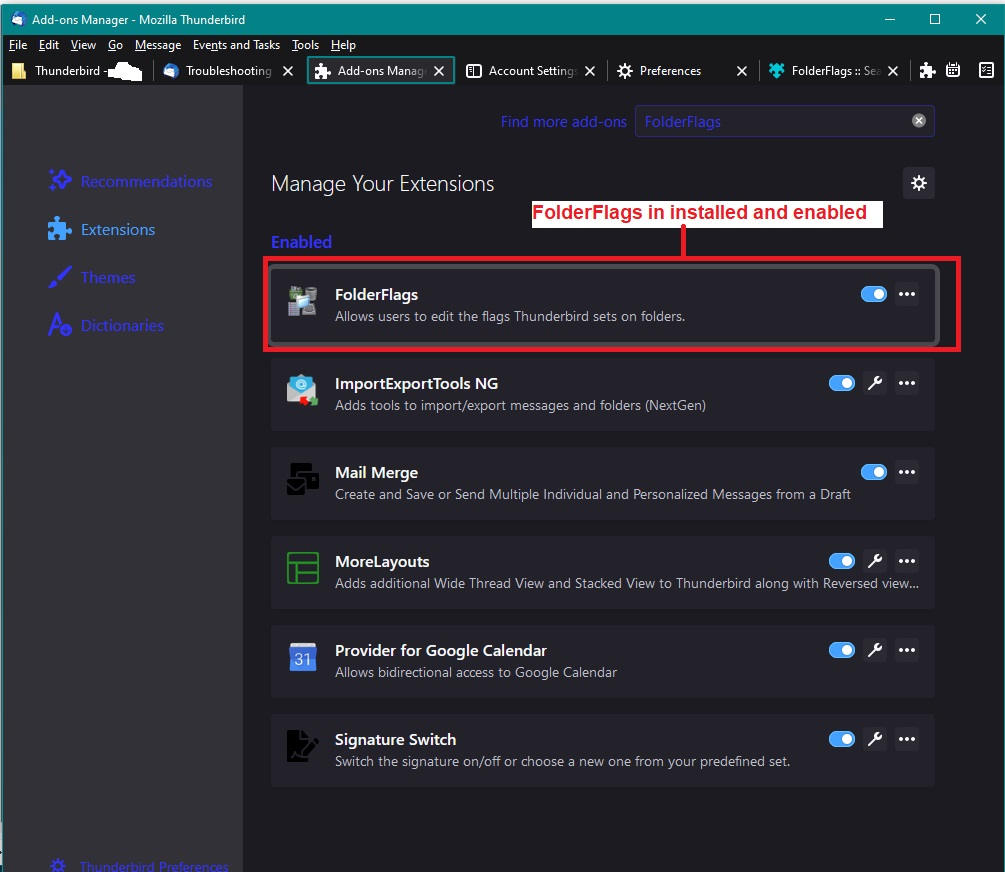
To do the method as shown in images:
- Menu icon > Addons and Themes
- Select 'Extensions' which has a jigsaw puzzle icon
- In top search type: folderFlags and press 'Enter' key
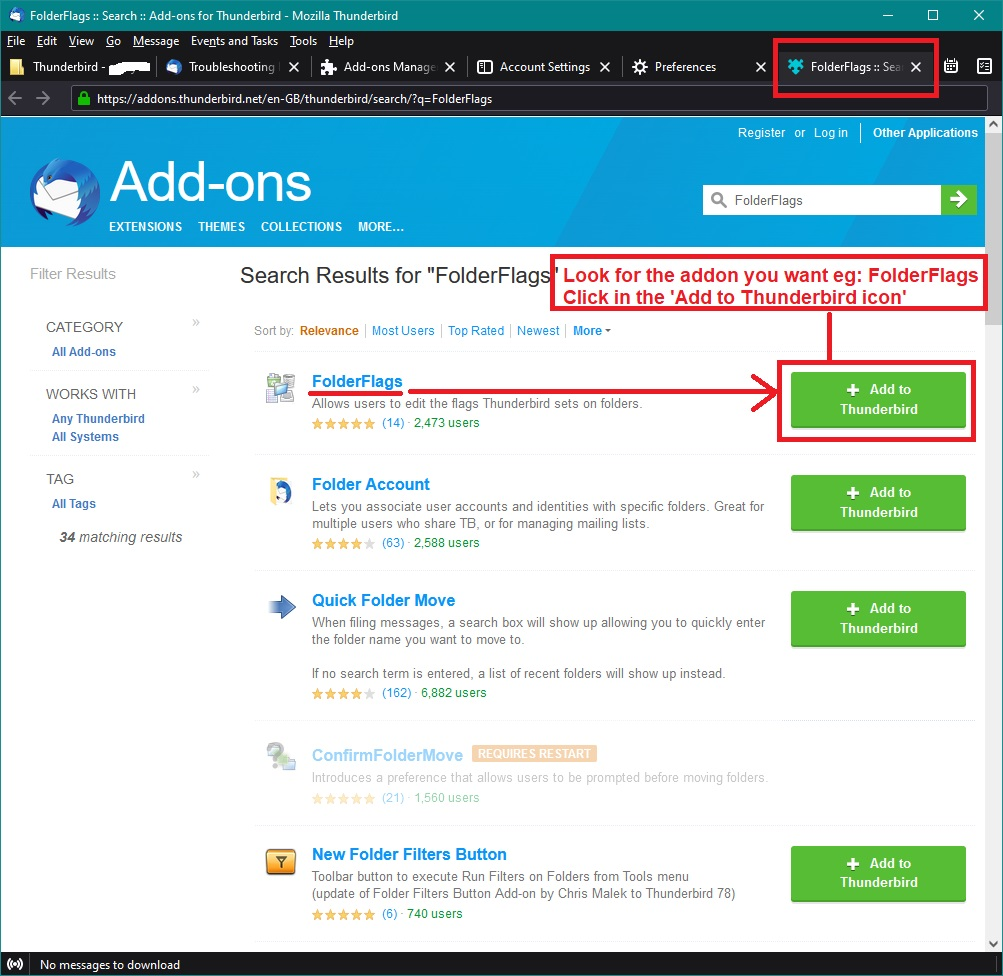
A new tab opens showing a list and you will find 'FolderFlags' is probably top of the list.
- Click on 'Add to Thunderbird'
- You will get a pop up which asks you to add it, so click on 'Add'
- It will then show another popup to say it is added, click on 'OK'
Now you can use it.
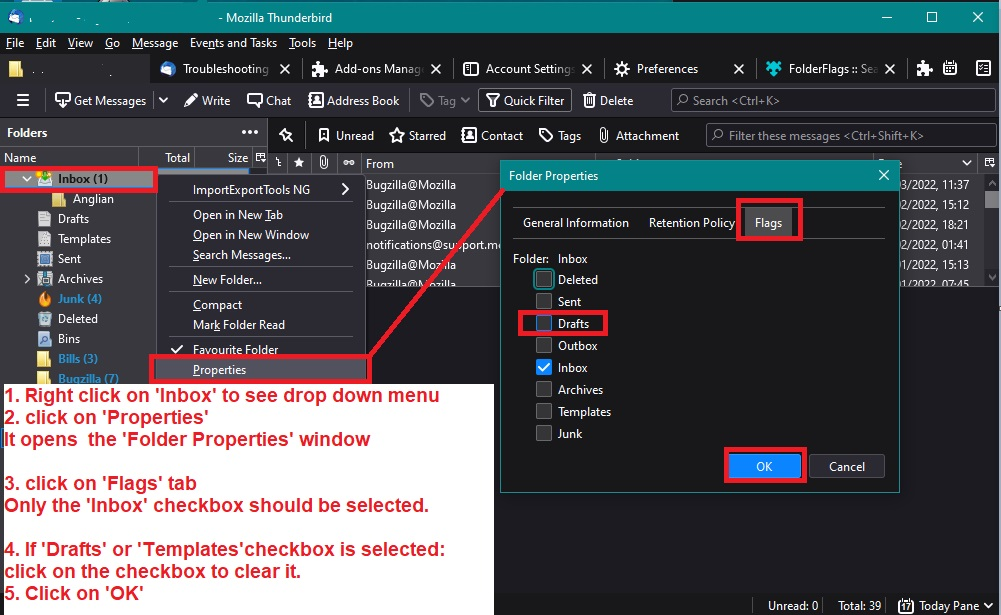
- Right click on effected 'Draft' folder and select 'Properties'
- Select the 'Flags' tab
- uncheck any 'Draft' or 'Templates' flag that has been set, let me know what flags were set.
- click on OK
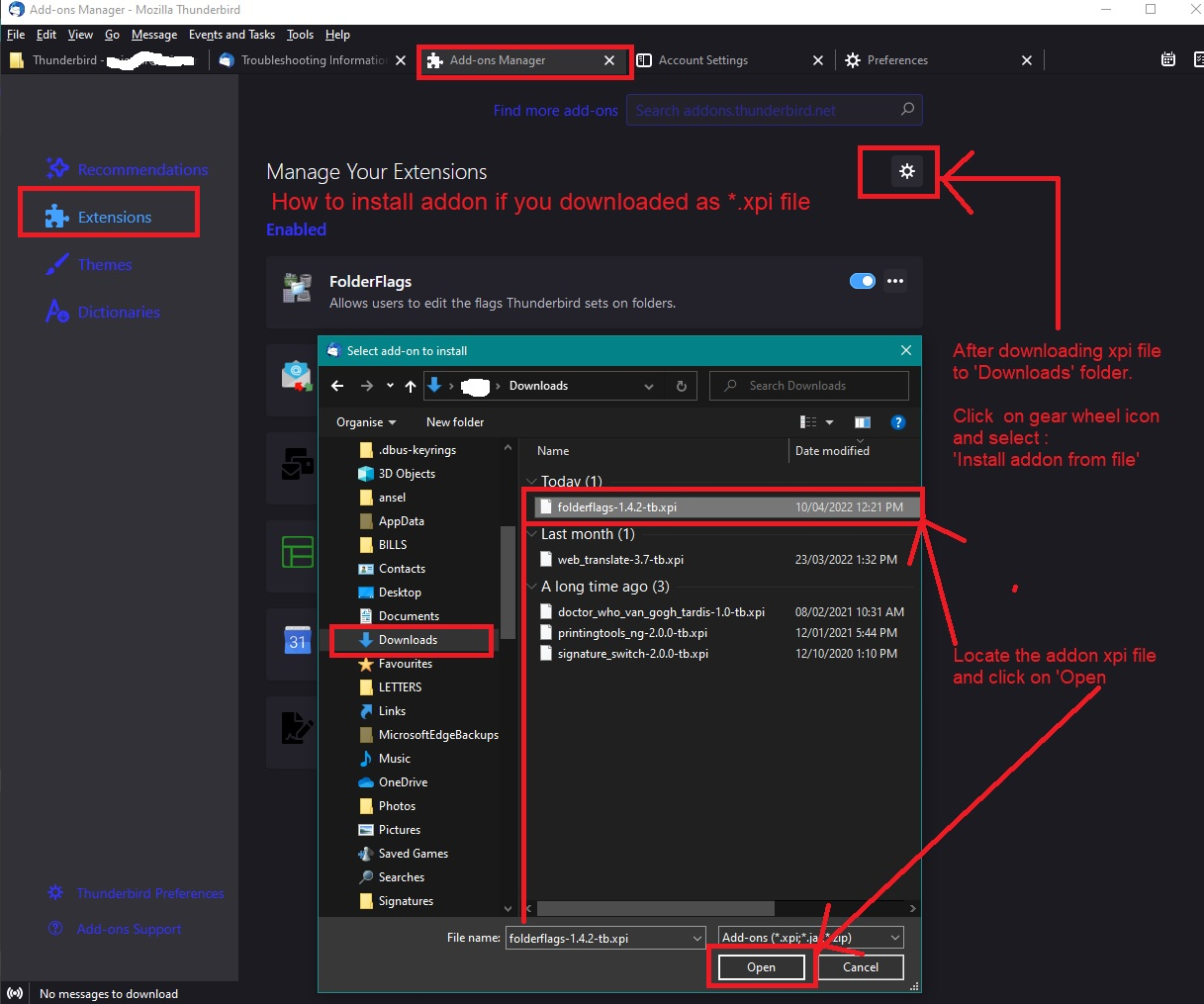
Alternative Method: Go to this link and it opens in browser:
- https://addons.thunderbird.net/en-us/thunderbird/addon/folderflags/
- Click on 'Download Now'
It downloads to your computer and is usually auto put into the 'Downloads' folder as an .xpi file In Thunderbird:
- Menu icon > Addons and Themes
- Select 'Extensions' which has a jigsaw puzzle icon
- Top right is a gear wheel icon - click on it to see drop down options.
- Click on 'Install Addon from file'
It will open a new window - see image below
- Locate the 'Downloads' folder to see the 'folderflags-1.7.2-tb.xpi' file you downloaded.
- Select the file so it shows in the 'Filename' at bottom of window and click on 'Open'
- A pop up appears asking you to click on 'Add'
- then another pop up says it was added and you click on 'OK'
Now you use the addon as directed previously.
Once flag is removed you should be able to delete it as it becomes a normal folder.
Images below as a guide. The first image shows how to install if you downloaded the file from the link. The others show how to do it via Thunderbird. The last image shows how to use it to remove a flag - in your case you are removing a 'Drafts' flag from the 'Draft' folder.
If still a problem to delete - let me know and I'll offer advise on how to do it via the profile folders.
PS: If you right clickon the mail account name folder and select 'Subscribe' - do you see the 'Draft' folder mentioned?