


Moving Thunderbird data from Win7 machine to a Linux Mint machine.

I use Thunderbird 115.18.0 on a Windows 7 machine. I wish to transfer all my Thunderbird data to a machine running Linux Mint 21.3 which has Thunderbird 128.12.0esr. I have not been successful after many tries. Could this be because the Thunderbird revisions are different? If so, can I get 115.18.0 to install on my Mint machine? If not how should I proceed? I have already tried creating a new .thunderbird directory with ********.default directory from the other machine. I have also tried a new .thunderbird directory with a the ********default-release directory as directed by one site.
All Replies (20)
it is more likely caused by the use of snap installers in Ubuntu and therefore mint.
why are you not using a current release. 128 is also out of support.
Hello Matt, I don't know why I am not using a "current release". The Thunderbird on my Mint machine came with the Thunderbird that I have. I want desperately to solve my current problem first. I can look at changing to a newer release later if there is a case for it. I do not understand the reference to "snap installers".
I'd be inclined to first update win7 to 128, then attempt the move to linux with version 128.
Install and start 128 on the linux system, let it create a directory, then copy your windows profile directory into that. It should create xxxx.default-release directory. (Profiles named xxxxx.default in not used in normal practice, so I'd avoid that.)
Then describe your problem, if any.
Thank you Wayne, Unfortunately, Thunderbird regards Win7 as such an outdated operating system, that it aborts any attempt to upgrade on that platform. Apart from that detail, I have tried what you suggest. I plan to list the contents of the xxxxx.profile-default folder on the two machines to see if they at least have content items with the same names. Do you know where I could get Thunderbird 115.18.0 to install on the Mint machine?
Do you know where I could get Thunderbird 115.18.0 to install on the Mint machine?
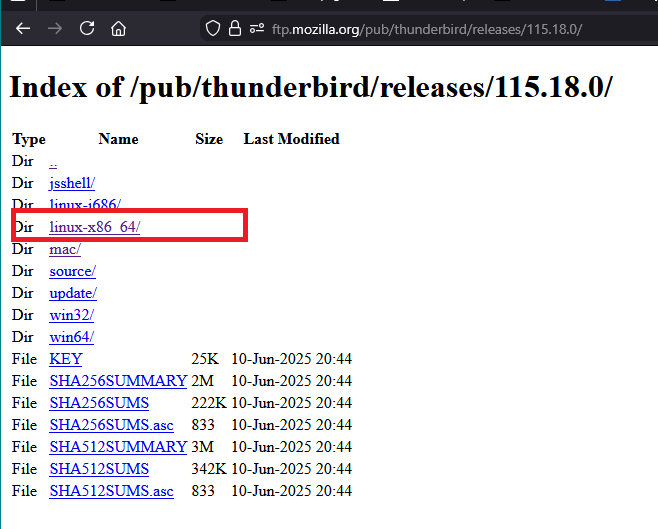
https://ftp.mozilla.org/pub/thunderbird/releases/115.18.0/
Select the appropriate linux option, then select the desired language, finally click on the 'thunderbird-115.18.0.tar.bz2' to get a download.
Note: I recall when moving from Windows to Linux it helped to delete the 'pkcs11.txt' file in the profile. If profile in Linux used a version more recent than 115.18.0 then delete the 'compatibility.ini' file.
Basically Exit Thunderbird on both computers. Copy all the contents of the profile name folder on Win7 On Linux - locate the default profile, remove all contents and then paste in the copied contents then delete 'pkcs11.txt' file and 'compatibility.ini' file. Start Thunderbird.
Thank you for your attention to my matter Toad Hall, Unfortunately, the url you provided does not seem to provide a place to: "Select the appropriate linux option, then select the desired language, finally click on the 'thunderbird-115.18.0.tar.bz2' to get a download." As I have explored around, it has become clear that I have to learn more about downloading software in Linux before I tackle that. As to your suggestion that I can make the transferred profile work by deleting pkcs11.txt and compatibility.ini, I did some research on the dichotomy between the ******.profile and the ******.profile-default folders. Some of the advice on the web contradicts other advice on this point. I may not have "the" picture, but I now have a clear idea of "a" picture here. I have tried following your instructions with the transfer of various combinations of these folders, but, unfortunately, none of them work. All lead to that dreaded octopus page. I will go back to trying to learn enough to install 115.18.0 on the Mint machine to see if I can transfer the profile when both machines have the same version of Thunderbird. Thanks again.
re :Unfortunately, the url you provided does not seem to provide a place to: "Select the appropriate linux option, then select the desired language, finally click on the 'thunderbird-115.18.0.tar.bz2' to get a download."
You are the first to report on an issue, so maybe you are not clear on wha you are seeing or what to do - I'll add some additional help info.
See Image below showing contents of the link. In this forum question - clickon the thumbnail image icon and it displays a lot bigger. 'Select the appropriate linux option' - there are only two linux options Either linux-i686/ OR linux-x89 64/ (this is probably the one you want)
That will take you another screen where you choose the prefered language eg: en-GB is English-British That will take you to another page where you click on the text: 'thunderbird-115.18.0.tar.bz2'
This is a link for help with installation in Linux.
Additional info on installtion - system info release notes etc for version 115.18.0
https://www.thunderbird.net/en-US/thunderbird/115.18.0esr/releasenotes/
Please read the system requirements for linux as it mentions - Thunderbird will not run at all without the following libraries or packages - so do check the info.
https://www.thunderbird.net/en-US/thunderbird/115.0/system-requirements/
re : I did some research on the dichotomy between the ******.profile and the ******.profile-default folders.
Windows OS is not the same as Linux OS In Windows OS, you are likely o see this type of contruction for profile
C://Users/username/Appdata/Roaming/Thunderbird/Profiles/profile name folder
The profile name folder can look something like this: 'abc456k.default' OR '6pw23hl.default-release' It does not matter. Open that profile name folder to see a load of folders and files Make sure Thundrebird is not running otherwise this will not work. Copy ALL of the contents of that profile name folder (do not copy the actual profile name folder itself - just it's contents)
On Linux computer if installing from the download I mentioned Thunderbird profile is here: home/ .thunderbird/profile name folder
That profile name folder is created by default when you install thunderbird and you get that request to create a mail account. At that point you exit Thunderbird - this is important otherwise it will not work. Then access the ~/.thunderbird folder It will have a 'profile name' folder of similar contruction to what you saw in Windows - just a different number letter etc. Open that profile name folder and delete all the contents, then paste all the copied folders and files into that profile name folder - so the new profile name folder now contains all the old copied profile data.
Then delete 'pkcs11.txt' file and 'compatibility.ini' file. Start Thunderbird.
Thank you again, Toad Hall. Your last part first. Your instructions starting with "Windows OS is not the same as Linux OS". Yes. I am across all that. What you have spelled out is exactly what I have done. I have done it many times now, some times with minor variants in the hope that I can overcome some little unseen trick. The only difference with my run yesterday was the deletion of 'pkcs11.txt' file and 'compatibility.ini' files. You say it doesn't matter which of 'abc456k.default' OR '6pw23hl.default-release' I copy across. After reading some instructions calling for one and some instructions specifying the other, I have been transferring both. I will try again, transferring only the '6pw23hl.default-release'. I will follow up the urls you have sent me in your last and penultimate post, and report back. Thank you again.
Greetings All, Particularly Toad Hall. In the instructions you sent me Mr Toad, you said to ensure that Thunderbird was not running on either machine when the file manipulations are done. I certainly have ensured that Thunderbird was not running on the Mint machine, but I was not 100% sure that I had closed it on the Win7. So I just went through it all again. I transferred only lu4hnubh.default-release, and deleted the two files as instructed. It didn't work, and I got the octopus screen again. When I powered up Thunderbird, there was only lu4hnubh.default-release in the ,thunderbird directory. Immediately afterwards, it had this: drwx------ 8 richard richard 12288 Jan 13 20:33 5c3cd7li.default-release drwx------ 3 richard richard 4096 Jan 13 20:33 Crash Reports -rw-rw-r-- 1 richard richard 0 Jan 13 20:41 folder_listing.txt -rw-rw-r-- 1 richard richard 62 Jan 13 20:33 installs.ini drwxr-xr-x 14 richard richard 12288 Jan 13 20:32 lu4hnubh.default-release drwx------ 2 richard richard 4096 Jan 13 20:33 Pending Pings -rw-rw-r-- 1 richard richard 259 Jan 13 20:33 profiles.ini drwx------ 2 richard richard 4096 Jan 13 20:33 x7aum95y.default
Note that there are TWO xxxxxx.default-release folders. It seems that the Mint Thunderbird has just made its own and ignored the seed. You wrote that either the default or the default-release folder would do, which seemed to imply that they are roughly equivalent. On my Win7 system, OisOy8wr.default is 18.5GB whereas lu4hnubh.default-release is only 16.1 MB If the profile can fit in 16.1 MB, then what can Thunderbird be doing to take up 18.5GB in the other folder? Have not tackled the change of version matter yet. Thankyou.
A really astute reader such as Toad Hall, would have realized that I had made a mistake in following his instructions. As soon as I realized this, I ran the process again making especially sure that I followed each step correctly. It still didn't work. The question about the size of the Win7 OisOy8wr.default file being so huge still stands. Thanks, Richard.
Let's start again:
you said "On my Win7 system, OisOy8wr.default" and "I transferred only lu4hnubh.default-release,"
Do you have a profile called 'lu4hnubh.default-release' on the win7 computer - because you said you transfered it ?
It would be helpful if you posted some images: On Win7 computer: upload an image showing contents of the 'Profiles' folder. So we can see all the 'profile name ' folders listed.
On Linux computer: upload an image showing contents of the '.thunderbird' folder. So we can see all the 'profile name ' folders etc listed.
On Linux computer: in the '.thunderbird' folder - locate and open the 'profiles.ini' file using a simple text editor program. Upload an image showing all the contents of the 'profiles.ini' file.
On Linux computer: in the 'lu4hnubh.default-release' profile name folder - locate and open the 'prefs.js' file using a simple text editor program. Post images that show all the contents of the 'prefs.js' file - you may need to do several images.
Thank you for bearing with me Toad Hall, <<You wrote>> Do you have a profile called 'lu4hnubh.default-release' on the win7 computer - because you said you transfered it ?>> Yes. But a point of clarification: I transferred this profile from the Win7 system a few days ago. I have it on memory stick. I have been using the memory stick version, as this project has gone on for some time, and my actual profile in the Win7 Thunderbird will be changing all the time with ongoing email traffic.
<<You wrote>> On Win7 computer: upload an image showing contents of the 'Profiles' folder. So we can see all the 'profile name ' folders listed.>> See Win7 Thundebird Profiles.jpg <<You wrote>> On Linux computer: upload an image showing contents of the '.thunderbird' folder. So we can see all the 'profile name ' folders etc listed.>> See .thunderbird.png <<You wrote>> On Linux computer: in the '.thunderbird' folder - locate and open the 'profiles.ini' file using a simple text editor program. Upload an image showing all the contents of the 'profiles.ini' file.>> See contents of profiles.ini.png <<You wrote>> On Linux computer: in the 'lu4hnubh.default-release' profile name folder - locate and open the 'prefs.js' file using a simple text editor program. Post images that show all the contents of the 'prefs.js' file - you may need to do several images.>> Remember that your instructions were NOT to copy the ******.default-release folder, but to empty the existing ******.default-release folder, and transfer the contents from the Win7 system into that. Consequently the ******.default-release folder, in .thunderbird in the Mint system has a different name. The contents of the prefs.js file from it are shown in the three images: prefs.js_page1.prn prefs.js_page2.prn and prefs.js_page3.prn
Thank you and regards, Richard.

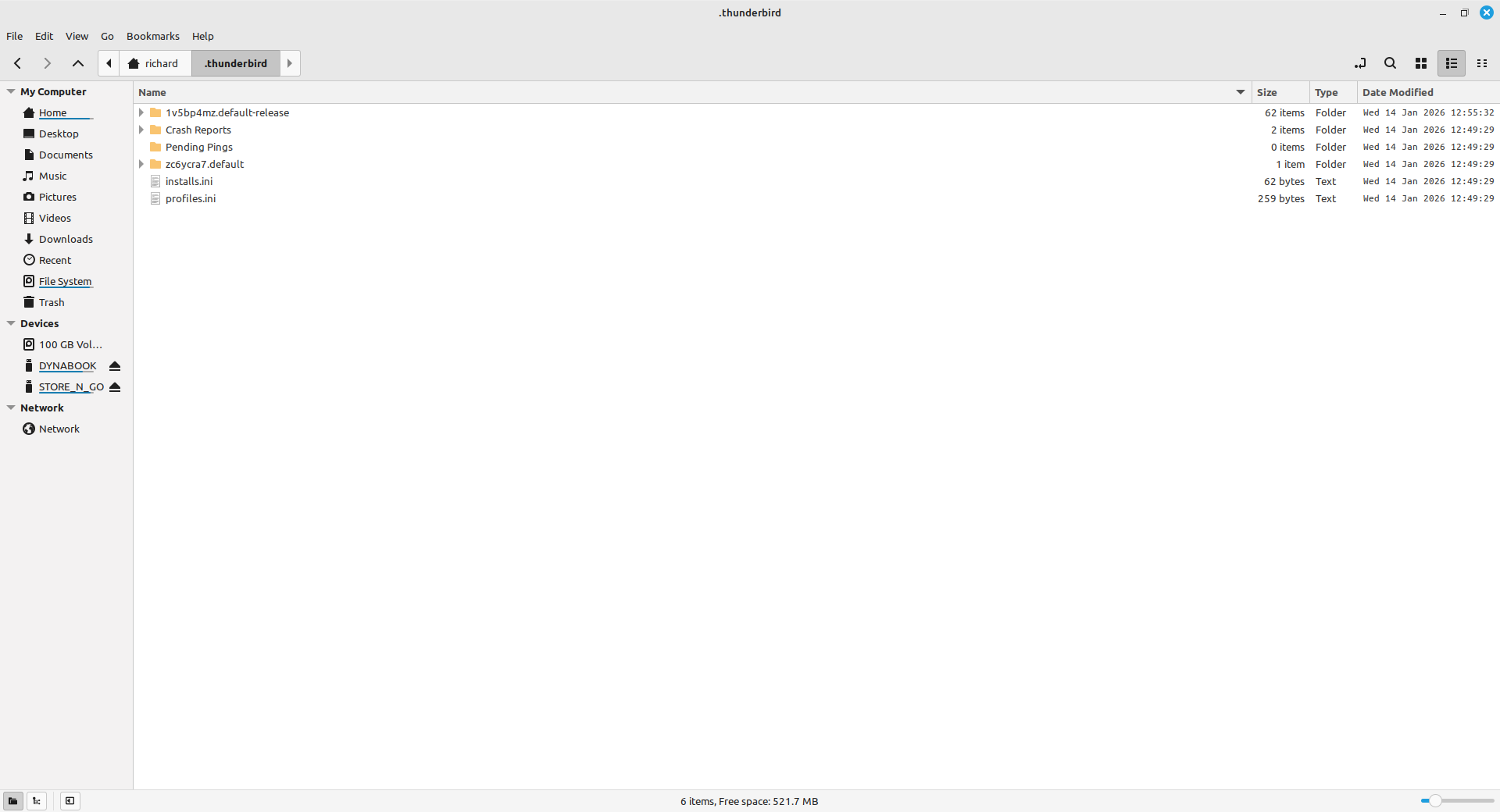
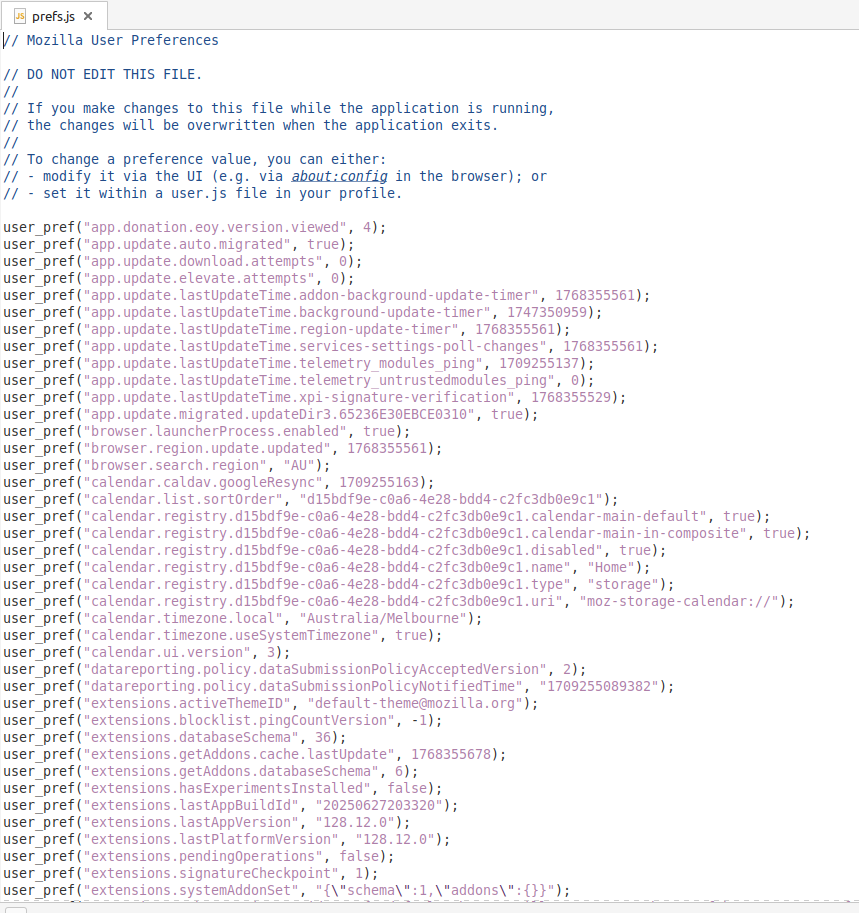
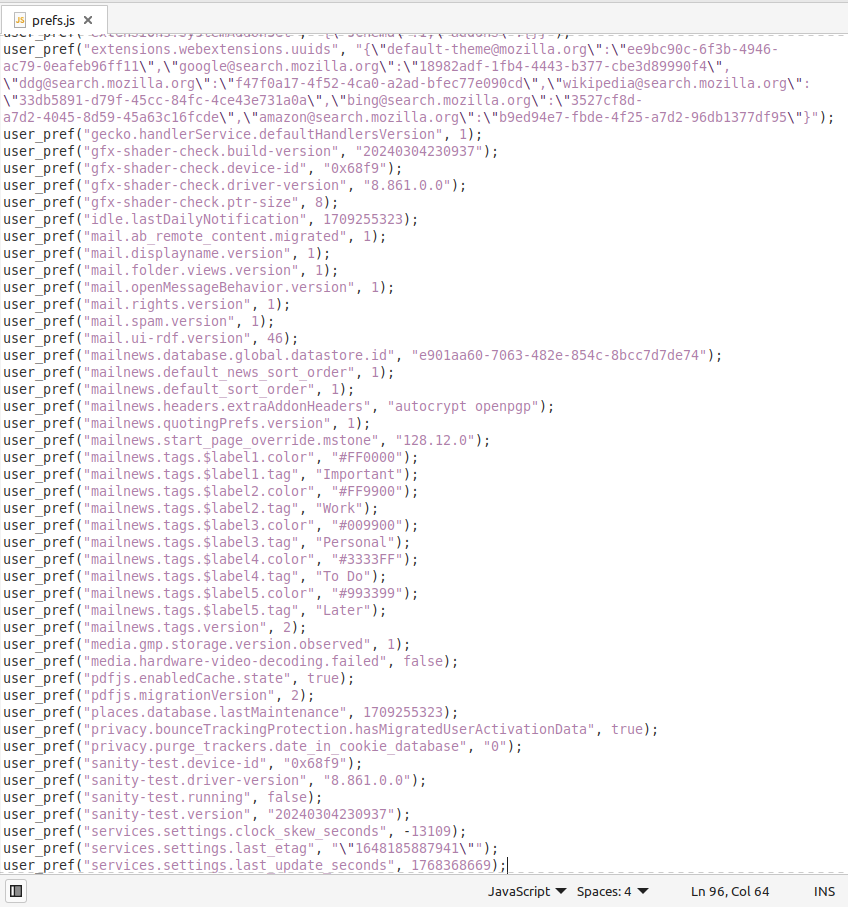
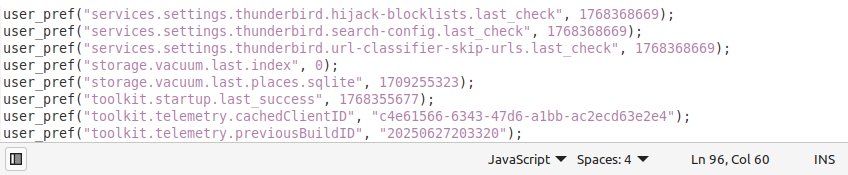
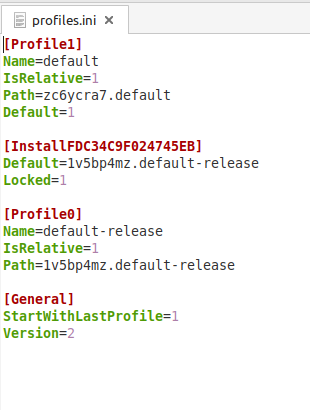
I'm assuming the contents of Win 7 profile - 'lu4hnubh.default-release' were copied into Linux '1v5bp4mz.default-release'
I'm assuming the 'prefs.js' images came from '1v5bp4mz.default-release' profile.
If that is the case then Win 7 profile - 'lu4hnubh.default-release' could not use that 'prefs.js' file as it does not have any mail accounts listed. It's missing a load of data. It certainly explains why it does not work.
The default profile on linux is 'zc6ycra7.default'
Your Win 7 images says the profile you are using is called '01s0y8wr.default' as it has a more recent modified date.
Exit Thunderbird on both computers this is important - nothing should be running.
Win 7 computer Access profile name folder called '01s0y8wr.default'. Copy all the contents - all files and folders of that profile. Put them on an external disk drive
Linux computer Access profile name folder called 'zc6ycra7.default' Delete all it's contents. Paste all the '01s0y8wr.default' copied files and folders into 'zc6ycra7.default' delete 'pkcs11.txt' file and 'compatibility.ini' file
Whilst in that 'zc6ycra7.default' profile - open the 'prefs.js' and post images so we can see the difference. Close 'prefs.js'
start Thunderbird
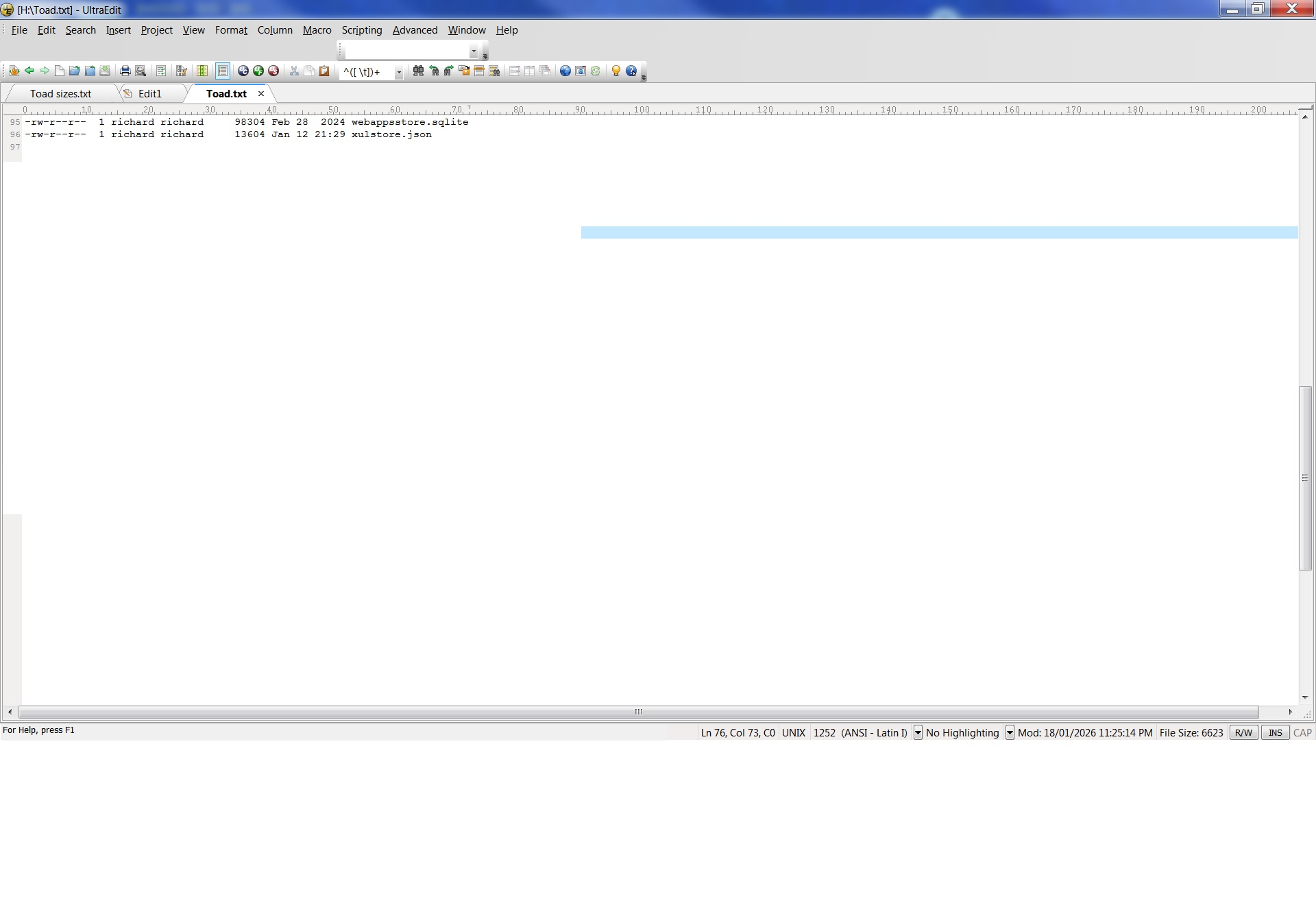
Once again, Thank you Toad Hall. I have launched into the tasks that you have given me, but have not been able to complete them. The folder 01s0y8wr.default is 18,6GB when the memory stick is viewed on the Mint machine. I cannot copy the contents into zc6ycra7.default on the Mint machine because it is too large. Although 18.6GB in the report in Properties, the sum of the item sizes in the file Toad.txt (see below) is:
37 6832705 (bytes, presumably)!
I did not know if what seems to be an excessive size is due to some rogue item that has become bloated due to the evolved incompatibility between the unsupported Win7 and the latest Thunderbird updates or what. To make changes in the Mint machine to accomodate the large folder is possible, but it involves changing the partitioning. I have a bit to learn before tackling that. If that is the only step forward, inform me and I will attend to that and then return to this forum.
Just in case the excessive size of 01s0y8wr.default is caused by one of more rogue items that you could advise me to delete, I have included images to show what is there. Neither Nemo, nor Windoze Explorer show the size of subfolders in a folder listing, so as well as showing the folder listing (I used WinExplorer), I have made images of the output from Terminal ls -l >Toad.txt (This horrible type face does not distinguish between a lower case "el" or an upper case "eye". What I have identified above is the "el-ess" command.) Thank you, Richard.
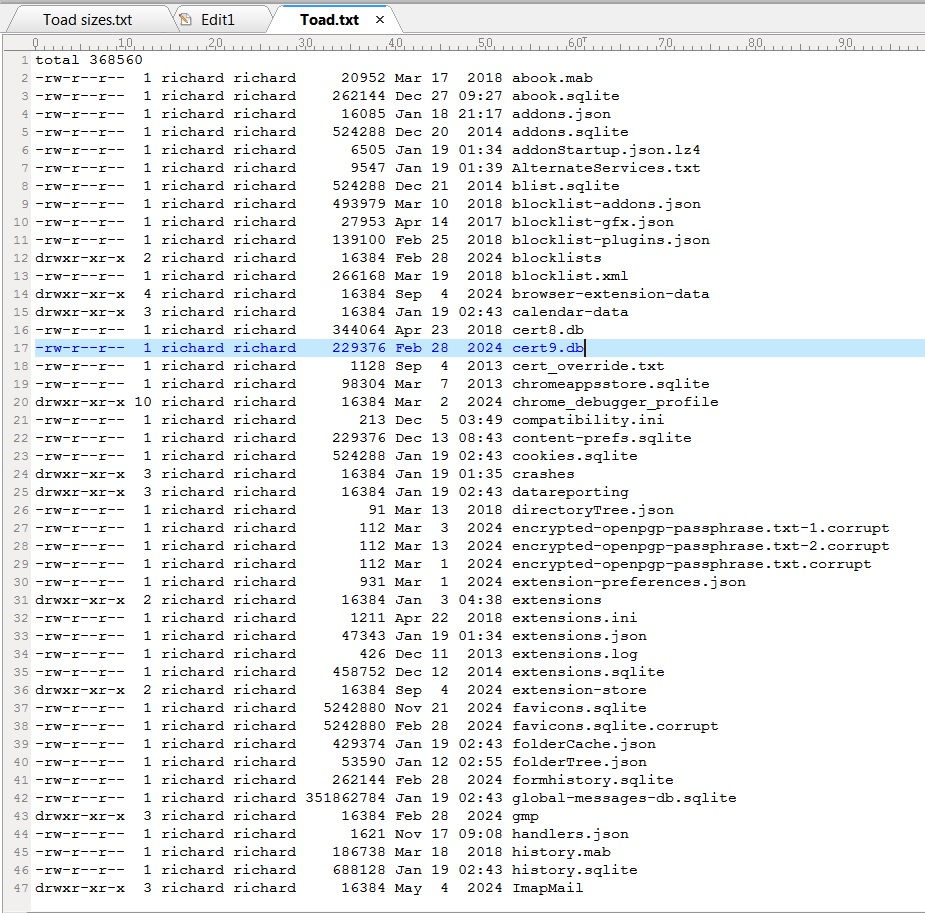
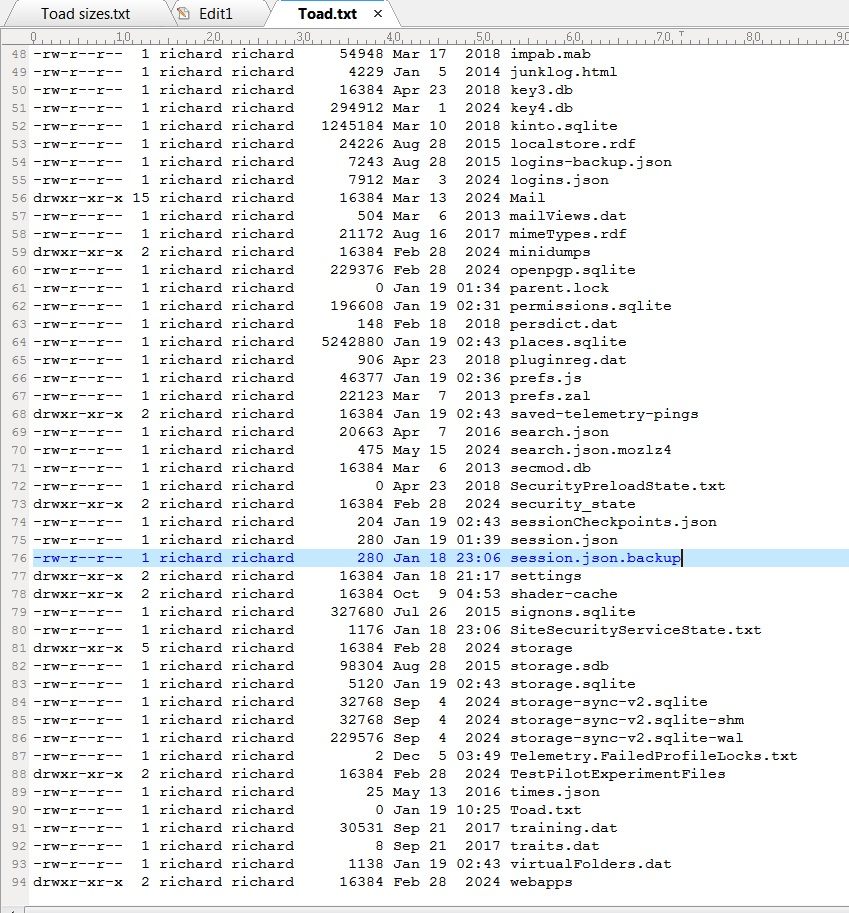
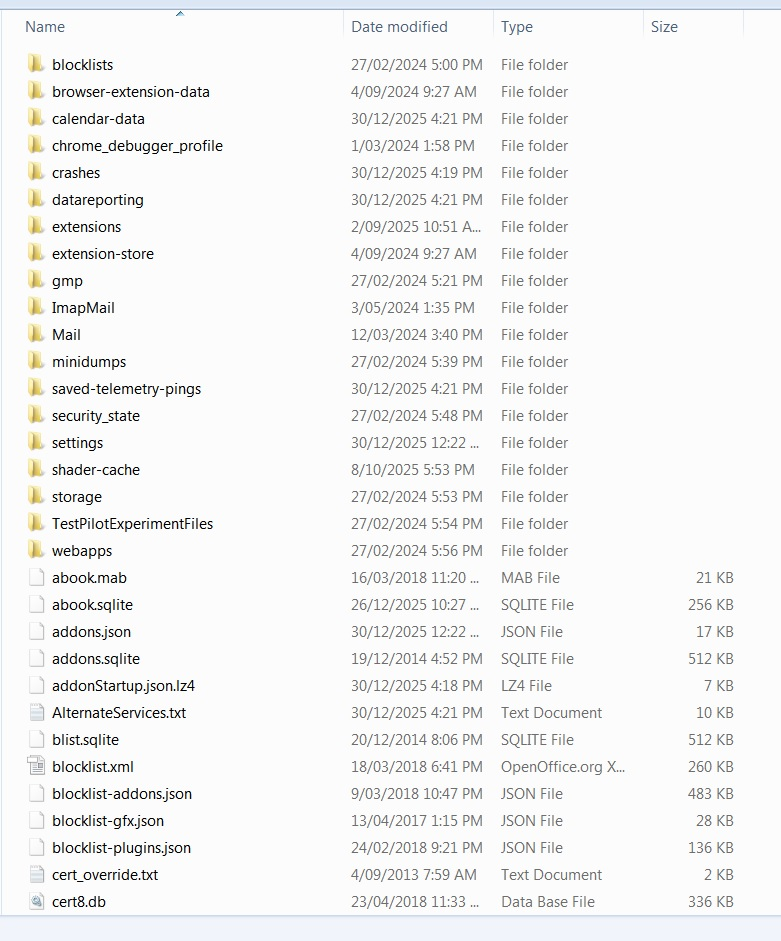
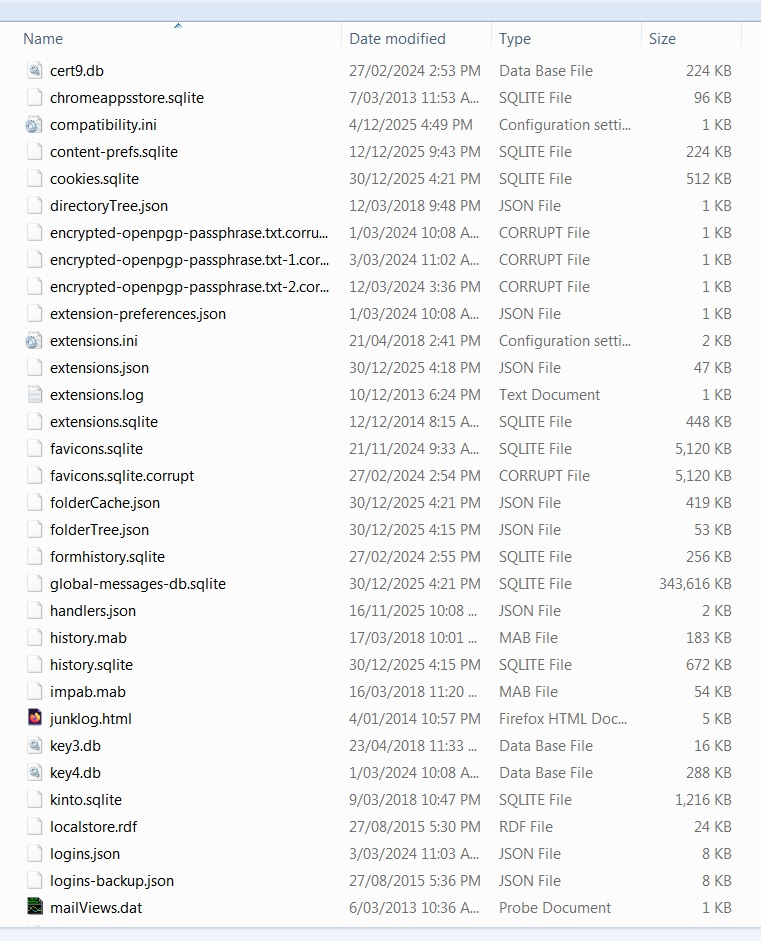
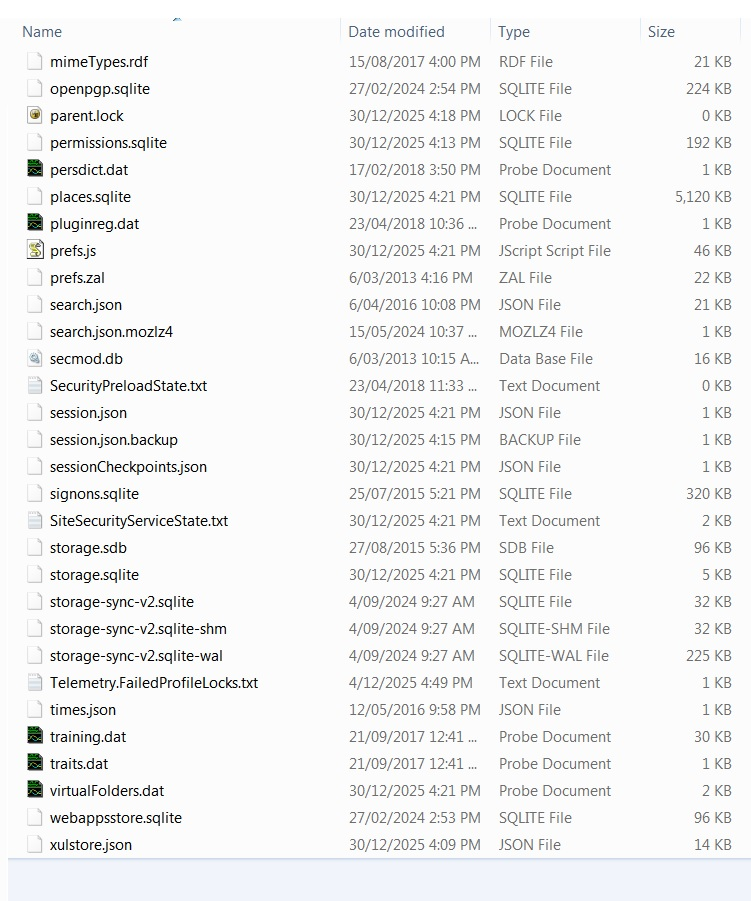
re :The folder 01s0y8wr.default is 18,6GB when the memory stick is viewed on the Mint machine.
Access that memory stick. In 01s0y8wr.default : It seems you have a very large 'global-messages-db.sqlite' - created to help with searching. I think the 351862784 is bytes which is 2.8GB ! Delete the 'global-messages-db.sqlite' file - it will get rebuilt latter. That should make it smaller - then Copy contents of the 01s0y8wr.default folder on memory stick into 'zc6ycra7.default' (make sure it is empty before you paste in the copied files and folders)
Did that work?
Thank you Toad Hall. I don't understand your statement that " I think the 351862784 is bytes which is 2.8GB !" To my mind, 351862784 bytes is 351862.784 kB is 351.862784 MB is 0.351862784 GB I don't see how you get 2.8GB. Before removing "global messages-db.sqlite, The Win7Explorer Properties has the folder size as
      19.960408021 GB           After removing, it was
      19.608545237 GB            The difference is
         .351862784  GB           SNAP
Whatever the reduction is size is, it is not sufficient to load the new contents into the ********.default directory in my .thunderbird directory. I am working my way through the GParted manual. There IS space in the machine. I just need it to be in the same partition as .thunderbird. I will report as soon as I have achieved that. I have some learning ahead of me. Thank you again. R.
re :351862784 is bytes which is 2.8GB ! lol it's 2.8 gigabits not gigabytes
It's still large and a rebuild will make sure it's up to date. So I would still delete it either immediately before pasting or immediately after.
To gain space - You could delete the contents of the other profile '1v5bp4mz.default-release' folder which fails to work.
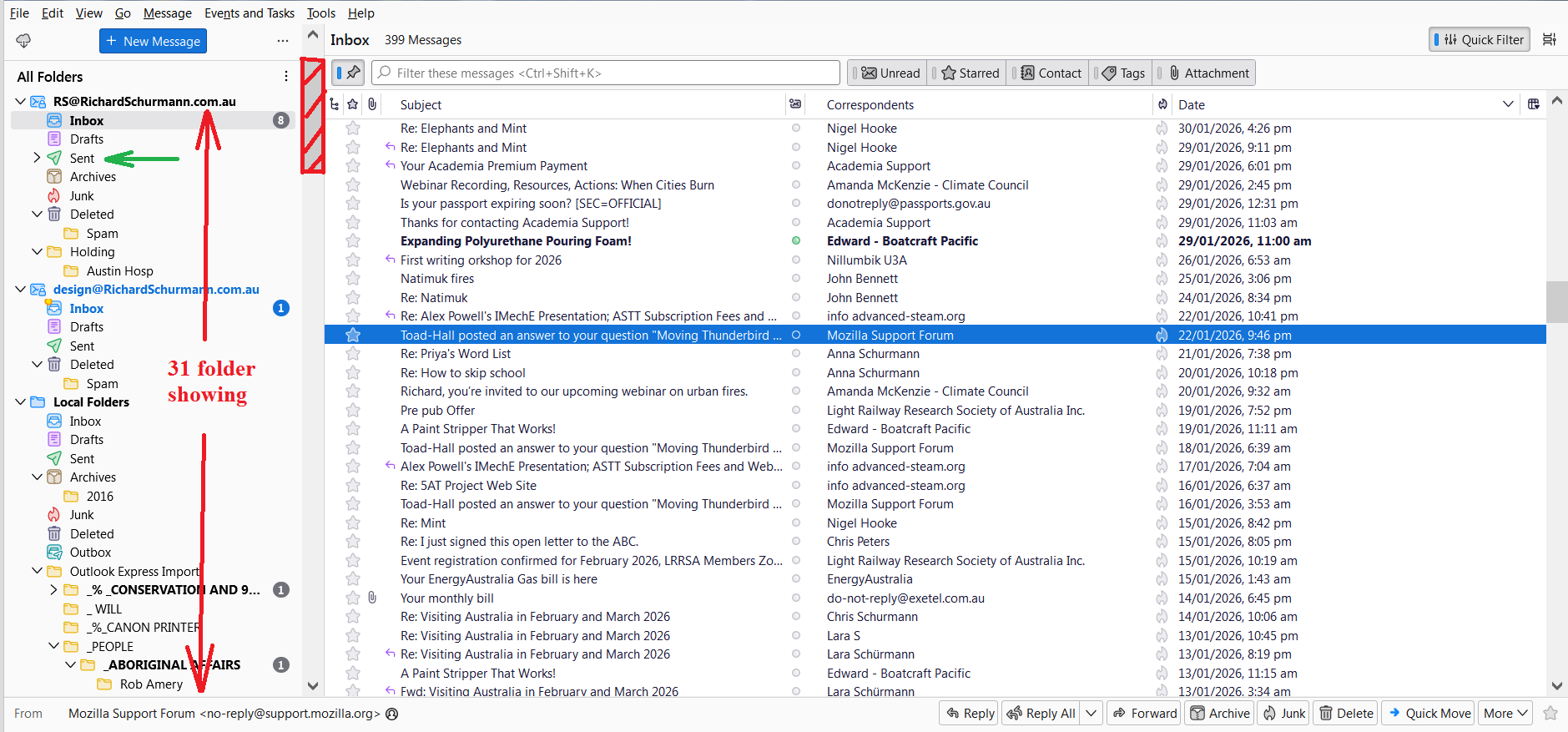
Hello again, Toad Hall, Here I am again after a delay. Yesterday, I had the partition boundaries on my Mint machine moved so I have lots of space, and can proceed with this Thunderbird business. This morning, I worked through the instructions you gave me on Jan 17th. All contents of 01s0y8wr.default copied from Windoze installation and into the emptied zc6ycra7.default folder. You instructed me to delete 'pkcs11.txt', but there is no file of that name. I deleted compatability.ini I took screen grabs of the text editor with prefs.js, so I can send you images. there are 14 screen shots at 1.3 MB each. I could try reducing the picture file sizes, or alternatively embed the .txt file in an html and place it on my own web site for you to see. Waht would be best? I deleted the 'global-messages-db.sqlite' file. The result is that some little bits worked, but overall, the problem is not solved. It seems that the contents of my "Sent" folder for one of my accounts has been saved. The "Inbox" came up, but the only contents were the emails that have arrives since I last had Thunderbird running on the other machine. (Interestingly, I deleted some spam on the Mint installation. I am back on Windoze now, and the incoming that I did not delete has come up on this installation of Thunderbird, and the item deleted on the Mint machine are deleted here as well.) I attach an image of my Thunderbird screen on the Windoze machine. You will see on the bar that the left there are 31 folders showing. You can see by the size of the slider (cross hatched) that the number of folders that I have sorted my emails into is many times that number. They represent my whole life corresponding with people over many years, and they are what I want to save. When I opened Thunderbird on the Mint machine, it wanted me to enter my credentials. I did this for one of my email accounts. Wouldn't the registration of credentials (email address, password etc.) be part of what I should have transferred? In a defferent message, you suggested that I the contents of the other profile '1v5bp4mz.default-release' folder, but you put that in the context of space saving only. I will try that and report. I will see how much I can reduce the file size on the images, and offer you them as well as the actual file in a place where you can look at it. Thank you so much for your help so far. Richard.
Hello Toad Hall, The file "prefs.js" can be viewed at www.richardschurmann.com.au/prefs.js.html
Please let me know if this is an acceptable presentation. I will continue to explore how much I can reduce the file sizes of those images without making them unreadable.
regards and thanks, Richard.