


Inconsistent syncing with Proton Mail Bridge

A big thank you in advance to all who take the time to read this, especially those who feedback.
Firstly, some quick details about my environment:
- Windows 11 Pro (fully patched).
- Proton Mail account – 2 proton address, and 10 addresses across 3 custom domains.
- Thunderbird 146.0.1 (64-bit).
- Proton Mail app 1.11.0 (5.0.324.1).
- Proton Mail Bridge 3.21.2 (br-215). This has been intentionally set to “Split addresses” mode, where (according to Proton) I can “Setup multiple email addresses individually”, and I have also disabled “Show all mail”.
- I have set up a new Thunderbird account for each Proton Mail address.
After only a couple of days of migrating my Outlook messages over to Thunderbird (in Proton Mail), two items of concern became apparent – this query here is the much more important issue; I’ll raise another question here on the community for the other problem.
Now I understand that all of the folders imported or created in Proton Mail have no association with mail addresses. I also expect – but please tell me if I’m wrong – that on the basis of Thunderbird being configured to “Subscribe” to all folders, as well as having the server setting of “Show only subscribed folders” unchecked for each account, then I should see all messages in all folders across all accounts.
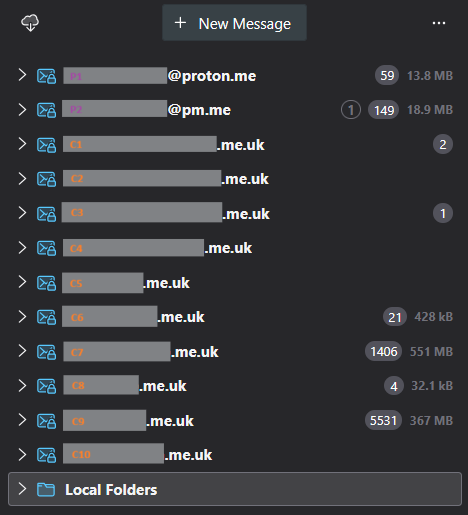
I’ve only just started the migration, but even now I’ve imported ~7,000 messages and – based upon the presumption that all accounts should see all folders and their messages – it appears to be a very inconsistent (and worrying!) picture (see attachment).
So far, I’ve:
- Resynced the Proton Mail Bridge. And resynced it again. And again!
- I’ve even run a repair on the Proton Mail Bridge.
- Before any of the two steps above began, I deleted the accounts and data from Thunderbird. When Proton Mail Bridge has then finally resynced, I added the accounts back in again.
- I’ve even gone as far as deleting my Thunderbird profile to effectively start it all again.
And finally, on a second machine (Dell laptop, same config as desktop above), I installed the same three apps and then added only one account to Thunderbird, which returned me just the one single message in the Inbox - absolutely nothing in any of the folders.
The Proton Mail app does show all messages in all of the correct folders, so could this be a Thunderbird issue, a Proton Mail Bridge issue, a combination, or something completely different.
As I said at the beginning, any and all constructive and helpful feedback will be most gratefully received.
All Replies (5)
You lost me about half way through.
Proton and how to configure is are entirely things you need to address with Proton. I am not aware of a single paying proton customer that actually offers their time here to support that particular commercial product.
Thunderbird interacts with Proton through a custom IMAP mail server application that proton provide their paying customers using the name Bridge. It is as far as Thunderbird is concerned an IMAP server located on the local host IP address.
As Thunderbird does not support IMAP mail folders that are not directly associated with an IMAP account I really got quite lost when you started talking about folder that were not associated with addresses.
My guess is you antivirus is interacting with the local IMAP application in some way that proton have not foreseen but I am truly guessing as I do not use their products. I find GMX and Google meet my simple email needs. With ws/Mime encryption where higher security is required.
Hi Matt,
Thanks for taking the time to reply.
I get that Proton Mail Bridge is a service on my PC that's there to support local mail client connectivity. I also presume (without confirmation from Proton) that it's also a localised indexing service to support (for example) full-text search of message content - something that, by default, Proton's infrastructure does not support over the internet.
Regarding the mail folders, and to quote (whilst also anonymising) the feedback (so far) from a Proton customer support specialist with whom a ticket was raised yesterday: "If you are using Split mode, all the folders will show under all email addresses. As the folders are created on the account level, they will be visible under each address."
My first line of support enquiry has always been - and will have to remain as - Proton. Nevertheless, with Proton promoting Thunderbird as a viable client app, it seemed a reasonable opportunity to tap into any potential expertise on here that may ... possibly ... have had similar experiences with Thunderbird and the Proton Mail Bridge.
Thanks again for your time on this matter.

Right click on any account name, select "Subscribe", and see if there are unchecked folders that you want to subscribe to.
Hi Rick,
Thanks for the feedback. I did double-check, and every folder in every account is checked.