


Certain calendar events now appear as accepted invitations - cannot edit or dismiss.

I hope I can explain this well: Recently, many recurring events from Google Contacts, namely birthdays and anniversaries, now appear in Google Calendar as invitations from "Unknown Organizer <unknownorganizer@calendar.google.com>" that I have accepted (but I have not.) These events keep triggering pop-up notifications. Those notifications do not respond to the Dismiss or Snooze buttons - they do nothing. I can dismiss the dialog box with the upper-right [X], but the pop up gain every time the calendar re-syncs. I try to edit the properties of the event, but the changes do not take. When I look at Google Calendar directly with my browser, these events do not show up, only the proper ones that are listed in my Birthdays calendar.
Why did this happen, and how can I fix this. The un-dismissable notifications make Thunderbird Calendar unusable. I find many similar (but not necessarily identical) complaints going back years, but no actual solutions.
Thunderbird 140.2.0esr Windows 10 22H2 Cardbook address book add-on 100.4
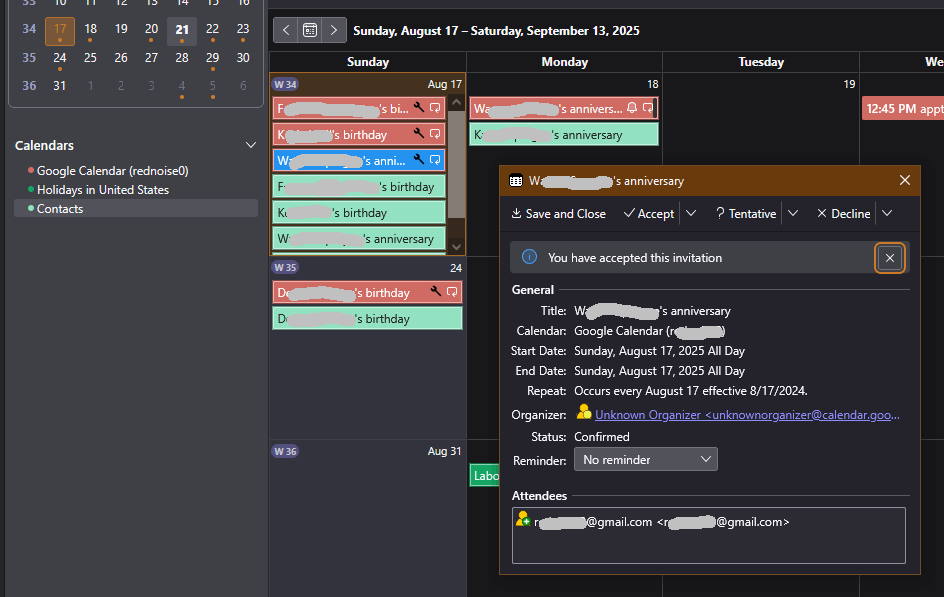
All Replies (3)

I see you posted this five months ago, and no response. I have that same problem, invitations from "unknownorganizer@calendar.gmail.com" for recurring events that don't show up on my google calendar at all, and which can't be dismissed or edited. I unsubscribed from my google calendar and re-subscribed, but the same thing happens again.
It's of course possible that this is a google.com problem, but at least an acknowledgement from Mozilla would be nice... For now, I'm switching to the Vivaldi calendar screen (that's on the Vivaldi browser). It doesn't appear to have this problem.
TBird 140.7.0esr on Linux
I went through a number of gyrations and eventually the problem mostly went away, though I still occasionally get the odd birthday notification (it would make more sense if I got all or none.) The way it stands now is that I have TWO events listed in the Calendar for every birthday/anniversary... but at least I'm not getting the pop-ups. I still hope the find the solution someday.
In practice, I don't use the Thunderbird calendar any more, I use Google Calendar in a browser. The Thunderbird Calendar interface is ugly, cluttered, and unfriendly IMO, but if reminders worked properly I'd still use it.
I recently installed Thunderbird for a friend of mine. Now HE's getting those unkillable pop-up reminders. I'm embarrassed that I don't know what to tell him.
Modified by Lin
Yeap--that two events in the TBird calendar for every one in the linked in Google calendar is an error I forgot to mention. Thank you for bringing that up!