Thunderbird Times Out Trying To Access Yahoo Email

Hoping that someone can get me pointed in the right direction to sort out a problem I'm having.
I've been using Thunderbird successfully for a number of years on a few different PCs to access my email account. It worked just fine years ago with AT&T and more recently Frontier email servers. Several months ago Frontier discontinued their email service. But I had a "Free Email For Life" account which they automatically switched over to a Yahoo Email account which allowed me to continue using my long standing "@Frontier.com" address. The change over went pretty smoothly and Thunderbird was still working as expected. Until it didn't.
In the last month or two Thunderbird in two Windows machines will not connect to my Yahoo email account. I continually get messages indicating a "time out" issue when attempting to connect. But I can still access my email by logging directly into my Yahoo webmail account.
The two main Thunderbird installations, one on a Win 10 laptop and another on a Win 7 Pro desktop are the main problem areas with time-outs and no connection established. Oddly enough Thunderbird for Android seems to work just fine on my phone.
The only free tech help that Yahoo would provide was essentially to check my SMTP server settings, which I did again for probably the fourth or fifth time. I also changed my password which was a couple years old . . . just in case. But I'm still spinning my wheels.
Hopefully someone else has had a similar experience and can tell me what I may have overlooked. I don't want to switch to Gmail or any other server if I can avoid it. Yahoo offers their own 3rd party app but it seems a bit futzier and more invasive than Thunderbird. Somebody please point me in the right direction of where to dig in next.
All Replies (3)
UPDATE ! ! !
Well here's a bit of interesting behavior.
The two Thunderbird installations that are timing out on Yahoo email are routed thru the same AT&T Turbo 3 cellular portable WiFi hotspot. The Thunderbird Android installed on my phone seemingly works just fine thru its own, seperate AT&T cellular service.
So I turned on the hotspot on my phone and paired it into my laptop and what do you know. I can now get Thunderbird to download my backlog of email. The only obvious difference I see between the two connections is that typically the Turbo 3 download speed runs at maybe 10 to 15 Mbps. However, my phone connection commonly runs at 20 t0 50 Mbps.
It doesn't seem to me that email should require a great deal of speed to connect and work properly. At least it never seemed to be an issue with a slow DSL connection years ago. Any suggestions as to what I'm overlooking here?
Chosen Solution
do you have DNS over HTTPS turned on in the Thunderbird account settings? What you see regarding that will vary based on Thunderbird version. As only one of the operating systems mentioned is currently supported, I must assume you are using older versions. Perhaps it would be germane to mention what they are.
A full report on what your server setting for the SMTP would also be most helpful. You mention variously Frontier ATT and Yahoo here. SP I do not know what account you are trying to send mail from using what SMTP server, and using the correct server is very important these days.
Matt said
do you have DNS over HTTPS turned on in the Thunderbird account settings? What you see regarding that will vary based on Thunderbird version. As only one of the operating systems mentioned is currently supported, I must assume you are using older versions. Perhaps it would be germane to mention what they are. A full report on what your server setting for the SMTP would also be most helpful. You mention variously Frontier ATT and Yahoo here. SP I do not know what account you are trying to send mail from using what SMTP server, and using the correct server is very important these days.
Matt-Thanks for the response. You convinced me to once again look into my settings. But this time I went thru the portable AT&T hotspot's settings with a fine tooth comb. I had a similar problem years ago with this device and had posted on the AT&T forums for help but ended up finding the problem on my own. There I posted my findings and the fix hoping it might help someone else with the same problem.
But when I tried to return to the AT&T forums to find the fix in my previous post, the forum has been taken down. Though I was sure the fix had something to do with the hotspot's settings. And once again I found a sort of "hidden" menu and an easy fix from there. And now I can again access my Yahoo email using Thunderbird with Win 10 and Win 7 machines using either of my two data plans.
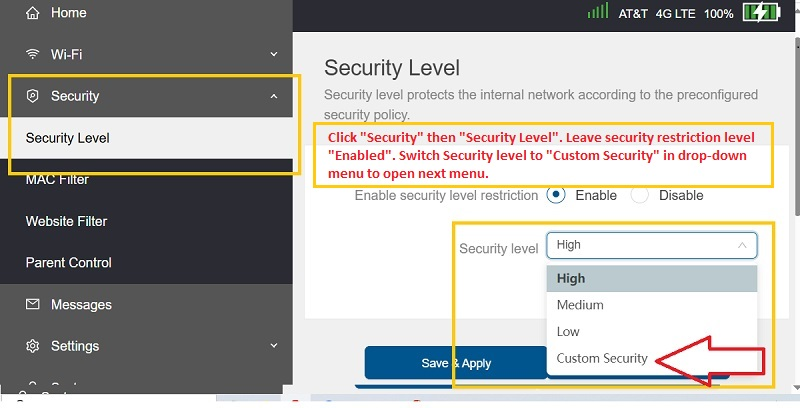
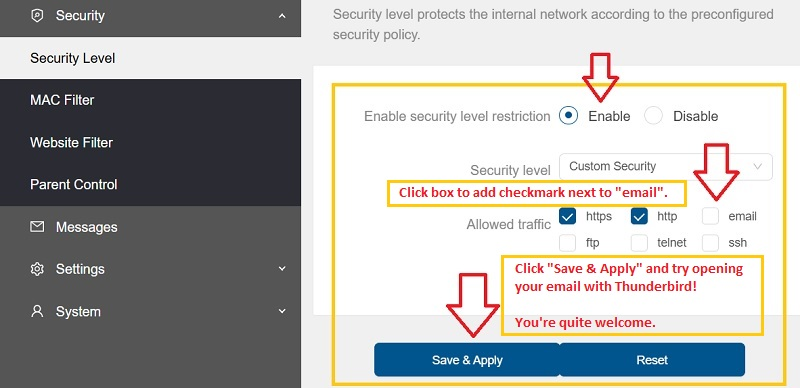
Here's a couple of screen shots showing the details.
https://assets-prod.sumo.prod.webservices.mozgcp.net/media/uploads/images/2025-06-01-12-47-59-539f49.png Click "Security" then "Security Level". Leave security restriction level "Enabled". Switch Security level to "Custom Security" in drop-down menu to open next menu.
https://assets-prod.sumo.prod.webservices.mozgcp.net/media/uploads/images/2025-06-01-12-48-16-10b5cb.png Click the box to add a check mark next to "email". Click "Save & Apply" and try opening your email with Thunderbird!
I don't know if these settings are particular only to AT&T products or if they are also found on portable hotspots, routers, modems, gateways, etc. from other ISPs. But why would AT&T not allow emails by default on this Turbo 3 hotspot? Like someone using it wouldn't want to access their emails with a third-party app?
Anyways this seems to have fixed the problem. And I think I got 'er whupped if she don't jump! Thanks again.