


don't work shortcuts for inspect element

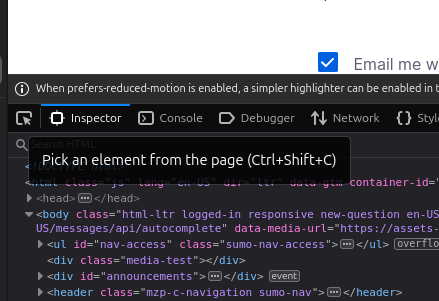
I use the Zen browser and I can't use ctrl+shift+c to view the element, I deleted the shortcut specified in the settings for copying the page URL so that the inspector would work, but it doesn't work, although the correct shortcut is indicated when hovering, but it doesn't work
I use the Zen browser and I can't use ctrl+shift+c to view the element, I deleted the shortcut specified in the settings for copying the page URL so that the inspector would work, but it doesn't work, although the correct shortcut is indicated when hovering, but it doesn't work
Chosen solution
For other users, Zen uses Ctrl+Shift+L instead of the usual Ctrl+Shift+C, despite the binding indicated on the inspector icon.
Read this answer in context 👍 0All Replies (2)
This is Mozilla support forum, please ask Zen Support about it.
Chosen Solution
For other users, Zen uses Ctrl+Shift+L instead of the usual Ctrl+Shift+C, despite the binding indicated on the inspector icon.