


Windows 10 reached EOS (end of support) on October 14, 2025. If you are on Windows 10, see this article.

Search Support

Avoid support scams. We will never ask you to call or text a phone number or share personal information. Please report suspicious activity using the “Report Abuse” option.

Learn More

POP account 'delete after [xx] days' function does not work

  • 1 reply
  • 1 has this problem
  • 16 views
  • Last reply by tgabor72
  • Archived

Hi,

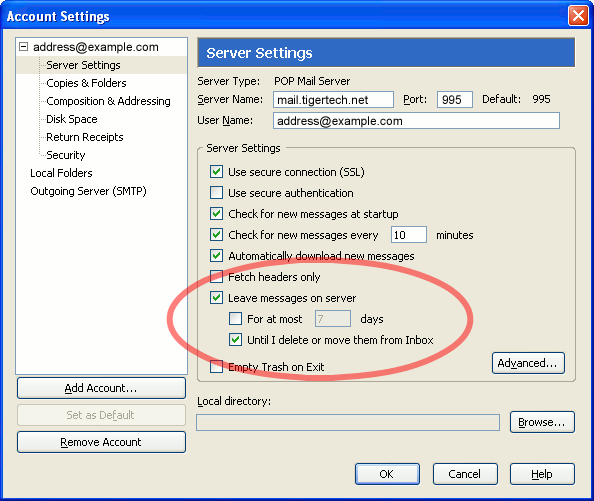
Setting the option 'Leave messages on server - For at most [xx] days' does NOT delete the messages from the server older than xx days. I want to remove them ONLY from the server, but keep them in my inbox. It was working like a charm sometime (I used POP mail accounts a long time ago this way), but does not work as expected now.

Please note, that -- the setting at 'Disk space', which removes old messages BOTH from the server AND from my Inbox is NOT what I want, -- I do not want to use IMAP on purpose, -- I do not want to move the messages from Inbox to anywhere else, -- I tested the behaviour with a Gmail account, and another private email account as well, without success.

Remarks: -- the screenshot is only illustration, -- tested on Windows 10 Pro Hungarian (but not tested on other language releases), -- tested on Thunderbird 60.9.0 and 68.2.2.

To be exact, the setting 'Leave messages on server - For at most [xx] days' does not have any effect at all, even if clear the checkbox at 'For at most [xx] days'. It's obviously a POP communication bug, even if nobody noticed due to the widespread use of IMAP protocol.

Maybe mail providers block the 'DELE' POP commands nowadays? I am totally clueless.

Any help or official bug report would be truly appreciated. If you have any questions, or tips, do not hesitate to write -- I am working in IT operations for decades, and ready to test any scenario in virtual environments.

Thank you, Gabor
Hi, Setting the option 'Leave messages on server - For at most [xx] days' does NOT delete the messages from the server older than xx days. I want to remove them ONLY from the server, but keep them in my inbox. It was working like a charm sometime (I used POP mail accounts a long time ago this way), but does not work as expected now. Please note, that -- the setting at 'Disk space', which removes old messages BOTH from the server AND from my Inbox is NOT what I want, -- I do not want to use IMAP on purpose, -- I do not want to move the messages from Inbox to anywhere else, -- I tested the behaviour with a Gmail account, and another private email account as well, without success. Remarks: -- the screenshot is only illustration, -- tested on Windows 10 Pro Hungarian (but not tested on other language releases), -- tested on Thunderbird 60.9.0 and 68.2.2. To be exact, the setting 'Leave messages on server - For at most [xx] days' does not have any effect at all, even if clear the checkbox at 'For at most [xx] days'. It's obviously a POP communication bug, even if nobody noticed due to the widespread use of IMAP protocol. Maybe mail providers block the 'DELE' POP commands nowadays? I am totally clueless. Any help or official bug report would be truly appreciated. If you have any questions, or tips, do not hesitate to write -- I am working in IT operations for decades, and ready to test any scenario in virtual environments. Thank you, Gabor
Attached screenshots

Modified by tgabor72

All Replies (1)

Is somebody here reading this????