


firefox quit working and i cannot even get it to open the profile page for creating an alternate profile and begin migrating to a new profile, what now?

I cannot get firefox to respond - even to open. I tried the support suggestion of creating a new profile but the instructions are not working either so I cannot create a new profile and test the system. I do not want to lose my saved info through a re-install if I'm not even sure it will work - if the data is corrupted. whatever that means.
At a stand still...
BTW - since I have to use IE to even access this info I cannot find the troubleshooting info needed below. This is getting ridiculously more complicated than I ever wanted it to.
الحل المُختار
Certain Firefox problems can be solved by performing a Clean reinstall. This means you remove Firefox program files and then reinstall Firefox and will not lose bookmarks and history. Please follow these steps:
- Download the latest Desktop version of Firefox from http://www.mozilla.org and save the setup file to your computer.
- After the download finishes, close all Firefox windows (click Exit from the Firefox or File menu).
- Delete the Firefox installation folder, which is located in one of these locations, by default:
- Windows:
- C:\Program Files\Mozilla Firefox
- C:\Program Files (x86)\Mozilla Firefox
- Mac: Delete Firefox from the Applications folder.
- Linux: If you installed Firefox with the distro-based package manager, you should use the same way to uninstall it - see Install Firefox on Linux. If you downloaded and installed the binary package from the Firefox download page, simply remove the folder firefox in your home directory.
- Windows:
- Now, go ahead and reinstall Firefox:
- Double-click the downloaded installation file and go through the steps of the installation wizard.
- Once the wizard is finished, choose to directly open Firefox after clicking the Finish button.
Please report back to see if this helped you!
Read this answer in context 👍 1All Replies (9)
الحل المُختار
Certain Firefox problems can be solved by performing a Clean reinstall. This means you remove Firefox program files and then reinstall Firefox and will not lose bookmarks and history. Please follow these steps:
- Download the latest Desktop version of Firefox from http://www.mozilla.org and save the setup file to your computer.
- After the download finishes, close all Firefox windows (click Exit from the Firefox or File menu).
- Delete the Firefox installation folder, which is located in one of these locations, by default:
- Windows:
- C:\Program Files\Mozilla Firefox
- C:\Program Files (x86)\Mozilla Firefox
- Mac: Delete Firefox from the Applications folder.
- Linux: If you installed Firefox with the distro-based package manager, you should use the same way to uninstall it - see Install Firefox on Linux. If you downloaded and installed the binary package from the Firefox download page, simply remove the folder firefox in your home directory.
- Windows:
- Now, go ahead and reinstall Firefox:
- Double-click the downloaded installation file and go through the steps of the installation wizard.
- Once the wizard is finished, choose to directly open Firefox after clicking the Finish button.
Please report back to see if this helped you!
I am having almost the same problem: Firefox froze so I tried to quit and restart but it won't quit. The "force quit" option on my Mac seems to have disappeared. Tried restarting my computer. No good. Firefox won't open and won't quit.
The solution posted doesn't work because I cannot delete Firefox from my Applications folder "because it's open". http://cl.ly/image/1L0D0m2Y3M1i
Any other suggestions?
Oh yeah, I also tried replacing my current version with a new version I just downloaded but it won't allow me to do that either.
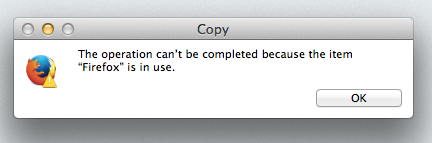
The solution posted doesn't work because I cannot delete Firefox from my Applications folder "because it's open".
Reboot the system.
I did that already, refer my first post that says, "Tried restarting my computer. No good."

carleecomm,
You posted in a "solved" thread started by A Windows user. You wrote that you are,
...having almost the same problem: Firefox froze so I tried to quit and restart but it won't quit. The "force quit" option on my Mac seems to have disappeared. Tried restarting my computer. No good. Firefox won't open and won't quit.
I found a similar question from a Mac user on MozillaZine's forum, in case it helps:
- http://forums.mozillazine.org/viewtopic.php?f=38&t=2709905 FIREFOX FROZEN IN OPEN POSITION
If not:
Since the chosen solution in this thread (a clean reinstall of Firefox) did not work for you, I think it would be better to ask a new question: https://support.mozilla.org/questions/new
That way, there will be more of a chance that another Mac user will read your question and offer to help.
Just back to say a special thank you to you AliceWyman!
I read the other forum case you linked to last night but couldn't try it until I got back to work today. Played out for me EXACTLY as it did for that person, with Force Quit not being available until I closed every other single application.
Oh what a relief! Thanks so much, you've made my day :)
Hey, that's great and you're welcome! Glad it worked out :-)
Tried Chosen solution to this problem but it didn't work. First please confirm that I did the step "Delete the Firefox installation folder" properly. C:\Program Files\Mozilla Firefox did not have a folder called installation Did you mean delete everything in the Mozilla Firefox folder? I deleted only firefox.exe