


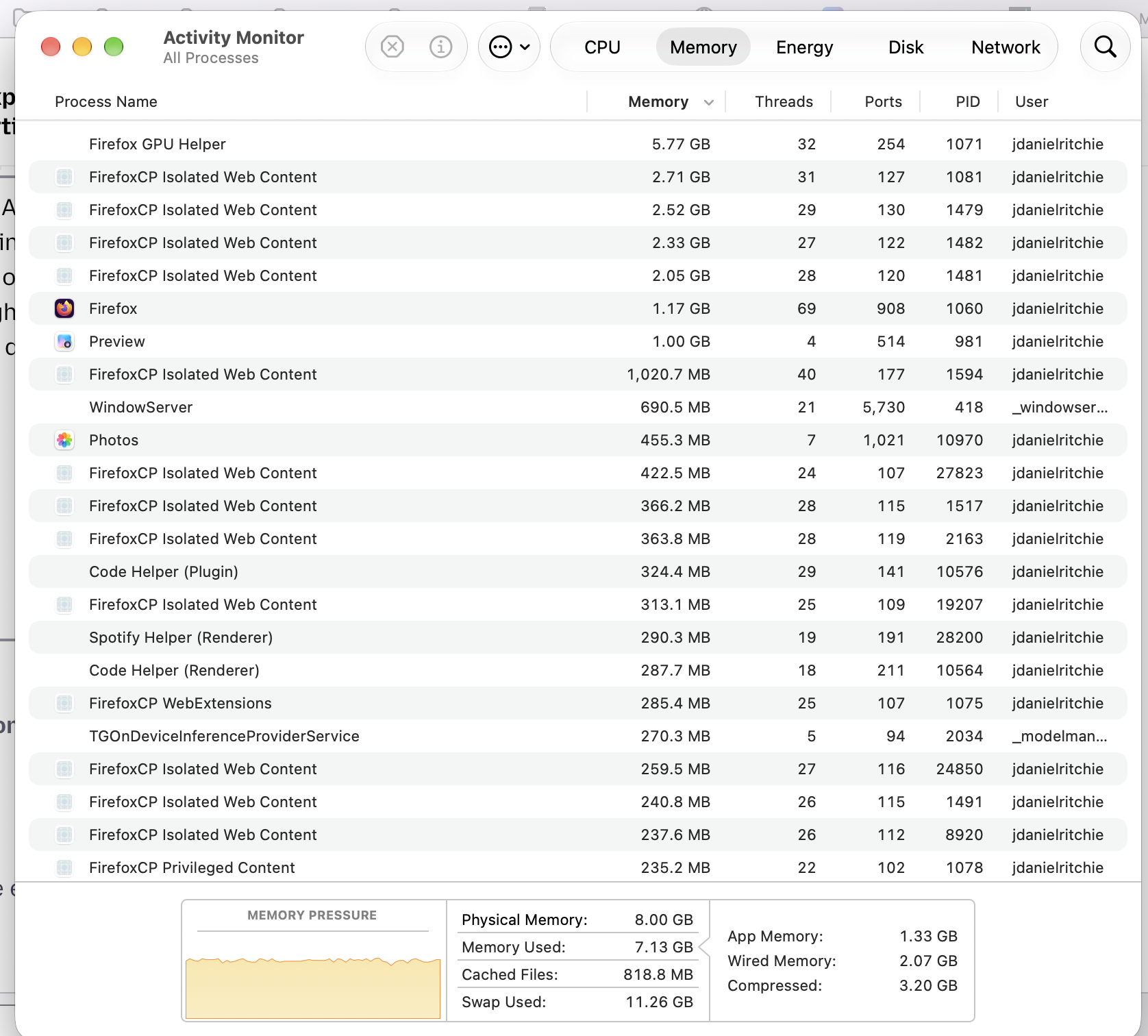
If my Macbook Air Activity Monitor shows that Firefox GPU Helper is using most of the memory, could that be what is slowing my Mac down?

Hi. My Macbook Air (M1, 2020) has been performing slowly in recent days. I'm not playing video games or watching videos, just mostly working on many tabs in Firefox (157.0.1). I looked in my Mac's Activity Monitor, which shows that Firefox GPU Helper is using about 5.75 GB of memory. The next few highest users say "Firefox Isolated Web Content." Could any of these be what is slowing my Mac down? I'll attach a screenshot of my Activity Monitor. I also clicked "Share Data" below. I would say that my Macbook is working at a fine speed at the moment, so perhaps the screenshot and data are not so helpful. Let me know if I can add something later in a reply, when my Mac is moving slowly, that would be helpful. Thanks.
All Replies (1)
Hello,
First, in Firefox, go to about:memory, and see what's taking all the most memory. If not, click "minimize memory usage" to force a cleanup cycle.
Next, you can try ending the "Firefox GPU helper" process in activity monitor. You are not required to end the browser, just that singular task.
Lastly, go to menu>settings>general, then scroll down to performance, then uncheck "Use recommended performance settings" and restart the browser and try again.