


Windows 10 reached EOS (end of support) on October 14, 2025. If you are on Windows 10, see this article.

ابحث في الدعم

Avoid support scams. We will never ask you to call or text a phone number or share personal information. Please report suspicious activity using the “Report Abuse” option.

Learn More
Open

Unable to save screen capture as PDF using fireshot

tmnnpyrm59

I use Fireshot on my Mac to take screenshots and normally save as PDF. This works fine using Safari and Chrome browsers. However, using Firefox, when saving the screenshot as a PFD it uses file type 'All files' Up till now, I have been unable to open the file saved as an 'All files' document. But this morning, saving the capture as a PDF 'All files' type, has saved the document as a PDF.

QUESTION: Just using Firefox, why does saving a screen capture uses 'All files' when saving as a PDF. And has the issue been noted and resolved, but the All files file type still shown? NOTE: The drop-down arrow on Format does not offer any alternative.
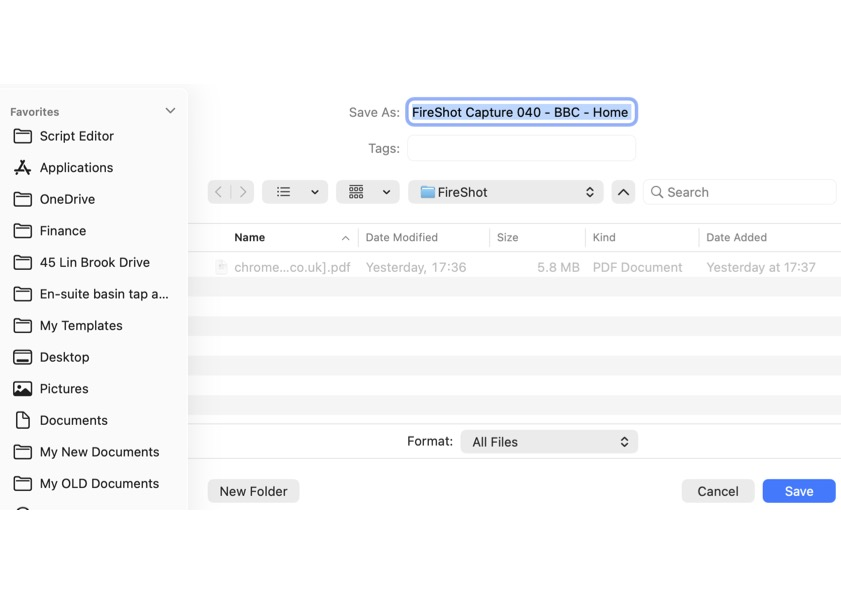
I use Fireshot on my Mac to take screenshots and normally save as PDF. This works fine using Safari and Chrome browsers. However, using Firefox, when saving the screenshot as a PFD it uses file type 'All files' Up till now, I have been unable to open the file saved as an 'All files' document. But this morning, saving the capture as a PDF 'All files' type, has saved the document as a PDF. QUESTION: Just using Firefox, why does saving a screen capture uses 'All files' when saving as a PDF. And has the issue been noted and resolved, but the All files file type still shown? NOTE: The drop-down arrow on Format does not offer any alternative.
Attached screenshots

All Replies (1)

All files is because your screenshot doesn't have a definitive type I imagine. See if you can set the screenshot to another option

اطرح سؤالا

You must log in to your account to reply to posts. Please start a new question, if you do not have an account yet.