


I have paid a so called donation and it will not let me past the donation page

Needed to ire install thunderbird email and could not get past the "donation" page Paid a "donation" and still cannot get past the donation page The release channel button did nothing Am thinking the donation is a scam How Can I use thunderbird for emails Margaret
All Replies (7)
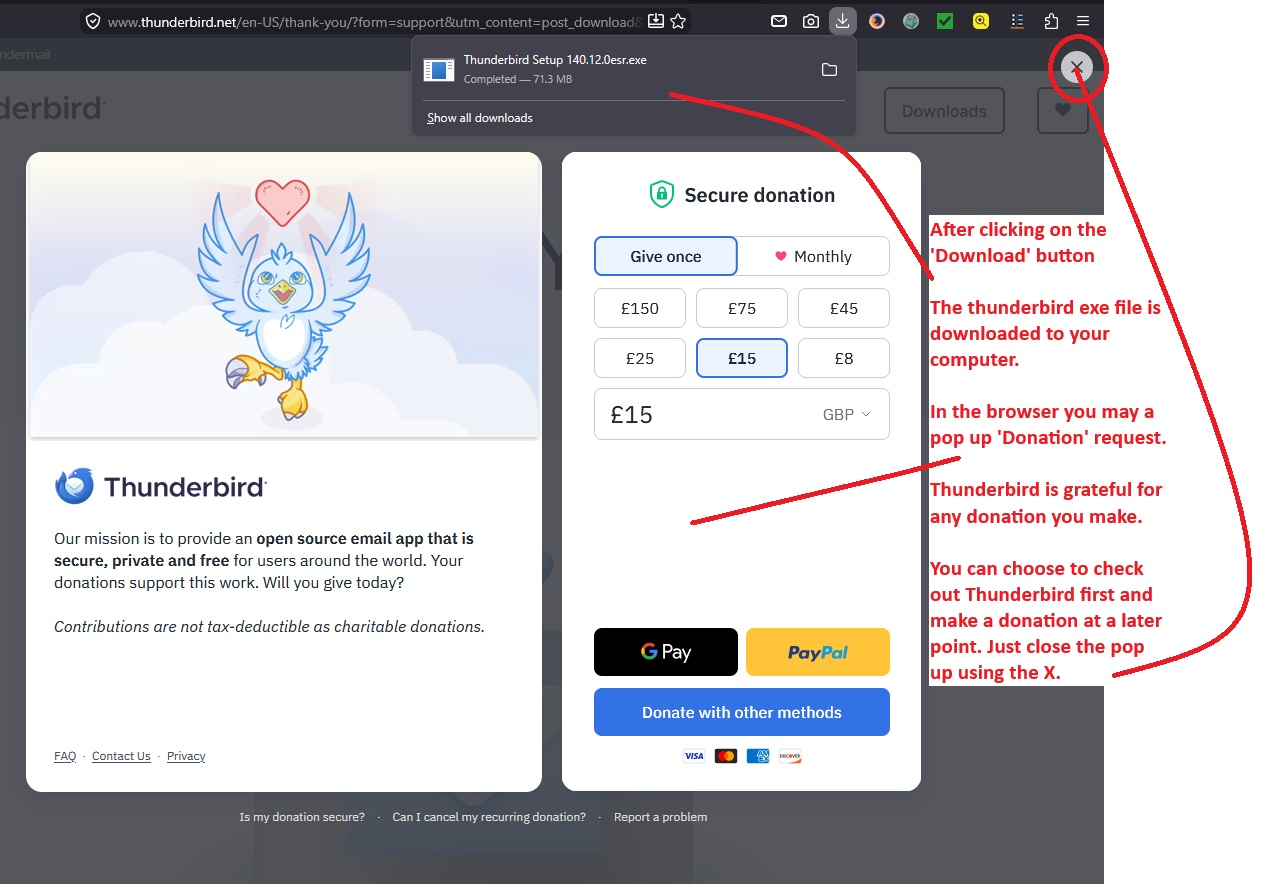
It's not a scam - assuming you used the link below - I think you may not understanding that clicking on the 'Download' button does two things: 1. It downloads a thunderbird exe file to your computer so you can install the program 2. A click on 'Download' button prompts a donation pop up.
So to install Thunderbird - you first need to get the download by using this link: https://www.thunderbird.net/en-US/thunderbird/all/
You select correct language OS etc Click on 'Download' button Then the download to computer occurs.
Note: When ever someone clicks on the 'Download' button, the file is downloaded to computer and then in browser you see the Donation pop up request. Thunderbird will be grateful for any donation you make because it helps to maintain this support page as well as keeping the program up to date. If you have made a donation, thank you. Please note: the website with the 'Download' button has no knowledge of whether you have made a donation or not. It simply responds - if you click on 'Download' - the donation pop up appears.
But it sounds like you keep pressing on the 'Download' button - why ? The Donation pop up - close the pop up by clicking on the X - SEE image below as guide.
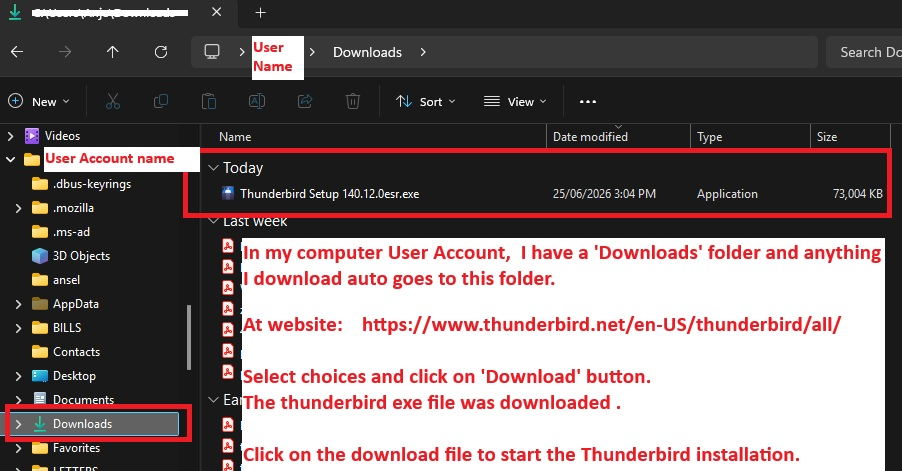
When you clicked on the 'Download' button.... The program exe file is downloaded to your computer. I use a Windows 11 OS and all files I download auto go to the 'Downloads' folder in my user account.
Look in the computer user account 'Downloads' folder for a thunderbird.exe file and then click on it to start the installation.
Modified by Toad-Hall
I've just clicked on download to get a fresh download so I can show where it can be found on computer. I use Windows 11 OS In my user account - you logon to that when you start up computer to see desktop. I have several default folders provided by Microsoft Windows OS. Such as Documents, Photos and 'Downloads' in the Downloads folder is the thunderbird setup exe file I've just downloaded.
You just need to click on that downloaded file to start the installation :)
See image below Note - if you cannot see image very well - in this Support forum question - click on the thumbnail image and it gets much larger.
I do not have the cross on the donation page. I have downloaded the program but it still does not work
mbellnco said
I do not have the cross on the donation page.
Then you might want to ask your browser provider how to fix it.
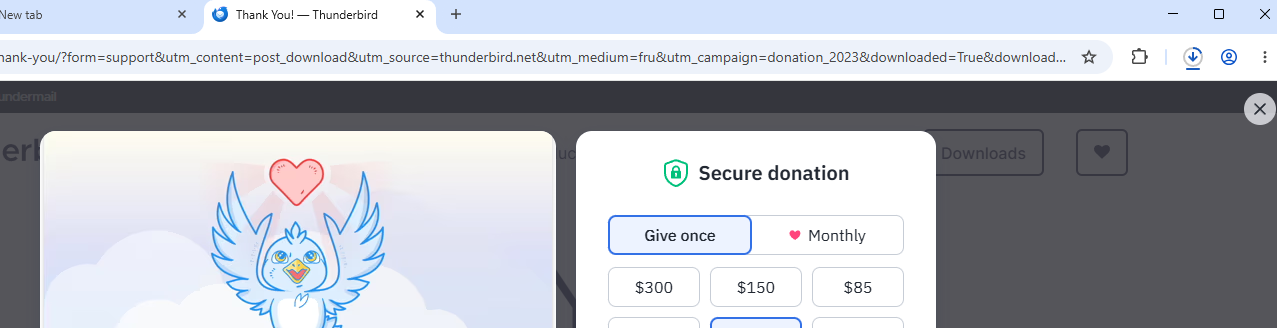
I see it in chrome version 149.
I have downloaded the program but it still does not work
Have you installed it? Following download you have to install the software you downloaded for it to work on your computer.
Generally I do not use Chrome. I find it has issues regarding privacy however ctrl+J opens the downloads history on Chrome. and clicking on the Thunderbird download will initiate the update/install just be sure to click allow what asked if you want the installer to make changes to your system.
This is what the download in my fresh chrome looked like

Now I am going to go out on a limb. Why do you need to reinstall? I have found over the years that many folk think reinstalling will fix issues. It rarely does more than complicate them so I figure I would ask the why before you go that far.
I was reinstalling because I could not get Thunderbird to work because I had the Welcome to Freedom window stuck across the right half of the screen and the only thing s not greyed out are write - which does not work chat - which I do not use and have not tried address book - which does open and quick filters. down the side calendar opens (I don't normally use this so have only just tried it) but is saying it is blocked
mbellnco said
I do not have the cross on the donation page. I have downloaded the program but it still does not work
After downloading the exe file Did you then click on it and follow the install instructions? If yes Start Thunderbird Please upload an image file (jpg) of Thunderbird so we can see what you see.
mbellnco said
I was reinstalling because I could not get Thunderbird to work because I had the Welcome to Freedom window stuck across the right half of the screen and the only thing s not greyed out are write - which does not work chat - which I do not use and have not tried address book - which does open and quick filters. down the side calendar opens (I don't normally use this so have only just tried it) but is saying it is blocked
I assume you mean this web page
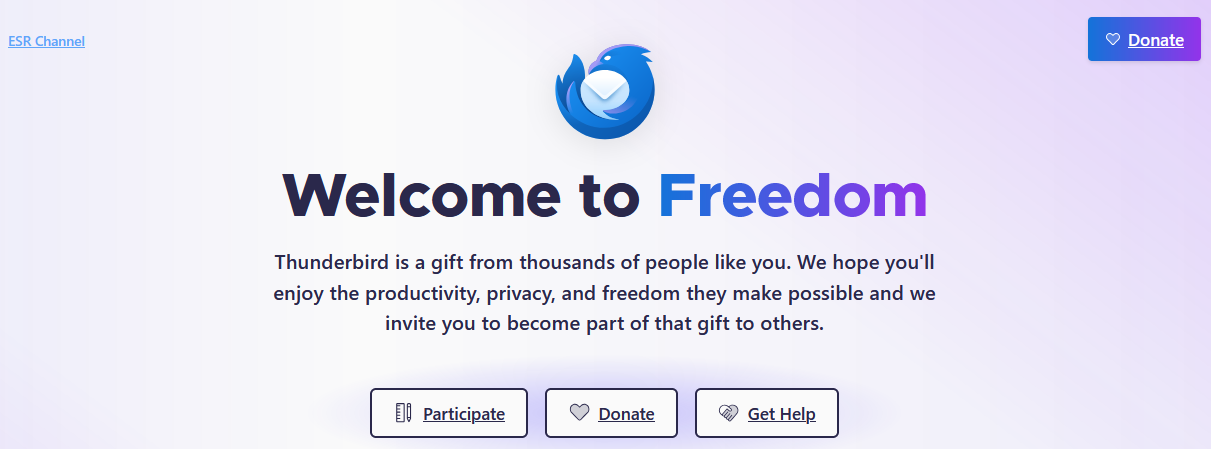
That is just a placeholder webpage used when Thunderbird loads to replace the display of an actual email message, Instead of leaving a large white blank space.
Only having some and mot everything in the folder pane indicates that the full load has not completed, but the issue is to establish why, but a reinstall is not the way to try and fix it. I hope you have not uninstalled Thunderbird yet.
Hold the shift key on your keyboard while Starting Thunderbird. That will force troubleshooting mode. Click to continue when prompted. Does Thunderbird load normally like that?
Give it 10 minutes if it does not, just to be sure. Some server connections take five minutes each to time out, so connection problems can be slow to bubble up to where they can be seen and impatience is something we all suffer from. So go have a coffee (or a hot chocolate) and let it do it;s worst for a while.