


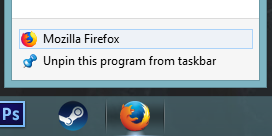
Firefox Quantum icon on taskbar looks like its old version

I have tried to unpin the icon from taskbar and pin a new one from Program Files folder but nothing has changed. And when I open Firefox, it looks ok.
My OS is Windows 8.1
الحل المُختار
Mkll said
Restart explorer.exe perhaps.
The problem was solved by clearing Windows cashe.
To do it on Windows 8.1 go to Start and Search "Free up disk space by deleting unnecessary files". Check all boxes and click OK.
All Replies (4)
Hi, right click on the shortcut or pinned program, and then click the Change Icon button -- and change it yourself.
Mkll said
Hi, right click on the shortcut or pinned program, and then click the Change Icon button -- and change it yourself.
Hi, thank you for answer but I can't change pinned shortcut, only an icon what appears after launching browser.
Restart explorer.exe perhaps.
Modified by Mkll
الحل المُختار
Mkll said
Restart explorer.exe perhaps.
The problem was solved by clearing Windows cashe.
To do it on Windows 8.1 go to Start and Search "Free up disk space by deleting unnecessary files". Check all boxes and click OK.