


missing local foolders
I have been deleting some old mails , but then suddenly all my local folders has disapeared
Gekose oplossing
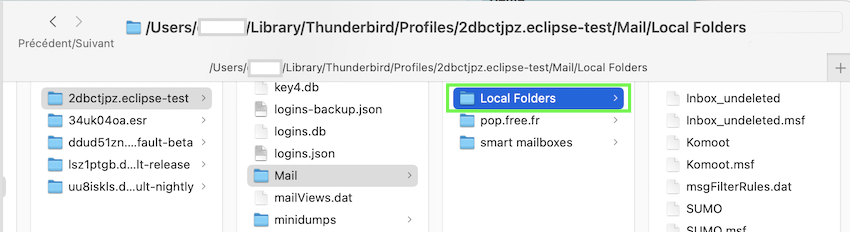
Unfortunately I don't know what your backup contains. If you have made a backup of your profile folder, open it, go to Mail > Local Folders and make a copy of the entire folder "Local Folders" which I show in my new image (note that the path to the profil folder is from a Mac) In Thunderbird go to Help > Troubleshooting Information > Profile Folder > Open folder, then quit Thunderbird. Open the folder Mail, delete the folder Local Folders and paste the Local Folders copy in Mail. Then restart and verify if your old local folders are back.
If you don't find the profile folder in you backup you should show a screen shot of your backup.
All Replies (9)
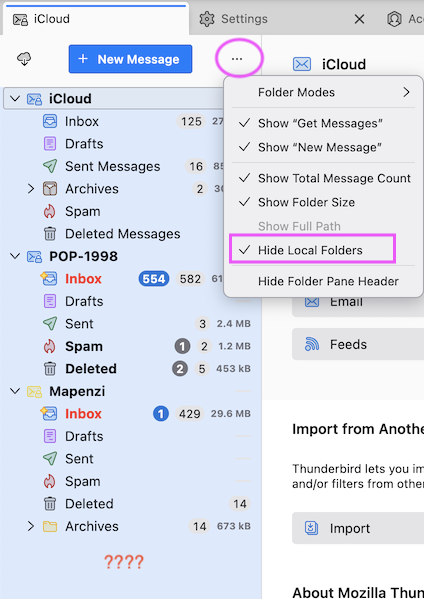
Does this mean that the entire <special account> Local Folders has disappeared from the folder pane? If this is the case click on the three points ••• of the folder pane options button and uncheck "Hide Local Folders". If Local Folders is still present in the folder pane which folders does it contain? Outbox and Trash and nothing else?
I have 2 account olessamsung@gmail.com: it is ok with local folders abuole@hotmailcom: there is the problem, all local folders gone, and hide is not checked regards Ole
Please don't post your email addresses. They are not necessary to understand and solve your problem. What we commonly call "Local Folders" is "a special account which is not associated to any identity". The Local Folders are displayed by default in the folder pane.
But now I presume that you have IMAP accounts and you are missing folders like Drafts, Sent, Spam, ... in these accounts. If I am right you are seeing bug https://bugzilla.mozilla.org/show_bug.cgi?id=2087454 This bug will be fixed in the update to Thunderbird 160 coming soon. In the meantime you may use a workaround described in comment #22 of the bug report
hi these local folders are there. It is folders I have created for my self to organiz´ce my mails,
ole
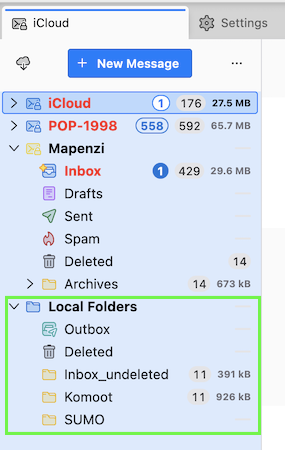
OK, so you definitively mean the "Local Folders" as the are shown in my new screen shot (see image) Do you still see the default folders "Outbox" and "Deleted" (Trash) ? Since I didn't observe you when you deleted "some old mails" I cannot imagine what happened exactly the moment your local folders disappeared.
Now we need to explore the "Local Folders" folder in your Thunderbird profile to verify if there are any message files left. In Thunderbird menu go to Help > Troubleshooting Information > Profile Folder > Open folder, then quit Thunderbird. Now the profile folder is opened in your Windows Explorer: go to folder "Mail" > Local Folders and make a screen shot of its contents. Also look for files which have the name of your missing local folders.
HI Sorry but I can't include a screnshot But there is nothing buta few files in the local folder:
msgFilterRules.dat 0 byte
OlesTest type File 0 byte OlesTest.msf type Msf-file 154 Kb Trash type file 0 Trash.Msf type Msf-file 1,57 Kb Unsent Messages type file 0 byte Unsent Messages type Msf-file 1,30 KB
all of them date 01-11-2026 between 16:01 and 16:43
And I can't find any of my folders in the whole mail tree
regards Ole
Your Local Folders seem to be entirely new, besides the folder OlesTest. Do you have a backup copy of your Thunderbird profile folder? If not, it will be extremely difficult to retrieve your missing local folders. I have no explanation how one could delete all local folders whilst deleting "some old mails".... I'll send you a personal message.
Hi I have an old balup I can restore Thank you for your support
what is the name of file I shall restore
Regards ole
Gekose oplossing
Unfortunately I don't know what your backup contains. If you have made a backup of your profile folder, open it, go to Mail > Local Folders and make a copy of the entire folder "Local Folders" which I show in my new image (note that the path to the profil folder is from a Mac) In Thunderbird go to Help > Troubleshooting Information > Profile Folder > Open folder, then quit Thunderbird. Open the folder Mail, delete the folder Local Folders and paste the Local Folders copy in Mail. Then restart and verify if your old local folders are back.
If you don't find the profile folder in you backup you should show a screen shot of your backup.