


Windows 10 reached EOS (end of support) on October 14, 2025. If you are on Windows 10, see this article.

Search Support

Avoid support scams. We will never ask you to call or text a phone number or share personal information. Please report suspicious activity using the “Report Abuse” option.

Learn More
Solved

search engine keeps telling me their systems have detected unusual traffic from my computer network.

roselynhansen

This is my first time to Mozilla Support with a question.

Firefox is my default browser using version 155.0.1. I use Strict ETP. [FYI - my skills are basic with IT]. I also use Firefox Focus on my iPhone.

I previously used Google Chrome but I must have removed it as it's no longer appearing in my desktop Apps.

As of a couple of days ago, I tidied up my Library/cache and deleted it to 'Trash', using Apple support community help instructions for housekeeping. (Because I was getting increased frequency in the spinning ball at start-up). I didn't delete any other folders - just Library/cache in my housekeeping.

Since then, when searching Google / Firefox, Google keeps asking if I'm a robot (asking me to tick a 'reCaptcha' box) as it's detecting unusual traffic on my computer - before it continues with my search via Firefox browser.

This doesn't happen when using other search engines, (eg: Bing or Duck Duck Go).

Using Google searches on Safari browser does not ask me if I'm a robot question ? Searches go through perfectly - no questions asked. Only when I use Google search engine with desktop Firefox. Is it my privacy settings?

I prefer Firefox as my browser because it's independent and open sourced, safe and for its sense of community.

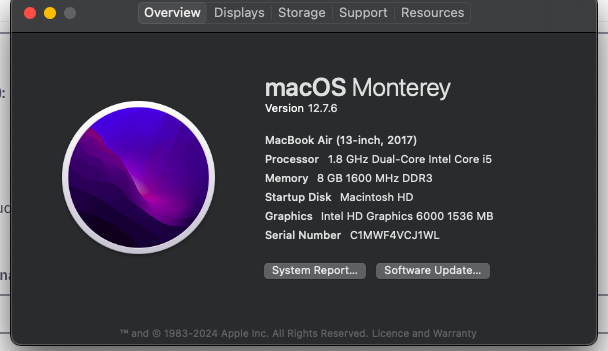
My desktop MacBook Air (2017) is 9 y/o - vintage? So, no longer receiving software updates - but hoping to upgrade with a new Mac desktop soon. (see attached image of current MacBook Air operating system Monterey version 12.7.6).

My question is:

- Why is Google only in the last two days asking me at every search, the above question about 'unusual traffic' / tick the robot box ? And,

- Should I reinstall 'Google Chrome' via the Apple Store?

Or for better security, think of getting a new computer sooner, rather than later ? :(

Many thanks for your support, and time. [No hurry!]

thank you in advance, regards, kindly Rose Roselyn Hansen (Australia)
This is my first time to Mozilla Support with a question. Firefox is my default browser using version 155.0.1. I use Strict ETP. [FYI - my skills are basic with IT]. I also use Firefox Focus on my iPhone. I previously used Google Chrome but I must have removed it as it's no longer appearing in my desktop Apps. As of a couple of days ago, I tidied up my Library/cache and deleted it to 'Trash', using Apple support community help instructions for housekeeping. (Because I was getting increased frequency in the spinning ball at start-up). I didn't delete any other folders - just Library/cache in my housekeeping. Since then, when searching Google / Firefox, Google keeps asking if I'm a robot (asking me to tick a 'reCaptcha' box) as it's detecting unusual traffic on my computer - before it continues with my search via Firefox browser. This doesn't happen when using other search engines, (eg: Bing or Duck Duck Go). Using Google searches on Safari browser does not ask me if I'm a robot question ? Searches go through perfectly - no questions asked. Only when I use Google search engine with desktop Firefox. Is it my privacy settings? I prefer Firefox as my browser because it's independent and open sourced, safe and for its sense of community. My desktop MacBook Air (2017) is 9 y/o - vintage? So, no longer receiving software updates - but hoping to upgrade with a new Mac desktop soon. (see attached image of current MacBook Air operating system Monterey version 12.7.6). My question is: - Why is Google only in the last two days asking me at every search, the above question about 'unusual traffic' / tick the robot box ? And, - Should I reinstall 'Google Chrome' via the Apple Store? Or for better security, think of getting a new computer sooner, rather than later ? :( Many thanks for your support, and time. [No hurry!] thank you in advance, regards, kindly Rose Roselyn Hansen (Australia)
Aangehegde skermkiekies

All Replies (2)

Gekose oplossing

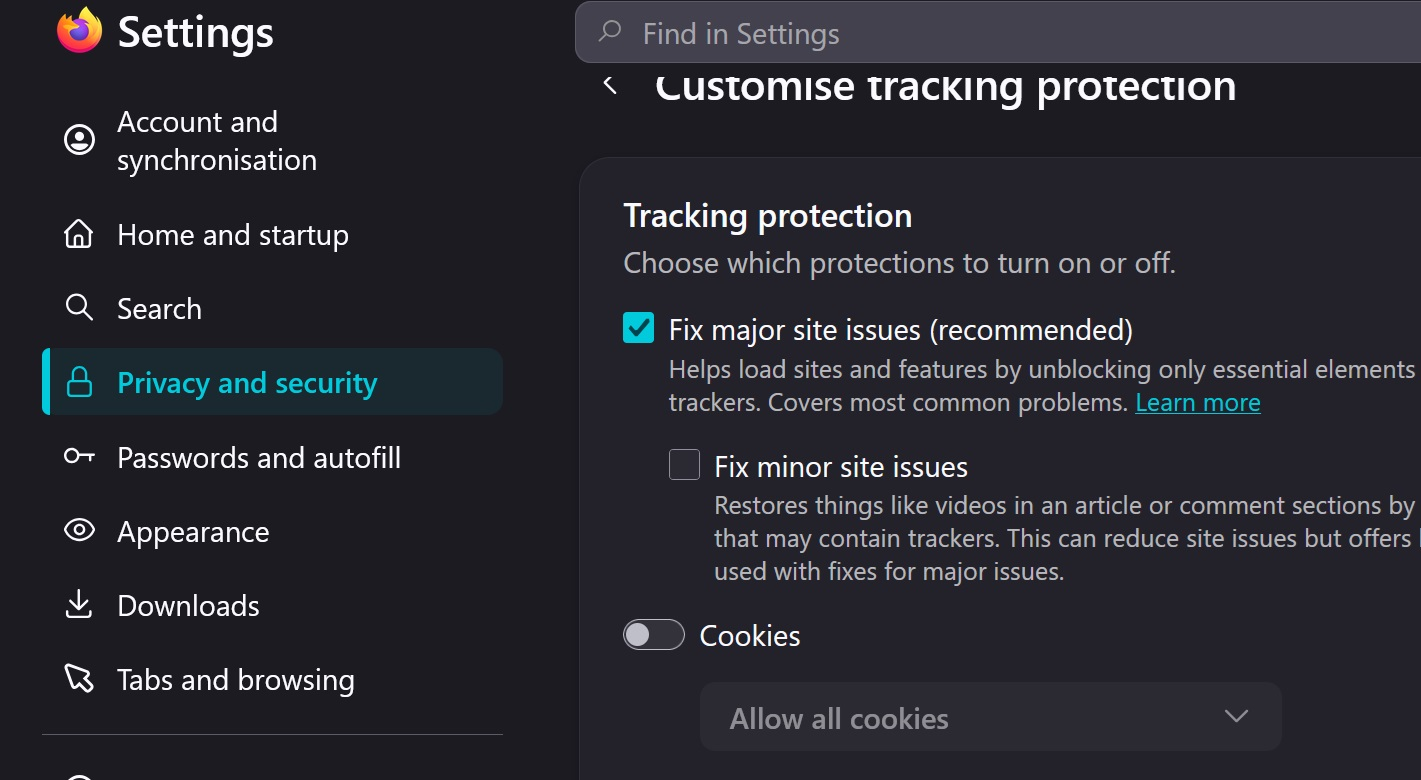
The default cookies is to block cross-site/third-party cookies. Try setting that to [Allow all cookies] whilst you navigate Google's issues, if that works then set it back to your current setup
Thank you! Issue resolved.

Vra 'n vraag

You must log in to your account to reply to posts. Please start a new question, if you do not have an account yet.