


frequent crashes. on Linux
Hello all, thank you in advance for your time. I've got a Lenovo running Linux (Zorin, an Ubuntu branch)
Crashes have been more and more frequent over the last couple weeks. Usually it closes only Firefox, sometimes it throws me back to the login screen, and rarely the computer crashes entirely. I've been trying to pin down the source of the crashes -- it hasn't only been Firefox, but most of the crashes are while FF is open.
THIS tab keeps crashing, as I type.
It seems to happen more often when I'm watching video.
Here are all the crash IDs within the last 24 hours: bp-dfb0bd40-4ce6-41bd-b9cb-ad0510260913 13/09/2026, 11:15 View bp-50a8400a-3439-4af4-b5c7-6e60f0260913 13/09/2026, 11:15 View bp-0893e979-6a06-40cc-ad0b-757210260913 13/09/2026, 11:15 View bp-8a1bbc36-9c1d-412c-a2cf-c4c040260913 13/09/2026, 11:15 View bp-4c97e699-dee7-470f-9f82-855760260913 13/09/2026, 11:15 View bp-4526b2af-908a-45be-89ae-293ef0260913 13/09/2026, 11:08 View bp-60af27d7-aeef-4761-b86e-7595a0260913 13/09/2026, 11:08 View bp-25b42dd1-3f54-4be4-bde7-801f60260913 13/09/2026, 11:08 View bp-e92ad4f9-b7d3-453e-8c5a-066910260913 13/09/2026, 11:08 View bp-d19f0c4c-9eb7-45d1-a7e7-978d90260913 13/09/2026, 11:08 View bp-b212719f-1daa-459c-8491-2c6cb0260913 13/09/2026, 11:08 View bp-9effc3ad-0b73-43d2-839c-805a00260913 13/09/2026, 11:08 View bp-7e5b6de1-7a84-48ad-86c0-e07510260913 13/09/2026, 11:08 View bp-271c4c4f-9f81-480a-9815-5f5bf0260913 13/09/2026, 11:08 View bp-956cef3e-25a1-4a8c-b7e1-668be0260913 13/09/2026, 11:08 View bp-92a596e6-edc8-4920-9365-6e3e00260913 13/09/2026, 11:08 View bp-6e309137-bf0a-4ee1-8ddf-492b20260913 13/09/2026, 11:08 View bp-d3eadcae-1967-4c31-856f-284f80260913 13/09/2026, 11:08 View bp-e319008d-d7e3-4354-95db-846e10260913 13/09/2026, 11:08 View bp-ce80cf98-4aad-46ee-a2a2-40ccf0260913 13/09/2026, 11:08 View bp-41734b4e-09d0-4dfe-ab7a-c74400260913 13/09/2026, 11:08 View bp-37752c09-a2ae-4f35-8ee6-62ee60260913 13/09/2026, 11:08 View bp-01aed5a5-d3da-4551-9646-eb73d0260913 13/09/2026, 11:08 View bp-0d52d173-f46d-4d5c-b723-441930260913 13/09/2026, 11:08 View bp-5a9507dd-21f3-4be3-8d68-ad70f0260913 13/09/2026, 11:08 View bp-0a5b5b7c-6400-41f7-ba67-c881b0260913 13/09/2026, 11:08 View bp-2ff2f687-e231-4ac5-925a-fde060260913 13/09/2026, 11:08 View bp-1c9a1836-3ebe-40bd-ac76-182850260913 13/09/2026, 11:08 View bp-f4bbc332-be5c-48f7-8e6e-c008a0260913 13/09/2026, 11:08 View bp-807e438c-9bb1-4056-b67b-48e870260913 13/09/2026, 11:08 View bp-b422a84c-4096-4ab8-926c-d63030260913 13/09/2026, 11:08 View bp-9740f00f-a1ac-4fce-96b3-704940260913 13/09/2026, 11:08 View bp-0a571a75-602f-4802-98df-22ee30260913 13/09/2026, 11:08 View bp-5f7a41ac-f92a-42b3-96bc-6dda70260913 13/09/2026, 11:08 View bp-d81a88f6-3da4-4e15-8669-352390260913 13/09/2026, 11:08 View bp-324a6102-496b-4724-9deb-3532f0260913 13/09/2026, 11:08 View bp-40969791-0669-4158-abd6-b57230260913 13/09/2026, 11:08 View bp-7b5c8e37-6cfe-4027-9bd1-fc0d80260913 13/09/2026, 11:08 View bp-62dbac62-1feb-47a6-be53-bd8b10260913 13/09/2026, 11:08 View bp-9197029c-0719-4294-bc37-e7f320260913 13/09/2026, 11:08 View bp-941d7f54-5b2e-4783-83f2-66c330260913 13/09/2026, 11:08 View bp-00202476-8680-4295-8a76-a97db0260913 13/09/2026, 11:08 View bp-027dfa8e-f3e1-44e9-a405-1ae350260913 13/09/2026, 11:08 View bp-369f58c9-4456-4578-977e-49cfe0260913 13/09/2026, 11:08 View bp-78c25147-3a9c-4ad8-9210-eb0ca0260913 13/09/2026, 11:07 View bp-f1f4b2b3-0885-4259-8dd3-bfa700260913 13/09/2026, 11:07 View bp-72d20621-92ea-417a-b063-deba40260913 13/09/2026, 11:07 View bp-721a4c72-ab3c-4ea0-8428-72b6d0260913 13/09/2026, 11:07 View bp-ffb02689-cb96-48e2-ab89-1c7f10260913 13/09/2026, 11:07 View bp-407b7ac2-8d4c-404d-974a-96d790260912 13/09/2026, 0:37 View bp-9decd8ef-b380-4bfe-8264-6841b0260911 11/09/2026, 22:40 View bp-c9a8eae8-8723-48ba-aab0-48db10260908 08/09/2026, 22:57 View bp-e0ac525c-a6c7-4af5-abe8-0ab5e0260913 13/09/2026, 11:16 View bp-91be494d-2e41-42b7-9330-e49630260913
All Replies (9)
Hi, this looks really bad from the reports, it's basically crashing on random places. This is not caused by a single place hitting a limit somewhere, this just completely unstable, from the ground up.
If you restart into Troubleshoot Mode (from Help menu) to unload all addons, is there any change?
I'd recommend running a good hardware test, esp. with load tests of memory segments, to rule out any HW fault.
Is Zorin updated? "It seems to happen more often when I'm watching video" AMD driver https://help.zorin.com/docs/hardware/ CPU / GPU Temperature?
After I posted this, I don't fully remember what I did. There was one or two more crashes before I closed FF for the night. bp-91be494d-2e41-42b7-9330-e49630260913 13/09/2026, 11:16 bp-e0ac525c-a6c7-4af5-abe8-0ab5e0260913 13/09/2026, 11:16
I'd spent a lot of time beforehand mucking about in the logs and program files trying to pin down what made things crash. I'd managed to stop a startup program that I'd thought I'd deleted and was tripping lots of errors. I removed and re-downloaded Firefox twice. I think without system files the 2nd time? For a while I was checking graphics drivers and that was a dead end. Maybe-related, the Updater seems to be very confused that I removed Brave browser from my system (came with the distro). Anyway, I have no hope of exactly reproducing what happened. I do know how to pull up logs for the machine (separately from the crash logs on Firefox).
I went to sleep, and I woke up this morning and things were okay? I did have one freeze/crash mid-day but I didn't even have FF open so it's likely unrelated...? got these back: GLib-GObject: g_object_unref: assertion 'G_IS_OBJECT (object)' failed A start job for unit UNIT has finished with a failure. The job identifier is 472 and the job result is failed. bgscan simple: Failed to enable signal strength monitoring gkr-pam: unable to locate daemon control file GLib-GIO-CRITICAL: g_bus_get_sync: assertion 'error == NULL || *error == NULL' failed
Otherwise, I've been able to use FF normally today. It's... strange.
If you guys think the issue is my hardware, and not FF itself, then I guess I'll take my question to the next relevant place... checking hardware. But I don't actually know how to do that. I've been using Linux a year, I can use Terminal, but I'm not exactly a whiz and I'm not sure what software is safe to use to check the hardware status.
lol and I got a crash right now. smh bp-26431cfb-22ed-479e-adc3-3e3380260913 13/09/2026, 22:37
computer logs say, Privileged Cont: Exiting due to channel error. firefox-bin: ExceptionHandler::GenerateDump minidump generation WRRende~ckend#0 : ExceptionHandler::WaitForContinueSignal waiting for continue signal... ExceptionHandler::SendContinueSignalToChild sent continue signal to child
and etc
in short: is the problem IN firefox, or is FF crashing a symptom?
Gewysig op deur Astra
sorry for an additional response, but I'm trying to reproduce the crash while in Troubleshoot Mode, as was suggested. This page specifically triggered a whole lot of crashes, so that's why I'm here. I've got YouTube playing in another tab as well. I'm going to copy-paste some of the codes here, they're the same as earlier ones, but sometimes the crashes happened while I was typing or copy-pasting. Here goes. bp-077c1f29-e1d8-4bae-9c7c-46bcf0260913 13/09/2026, 22:41 View bp-26431cfb-22ed-479e-adc3-3e3380260913 13/09/2026, 22:37 View bp-d770d33a-ca67-45dc-855b-f82450260913 13/09/2026, 22:37 View bp-d5edea27-c8d9-47ad-b0d9-376910260913 13/09/2026, 22:37
and here's some copy-paste from the computer logs. libva info: Trying to open /usr/lib/x86_64-linux-gnu/dri/intel-vaapi-driver/radeonsi_drv_video.so JS ERROR: TypeError: this.actor is null _syncEnabled@resource:///org/gnome/shell/ui/windowManager.js:138:25 onStopped@resource:///org/gnome/shell/ui/windowManager.js:150:35 _makeEaseCallback/<@resource:///org/gnome/shell/ui/environment.js:150:22 _easeActorPrope
well, that didn't trigger anything either.
By the way, I did open Troubleshoot Mode at some points in yesterday's attempts to fix things, and it still crashed yesterday in TM. But today it isn't. beginning to think that yeah, it's not FF itself. probably.
My computer temperature has historically been really, really hot. But today, and yesterday, it was fine and cool. I had some issues with the fans because my two cats have been shedding like mad. Also my power cable noped out after about four years of continuous abuse, but I have a new one attached now. Really shoulda shopped around, I paid through the nose for a new charger since it's 300W.
Still no crashes, but that's absence data and not solid proof. Either way, I'll keep y'all updated. Maybe tomorrow I'll try to check the hardware status. I'd feel a little silly if it just turned out an ant crawled into the RAM and died there or something, lol.
Nope, that's perfectly fine. To put it into some perspective — no two crashes were the same, and each and every one makes you either unique on the whole planet, or, say one of three, four people/devices crashing in the same spot during the past 7 days — which usually means it's as random as it gets, and there's no reason why the crash occurred at that particular spot. Systemic issues aside (read: Raptor Lake material degradation), the reasons are usually faulty RAM modules, or OS–level things (GPU driver bug and the like).
Maybe the right question is… is that a recent change? Would it make sense to run something like mozregression and feed it a range of versions, and see if there's any difference in stability over time?
progress report: have been busy. yesterday I had three FF crashes (one crashed the computer too) and one startup failure. this morning I opened up the case to check for any obvious signs of failure/damage and it looks alright to my inexperienced eyes. I took the chance to clean out lingering dust and crumbs as well. next I will run a memory test when I have the chance.
if the mods want, since I've probably(?) ruled out FF as the *source* of the problem, the thread can be marked solved or closed or whatnot...
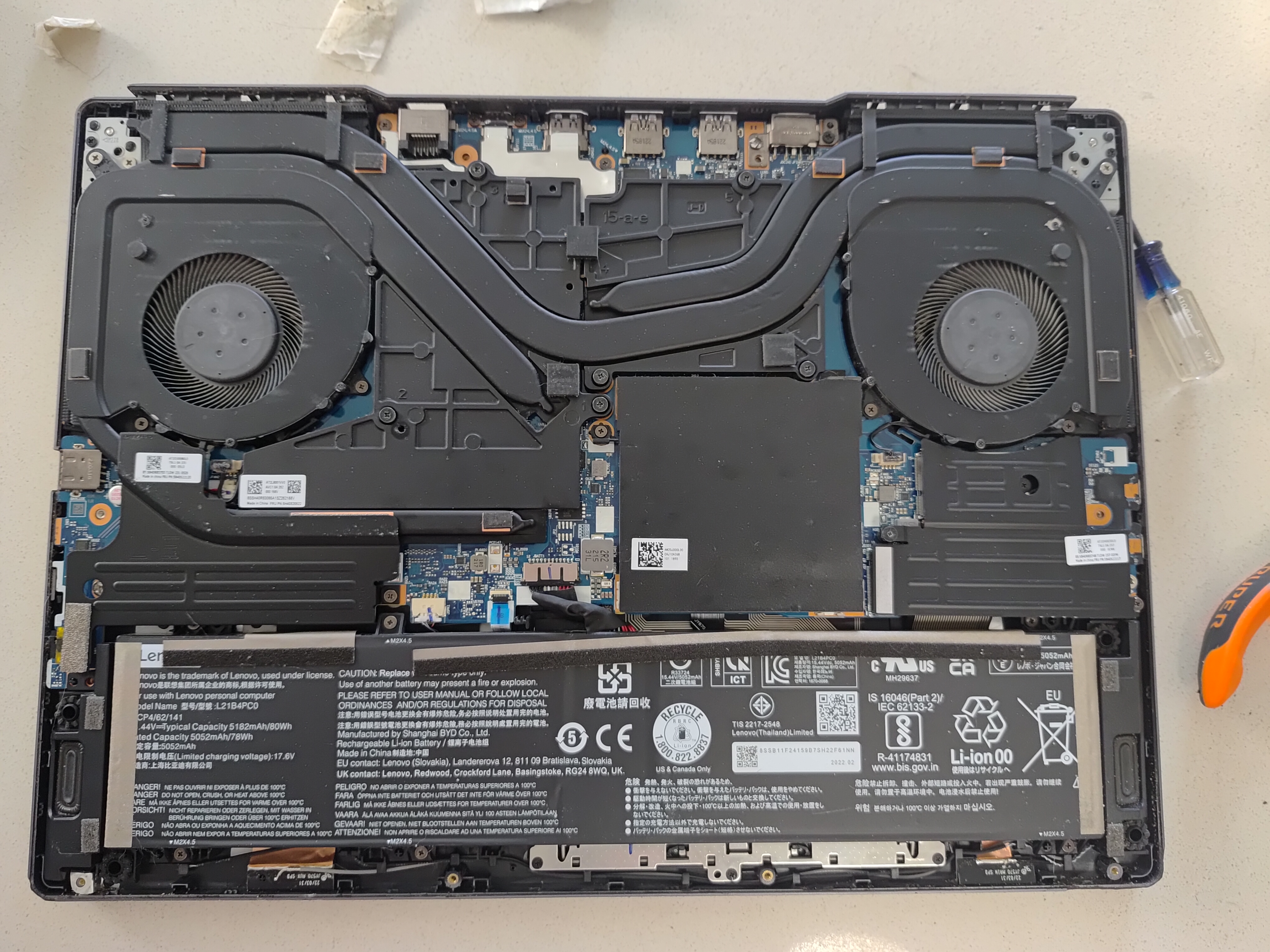
Hi Astra, nice picture, this is before you cleaned? Our furry friends are very good at clogging vents. I the pic I can see some of the fins on the RH fan are clogged, as is the vent outlet on the LH side. Search 'clogged laptop fan' checkout images. Heat kills computers, electrolytic capacitors dry out and vent, so there performance will gradually degrade. Search 'vented motherboard capacitor' Hope jbr is able to further guide you. Good Luck 🍀
Gewysig op deur me.at.here-55
the photo is from midway, I pulled out the extra hair from the fans and used a soft paintbrush to remove fine dust from crevices.
good news and bad news: I ran a test of my RAM and it passed with flying colours. works perfectly. good to learn about the various kinds of hardware degredation to watch for.
I'll try out mozregression to see if it makes any difference. And I'll keep searching the computer logs for clues what to investigate next.
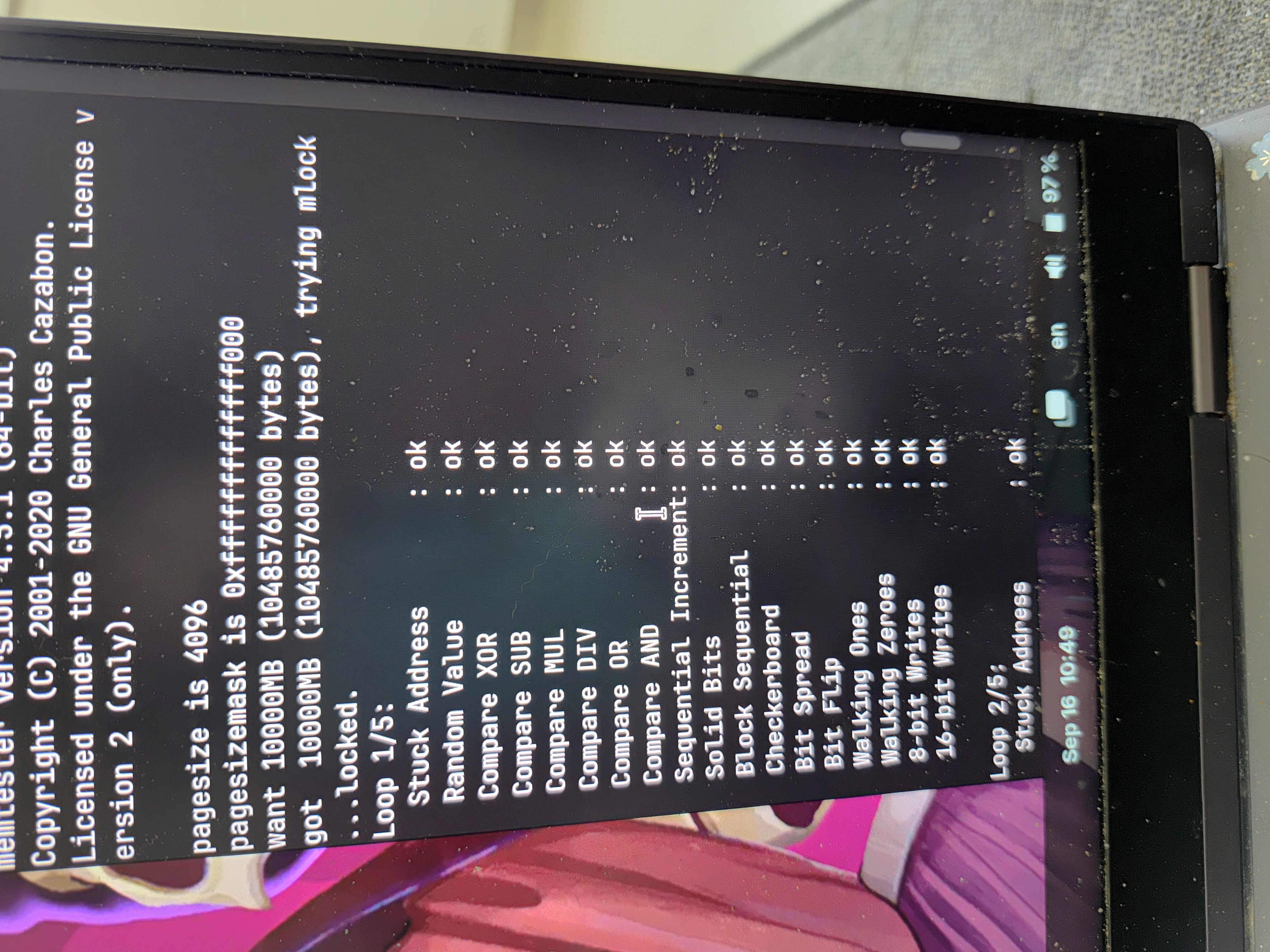
Good Work Astra, did you see how the gunk builds up at the fan output abutted to the heatsink input under the cover?