


How to remove the Thundermail sign in menu from Thunderbird 153
If you are using the release level of 153, and prefer not to see the Thundermail menu entry, do these two things:
Add this statement to the userControl.css file: /* ##### Stop display of Thundermail menu item. */ @media not -moz-pref("mail.accounthub.thundermail.enabled") {
 #tbpro-menu-id-root {
   display: none;
 }
}
Set this entry in Config Editor to FALSE: mail.accounthub.thundermail.enabled

Gekose oplossing
Mapenzi said
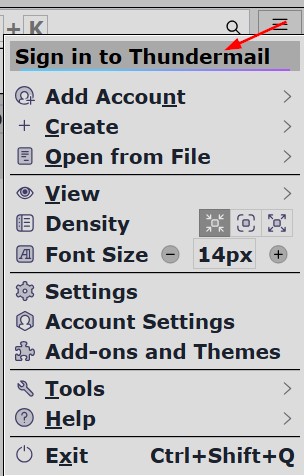
Where or in which menu should I see the "Thundermail" sign ? I'm using the macOS version of Thunderbird 153 release.
TB main menu and Account Hub

Gewysig op deur Ed
All Replies (4)
If unfamiliar with userChrome.css, this is a user-created text file, and must be named exactly userChrome.css and stored in a folder (again, user-created) named chrome in the profile folder. To activate, the user must enter config.editor from Settings>General and change
toolkit.legacyUserProfileCustomizations.stylesheets from false to true.
https://support.mozilla.org/en-US/kb/userchromecss-js-usercontent-unsupported
Gewysig op deur david
Where or in which menu should I see the "Thundermail" sign ? I'm using the macOS version of Thunderbird 153 release.
Gekose oplossing
Mapenzi said
Where or in which menu should I see the "Thundermail" sign ? I'm using the macOS version of Thunderbird 153 release.
TB main menu and Account Hub
Gewysig op deur Ed
Got it, thank you!