


How to stop Thunderbird printing my emails

I used to just have my Canon TS6350 do my printing. Great. Now Thunderbird seems to have taken over my choice of how I print for a long while and it's driving me nuts. It is a dreadful system. I have searched settings to no avail. Can someone advise a Geri Brit of 82 how to deal with the problem Thank you very much Kind regards Alan Jones
Gekose oplossing
When you are in Thunderbird and click the print option, thunderbird prints your email to your printer as a service. If that is not what you want, I believe the print menu has the option to save as a PDF.. You can then invoke the Canon software to print the PDF.
Lees dié antwoord in konteks 👍 1All Replies (14)

Please explain the situation in more detail. As I read it, you're saying that Thunderbird is automatically printing all your emails without you telling it to?!? That would absolutely be abnormal behavior.
What is your operating system, and what version of Thunderbird? Are you presented with a Print dialog box?
No not auto. When I right click a list appears with 'print' at the bottom. I choose this and instead of going to canon, it goes to 'thunderbird print' rather than letting me choose which app I want. It is so un-user friendly and stilted, not smooth like Canon
Gekose oplossing
When you are in Thunderbird and click the print option, thunderbird prints your email to your printer as a service. If that is not what you want, I believe the print menu has the option to save as a PDF.. You can then invoke the Canon software to print the PDF.
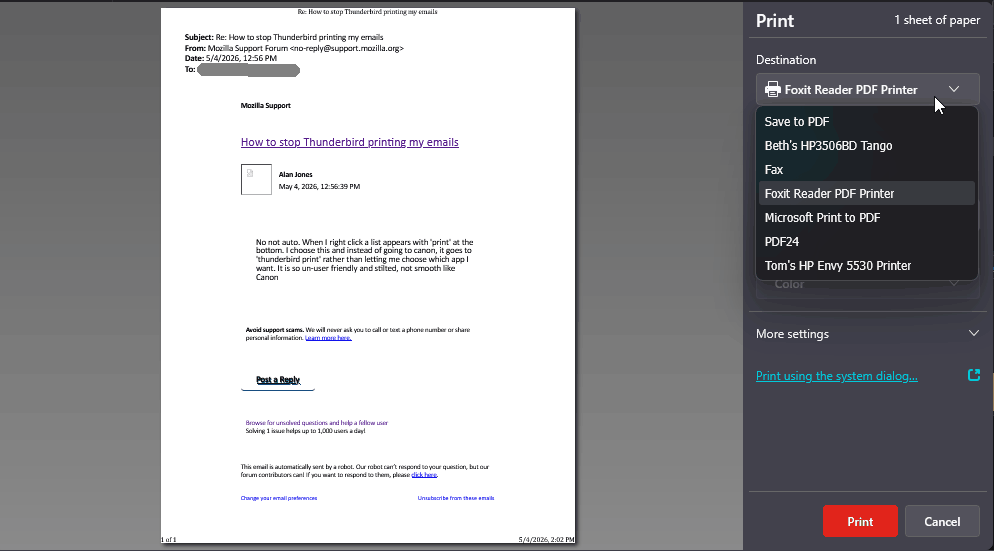
When you invoke Print, you should see a dialog box like the attached image. You'll see a drop-down list where you can choose from among the installed printers. The system's default printer should be the first one on the list. This is Thunderbird's own Print dialog box, but notice that there's also the option to use the operating system's own Print dialog box, if you want.
This is using Windows 11. Other operating systems might look a little different. Is this not what you see?
This new Thunderbird prevents my Canon from asking me, how I want things printed. I am PUT to its settings, then have change to Canon app, but it does not let me choose which pages to print. I have to go back to the TB bar and put in the numbers. It is like a mail server is choosing for me, not letting me do, what I easily used to do. Yes, I can choose pdf rather than printer, but that is not how it worked until this new Thunderbird arrived. Don't feel like feeding it seeds and worms in the future 😁 Thanks for you advice Hey ho, so is progress, but not always good for Geris like me
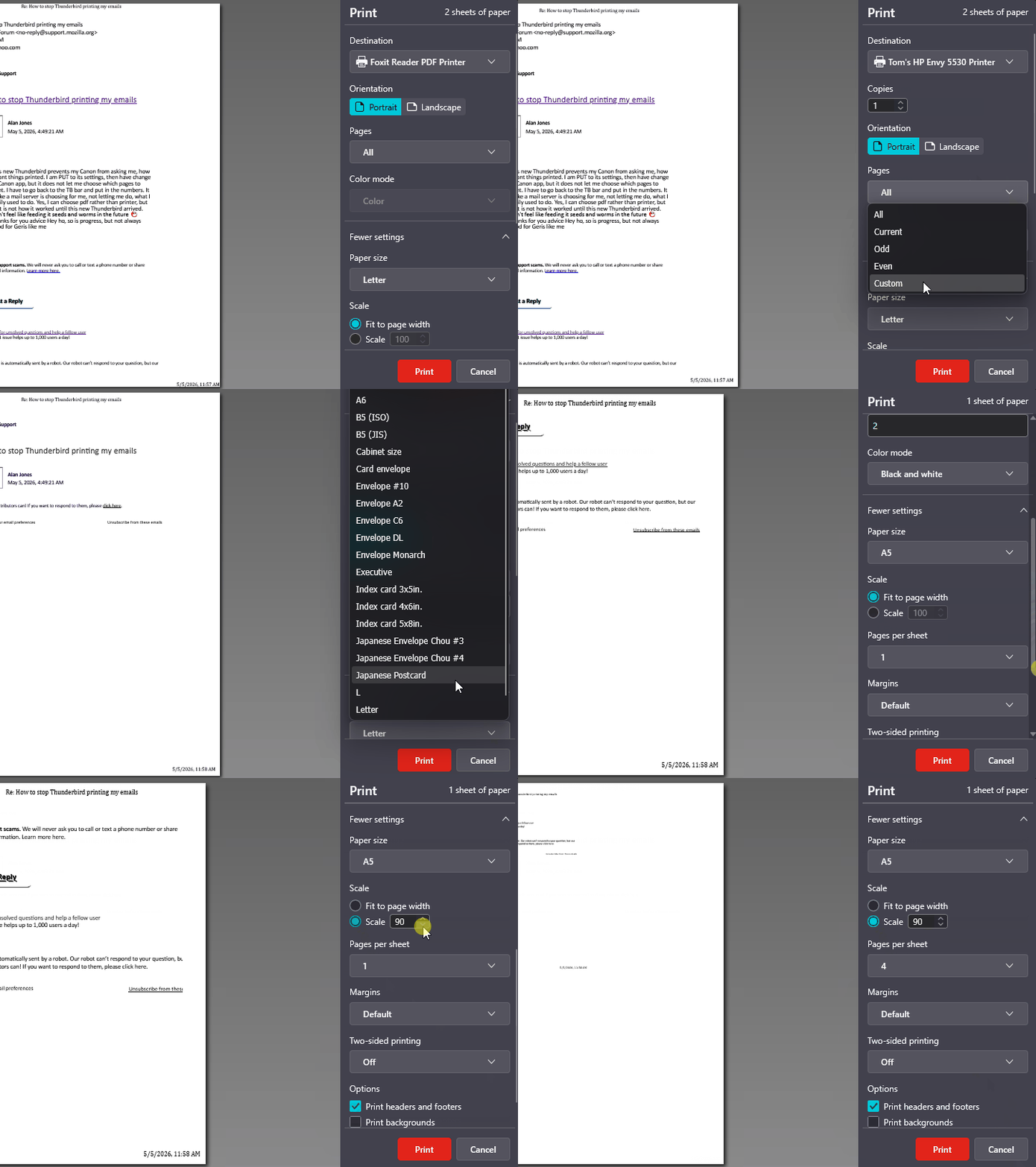
On my computers, when I choose a printer from the list, I'm presented with a full compliment of features supported by that particular printer. That includes being able to choose which pages to print, whether to print in color or black & white, to scale the page, print multiple pages on one sheet of paper, etc. See the attached animation. I would be surprised if it doesn't show similar options for your Canon printer. I also have the choice of using Windows' system print dialog, though it gives me the same or fewer options as the Thunderbird dialog, it just looks different.
If you truly can't get at the printer settings you need, that would unacceptable. I would expect to find similar limitations when trying to print from other programs. I'm afraid I can't offer any other suggestions.
To my understanding, the print feature has not changed in recent releases, and I also use a Canon printer. If there is a specific function that you don't see, be explicit and maybe we can find it. Thank you
Difficult to explain. I will do the .pdf and print via that and it worked. Thanks

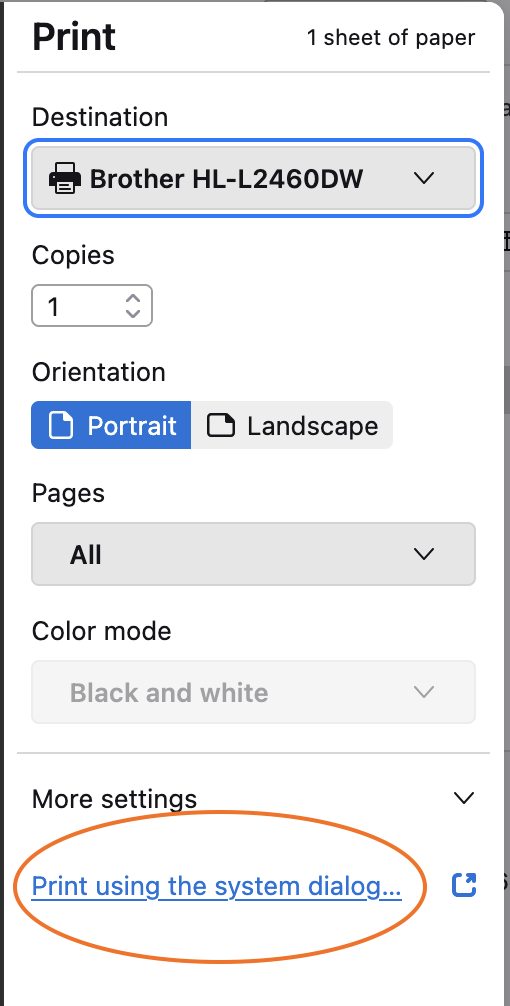
Alan, I am not confident that I understand the problem. A screen image would help. Is the problem simply that you must click on "Print using the system dialog"? See my attached screen image.
I can do all this and is OK, BUT, my TS6350 printer has two cassettes, one with unused clean A4, the other with used A4 paper to help recycling. Canon gives me the opportunity to mainly use recycled paper, but when I need a letter or important information to share, I use the cassette. Great for trying to save forests. This is what Thunderbird print cannot arrange when it orders printing.
Alan Jones said
I can do all this and is OK, BUT, my TS6350 printer has two cassettes, one with unused clean A4, the other with used A4 paper to help recycling. Canon gives me the opportunity to mainly use recycled paper, but when I need a letter or important information to share, I use the cassette. Great for trying to save forests. This is what Thunderbird print cannot arrange when it orders printing.
Understood.
There may be two ways to access the Canon-specific options such as tray selection:
- As I suggested above, "Print using system dialog".
- In the same window in which "Print using system dialog appears", "More settings" might reveal those options.
In both cases, you'll want to make sure that your Canon printer is selected in the printer selection menu.
Does either of those methods work for you?
Sorted how? Your answer may help someone else. It may also satisfy my curiosity.
Do the methods that I suggested solve the problem?