


the backup file is not being created
helloooo
i am experiencing an issue with firefox where backup (Firefox Backup) is not working since version 148.0
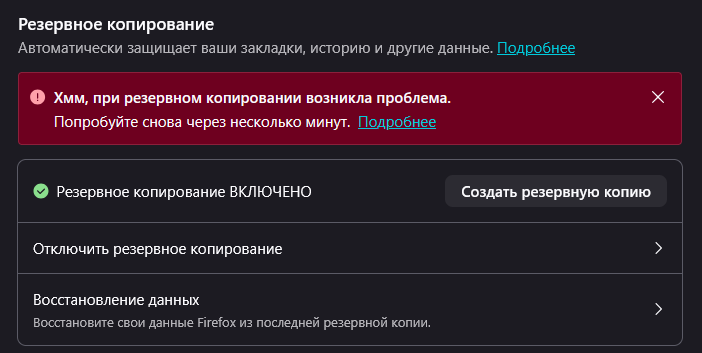
problem: - when I try to create a backup, i get the error: “Hmm, there was a problem with the backup. Please try again in a few minutes.”
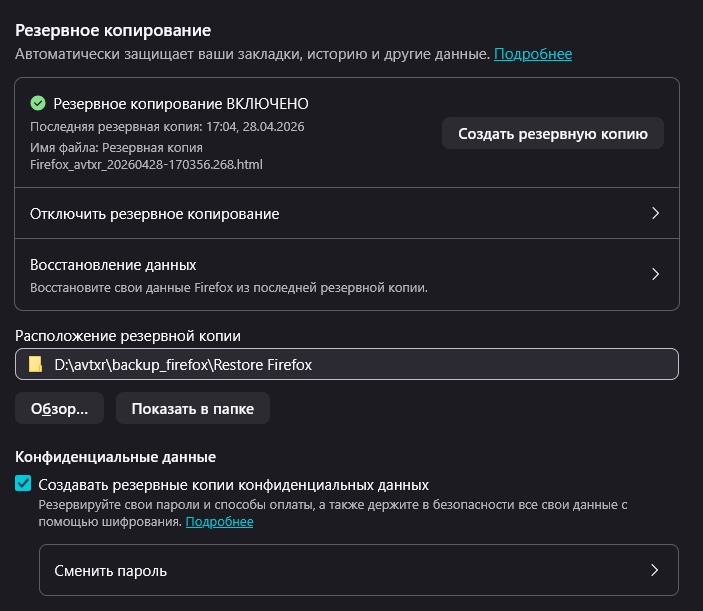
what I have already tried: - enabled and disabled backup password - changed the backup folder/location - cleared browser cache - tested across multiple updates (issue persists)
- backup is enabled, but I cannot create one - the error occurs every time - restarting the browser and system did not help
Gekose oplossing
after deleting the files from the "snapshots" folder, the backup went without error. but when I started the backup again, i got the error again, then i just deleted the "backups" folder – now everything works.
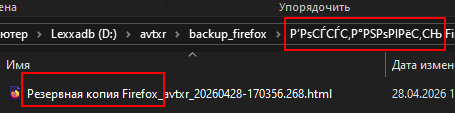
but its strange that such characters appear – apparently there's a problem with cyrillic.


All Replies (12)

Hey! So sorry to hear about this :( Could you go to about:config and then search up the preference browser.backup.backup-debug-info and share what it's set to?
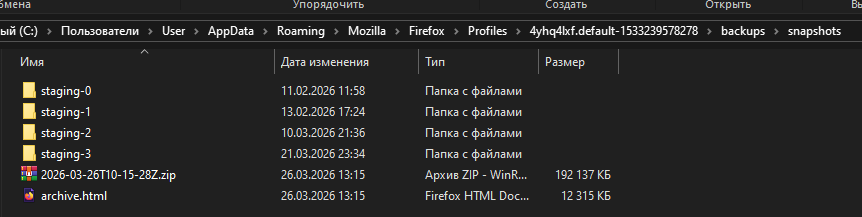
{"lastBackupAttempt":1777034400,"errorCode":{"name":"BackupError","stack":"#prepareStagingFolder@resource:///modules/backup/BackupService.sys.mjs:1976:25\n","unremovableContents":["C:\\Users\\User\\AppData\\Roaming\\Mozilla\\Firefox\\Profiles\\4yhq4lxf.default-1533239578278\\backups\\snapshots\\2026-03-26T10-15-28Z.zip","C:\\Users\\User\\AppData\\Roaming\\Mozilla\\Firefox\\Profiles\\4yhq4lxf.default-1533239578278\\backups\\snapshots\\archive.html","C:\\Users\\User\\AppData\\Roaming\\Mozilla\\Firefox\\Profiles\\4yhq4lxf.default-1533239578278\\backups\\snapshots\\staging-0","C:\\Users\\User\\AppData\\Roaming\\Mozilla\\Firefox\\Profiles\\4yhq4lxf.default-1533239578278\\backups\\snapshots\\staging-1","C:\\Users\\User\\AppData\\Roaming\\Mozilla\\Firefox\\Profiles\\4yhq4lxf.default-1533239578278\\backups\\snapshots\\staging-2","C:\\Users\\User\\AppData\\Roaming\\Mozilla\\Firefox\\Profiles\\4yhq4lxf.default-1533239578278\\backups\\snapshots\\staging-3"]},"lastRunStep":5}

Looks like a problem with #prepareStagingFolder
Are there messages in the Browser Console related to the backup?
Decoded:
 lastBackupAttempt:1777034400; (2026-04-24T12:40:00.000Z)
 errorCode:
  name:BackupError;
  stack:#prepareStagingFolder@resource:///modules/backup/BackupService.sys.mjs:1976:25\n;
  unremovableContents:
   0:C:\Users\User\AppData\Roaming\Mozilla\Firefox\Profiles\4yhq4lxf.default-1533239578278\backups\snapshots\2026-03-26T10-15-28Z.zip;
   1:C:\Users\User\AppData\Roaming\Mozilla\Firefox\Profiles\4yhq4lxf.default-1533239578278\backups\snapshots\archive.html;
   2:C:\Users\User\AppData\Roaming\Mozilla\Firefox\Profiles\4yhq4lxf.default-1533239578278\backups\snapshots\staging-0;
   3:C:\Users\User\AppData\Roaming\Mozilla\Firefox\Profiles\4yhq4lxf.default-1533239578278\backups\snapshots\staging-1;
   4:C:\Users\User\AppData\Roaming\Mozilla\Firefox\Profiles\4yhq4lxf.default-1533239578278\backups\snapshots\staging-2;
   5:C:\Users\User\AppData\Roaming\Mozilla\Firefox\Profiles\4yhq4lxf.default-1533239578278\backups\snapshots\staging-3;
 lastRunStep:5;
Browser Console
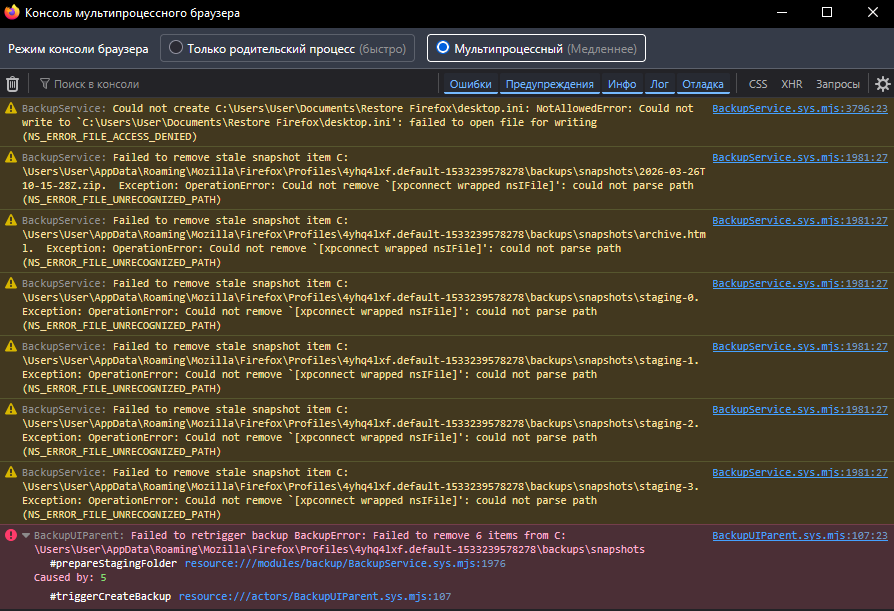
Maybe check the write permissions of the snapshots folder with the path in the screenshot as Firefox isn't able to remove previously saved snapshots.
It could also be possible that your security software keeps an handle on files.
Reboot the computer into Windows Safe Mode with network support to see if that has effect.
maybe just delete these files?
my antivirus is always turned off, except in a few cases.
There's also a message (the first one) that Firefox can't write to "C:\Users\User\Documents\Restore Firefox", which would be critical for creating a backup. So, while you can remove the mentioned folders/files manually, that alone may not be enough to fix this.
Gekose oplossing
after deleting the files from the "snapshots" folder, the backup went without error. but when I started the backup again, i got the error again, then i just deleted the "backups" folder – now everything works.
but its strange that such characters appear – apparently there's a problem with cyrillic.

The release notes for the latest Firefox version, 150.0.2, say "Fixed an issue that could prevent Firefox’s local backup feature from completing successfully", if this is related.

I also have this problem with FF 153.0.4. Trying to create an initial backup to my D: drive (2 TB Samsung 990 Pro M.2 Gen 4 NVMe SSD with 86% free space). WIN Pro 25H2 Operating system, Intel Core i7-14700K CPU; 64 GB DDR5 - 5600 MHz Corsair Vengeance DRAM.
No matter what I do I can't get the initial backup to complete even though the D:/Restore Firefox folder was created. I consistently get this message, “Hmm, there was a problem with the backup. Please try again in a few minutes.”
Gewysig op deur wighty44
wighty44 said
I also have this problem with FF 153.0.4. Trying to create an initial backup to my D: drive (2 TB Samsung 990 Pro M.2 Gen 4 NVMe SSD with 86% free space). WIN Pro 25H2 Operating system, Intel Core i7-14700K CPU; 64 GB DDR5 - 5600 MHz Corsair Vengeance DRAM. No matter what I do I can't get the initial backup to complete even though the D:/Restore Firefox folder was created. I consistently get this message, “Hmm, there was a problem with the backup. Please try again in a few minutes.”
Hi wighty44, please ask a new question for your issue. Also, when creating a question, please include the contents of the browser.backup.backup-debug-info preference as mentioned in the first reply here.