


Folders don't seem to be sycing in Unified Folder

Using Unified Folders option. Not sure what all the folders in the list represent, but these two SENT folders don't seem to be syncing. Why are these files diaplayed (> dalewebb1@Outlook.com and subfolders). Should the stuff they contain be in the UNIFIED folders? As usual, I'm confused. Thanks,
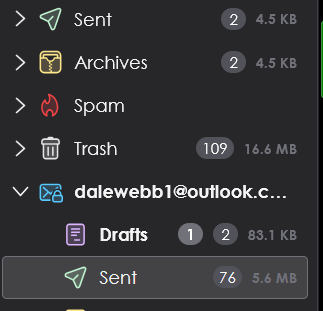
All Replies (5)
The Unified Folders feature shows those folders that are in different accounts yet have the same name. They are root folders, not subfolders. Inbox, sent, draft, trash are the norm. There is always the possibility that a folder is not being represented. To correct that, rightclick on the unified folder, then click choose to ensure that all related folders are shown.

I am confused with you, PathMan. I don't use unified folders, but I'm almost sure that the drafts and sent folders in your screen image should be unified above. The only folders that should appear below a specific account are folders that cannot be unified, that is, that are not special server folders. Unless this account is a POP account and there's something about POP accounts and unified folders that I don't understand?
Do this account's sent and drafts folders also appear in the uniifed folders above?
If you turn off unified folders, do you see two sent folders and two drafts folders in this account?
Do this account's sent and drafts folders also appear in the unified folders above? They don't appear to.
If you turn off unified folders, do you see two sent folders and two drafts folders in this account? No
See attached image.
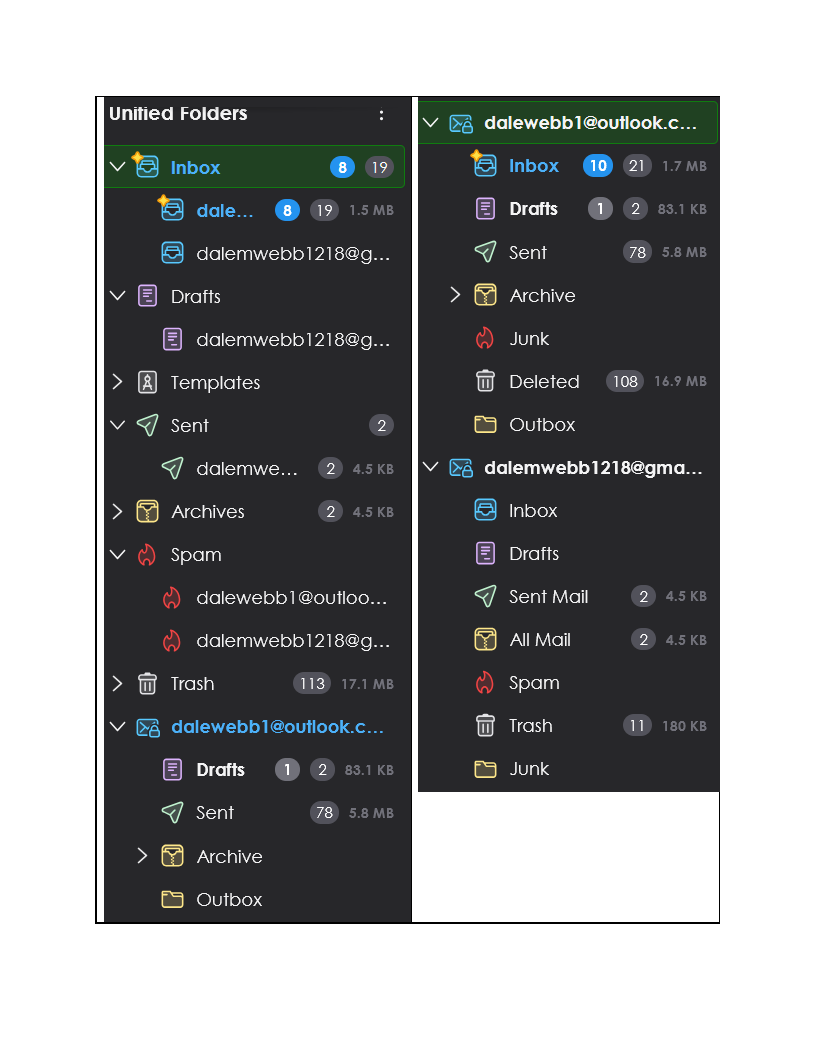
I do not know why those folders are not getting unified. I believe that I have seen a similar problem solved on this forum, but I do not remember the solution. Did you search the forum?
Let's hope that reinforcements join the discussion.
Dave, Sorry, I'm a simpleton. You lost me with:
To correct that, right-click on the unified folder, then click choose to ensure that all related folders are shown.
CHOOSE doesn't appear in the resulting dialog box. Nothing seems applicable. I give up on the UNIFIED folder option.