


Chrome or Firefox

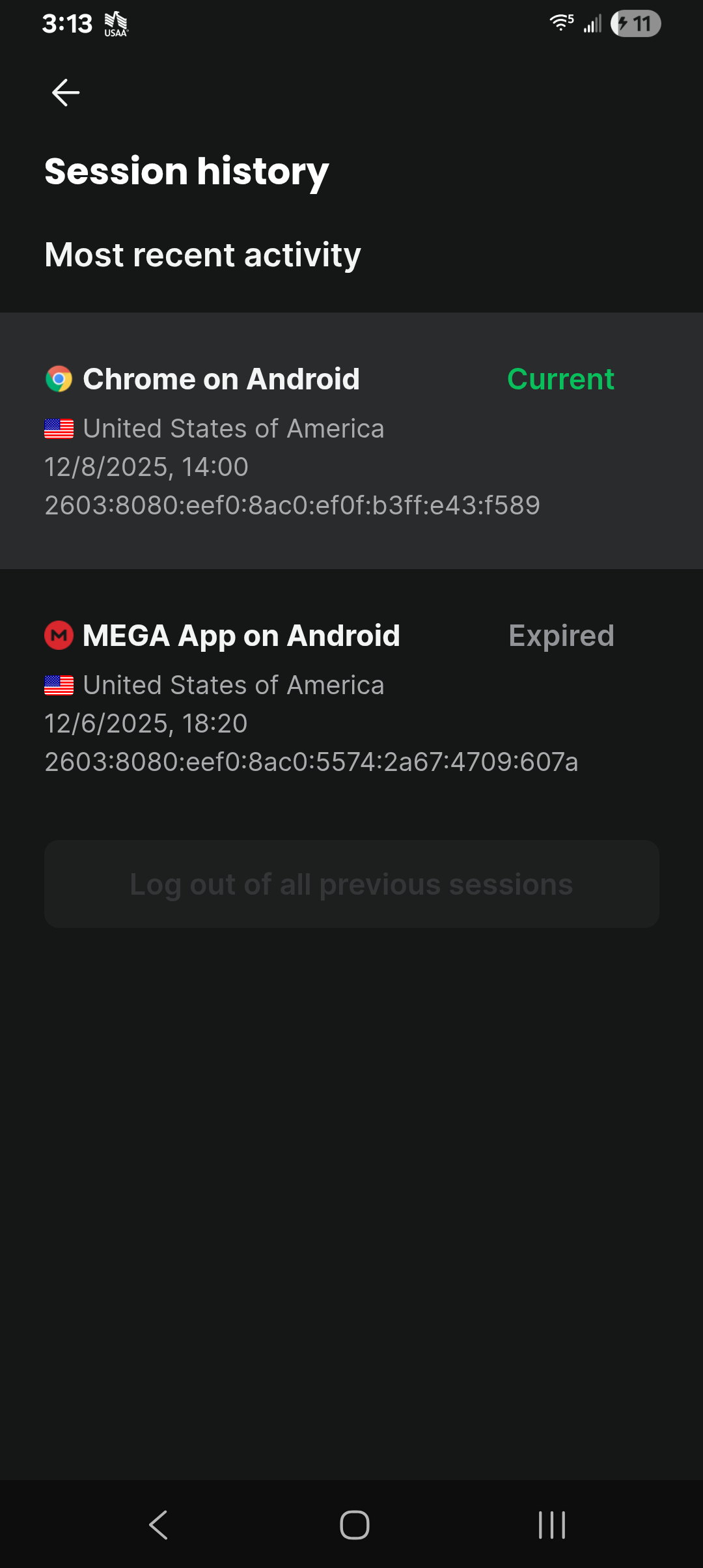
Today, using Firefox--or at least what i think is Firefox--i checed session history while logged into my mega.nz account. It lists 2 instances, one of which is for 3 days prior when I originally set up the Mega account using the Mega app, and the other is for yesterday when I entered the account using the FF browser--or, again, what i think is the FF browser. What's curious is that it shows i was using the Chrome browser, and that I'm apparently still using this browser as it's listed as the "Current" session. How can this be? While I have the Chrome app on my phone, I disabled it long ago and have never used it, and most certainly did not use it during the time and activities in question. I have long speculated that I have been hacked and that my phone is sometimes (always?) controlled by this hacker, though no solid proof. Assuming the hacker uses Chrome, could this be reflecting their using the Chrome browser, as opposed to the FF browser, which I'm currently using (or think im using)? In other words, is this the proof of a hack? Or is this a glitch within Mega, mistakingly listing Chrome as my browser?
All Replies (5)
Not a hack. They have a bug there, or less likely, we provide them user agent string of Chrome.
...Or it's a hack. (Without justification I cannot eliminate it as a possibility.)
Neverthelesd, thank you, you've helped me narrow it down to 4 possibilities: 1. Hack, 2. Mega bug, 3. Firefox provided them user agent string of Chrome, 4. Other.
I just received Mega's response and have included it below for your consideration. Maybe it can help you (or other forum users) provide further insight. It references useragent info:
"Thank you for contacting MEGA support.
Our system indicates the browser used is Chrome. Without further evidence, we cannot definitively determine if this is proof of a hack or a MEGA glitch.
We recommend having your phone checked by a technician for any potential malware or viruses.
Kind regards, MEGA Support
AppInformation: App name: Mega App version: 15.22(253240834)(d7b78e2f27) Sdk version: 10.1.0
Device Information: Device: samsung (xxxx) Android Version: Android 15 - 35 Language: English
Useragent: MEGAAndroid/15.22_253240834 (Linux 6.6.50-android15-8-abA146USQUEEYJ8-4k aarch64) MegaClient/10.1.0/64 Simplified Useragent: Android IP: xxxx:xxxx:xxxx:xxxx:xxxx:xxxx:xxx:xxxx Current Client Language: en"
Ok, per the email, Ty is a robot, which probably explains no follow up to my response. I've supplied Megas response to my dilemma above, which i think might help somebody on this forum more than it helps me-- it's all gobbledy-gook to me. Anybody?
Ok, per the email, Ty is a robot, which probably explains no follow up to my response. I've supplied Megas response to my dilemma above, which i think might help somebody on this forum more than it helps me-- it's all gobbledy-gook to me. Anybody?

This is most likely not evidence of hacking. Firefox on Android uses the Android System WebView / Chromium user agent for certain logins, redirects, or embedded pages. Because of that, some services (including Mega) may incorrectly identify the browser as Chrome, even when you accessed the account through Firefox.
If Chrome is disabled on your phone, it does not mean Chromium components are unused—many apps rely on them internally. A “Current session” labeled as Chrome is usually just a user-agent detection issue, not proof of remote control or account compromise.
If you’re concerned, the safest steps are to log out of all sessions from Mega, change your password, enable 2FA, and review device access—but based on this alone, it looks like a normal Android browser identification quirk, not a hack.