


Customized search criteria yield no result

Some customized search criteria work as expected, e.g. Content-Type, Message-ID, In-Reply-To, ...
Some not: Content-Transfer-Encoding, Content-Disposition
Some may appear more than once, e.g. Content-Type.
Searching for contents of such criteria / tags yields no results.
How to customize search for these criteria properly?
Below is a shortened source / example addressing all of these issues:
X-Mozilla-Status: 0001
X-Mozilla-Status2: 00000000
Content-Type: multipart/mixed; boundary="------------3TP0..."
Message-ID: <123456789...@example.mail>
Date: Mon, 01 Jan 20... 12:00:00...
MIME-Version: 1.0
User-Agent: Mozilla Thunderbird
From: "from@example.mail" <from@example.mail>
Subject: =?UTF-8?Q?MusterSubject?=
To: "MusterTo" <to@example.mail>
References: <...@....eurprd06.prod.outlook.com>
<...@....EURP193.PROD.OUTLOOK.COM>
<...@....EURP193.PROD.OUTLOOK.COM>
Autocrypt: addr=from@example.mail; keydata=
xsDNBGN2t...==
In-Reply-To: <...@....EURP193.PROD.OUTLOOK.COM>
This is a multi-part message in MIME format.
3TP0...
Content-Type: text/plain; charset=UTF-8; format=flowed Content-Transfer-Encoding: 8bit
Dear Sir or Madam ...
3TP0...
Content-Type: application/vnd.openxmlformats-officedocument.wordprocessingml.document; name="=?UTF-8?Q?example=2Edocx?=" Content-Disposition: attachment; filename*0*=UTF-8' '%4...; filename*1*=%7...; filename*2*=%7... Content-Transfer-Encoding: base64
UEsDBBQA...
3TP0...--
Related threads/questions/keywords: filter, search, criteria, custom, message, body, header, tags, global
Best I could find: https://support.mozilla.org/en-US/questions/1475007 https://support.mozilla.org/en-US/kb/using-saved-searches https://support.mozilla.org/en-US/kb/getting-started-thunderbird-main-window-supernova
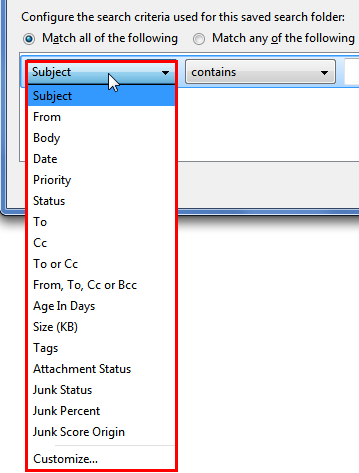
Gewysig op deur eBeL
All Replies (8)
I added Content-Transfer-Encoding as a header under Customize, then applied a search as in the attached picture. Checking 'run search on server' yielded the expected results. See if that makes a difference.
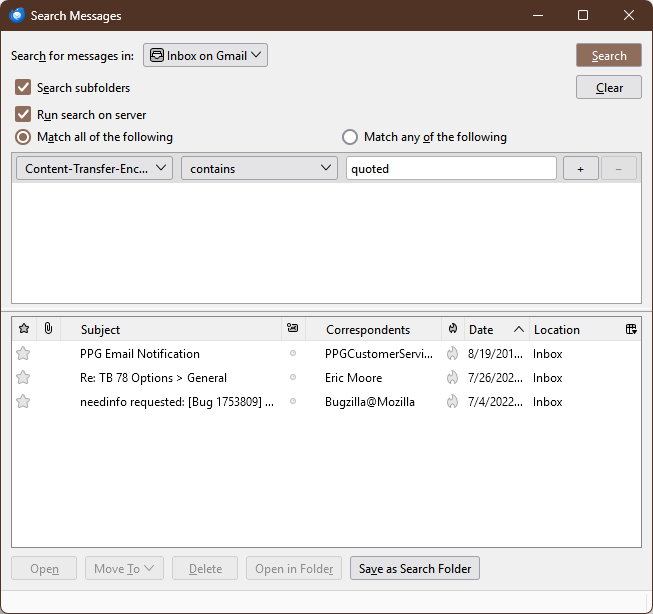
I did exactly this already and tested again.
However further experimentation on customized search criteria yielded, the question could be related to multipart/mixed messages.
Using customized search criteria some messages could be found. Expected behaviour includes all criteria / tags / headers the source / example shows, e.g. Content-Disposition.
I highlighted now the affected parts ignored by customized search.
Also results did not change by any means by checking 'run search on server'.
The issue is not resolved yet.
Thank you for the immediate reply - too fast to take notice.
Gewysig op deur eBeL

I may not be fully understanding the whole issue here, but the problem could be that customized search criteria looks in the headers only and you may want to search in the body of the message, in which case you may have to use Body criteria.
Good point, maybe these criteria are not part of the header.
Search criterion "Body" doesn't help. Body contents like "Dear Sir or Madam" are found, but none of the highlighted tags or related content (e.g. 8bit, filename, base64,..). Hence body search functions, but apparently unexpectedly limitted.
So if these tags/contents neither belong to body nor to header, how to search for this?
How to determine what Thunderbird identifies as body/header?
Thanks again!
Gewysig op deur eBeL
eBeL said
How to determine what Thunderbird identifies as body/header?
If you set View/Headers to All, all of, and only, the headers are displayed in the Header Pane. The rest is the body. The message source, Ctrl+U, shows all headers plus the body. So it should be easy to identify header from body.
Well, then the highlighted parts of the source / example are indeed not part of the header. But then the search criterion "Body" doesn't work as expected:
eBeL said
Search criterion "Body" doesn't help. Body contents like "Dear Sir or Madam" are found, but none of the highlighted tags or related content (e.g. 8bit, filename, base64,..). Hence body search functions, but apparently unexpectedly limitted. So if these tags/contents neither belong to body nor to header, how to search for this?
Body exposes only the HTML as rendered/displayed, not the source of the HTML. Once you accept that you will be a long way to understanding if it is working as designed. Likewise you can not use HTML elements in message filters.
Conclusive.
Quite unfortunate that presumably easily identifiable tags such as Content-Type, Content-Disposition, Content-Transfer-Encoding are not searchable, because they belong to the body. To be honest, I don't see a good reason why these tags belong to body instead of header. Would there be so many message formats to support? The example says muli-part / mixed in MIME format and I wonder how Thunderbird distinguishes between Body and Header.
However, w.r.t. attachments, searching by filenames and filetypes is not possible, but I guess it's a matter of ressources.
It's likely that users would appreciate searching attachments by files (names/types, number,..), not just attachment status or message size.