email address book

My address book no longer appears on the opening page. I cannot add new contacts to it. Please help. Thanking you in advance Mary Rettig marret@bluewin.ch
All Replies (1)
No longer appears where?
Thunderbird version 102 brought some changes. A places toolbar on the left of the folder pane which shows a button for the address book. In the image below the address book is the second listed.

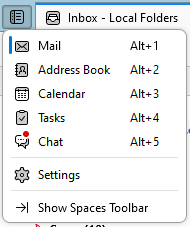
If the places toolbar is disabled there is a button on the toolbar to show the contents

This is my preferred display as I really see no point in a toolbar on the left when I button can show me a menu with much more information on it. Note the shortcut key of Alt+2 for opening the address book shown on that menu, as it is yet another way of getting there.
If your toolbar is turned off. There is an entry on the menu to turn it on, as well as one in the status bar at the bottom of the Thunderbird window that looks like this.