

Hierdie gesprek is in die argief.
Vra asseblief 'n nuwe vraag as jy hulp nodig het.

Opgelos
In die argief
Autofill Yellow
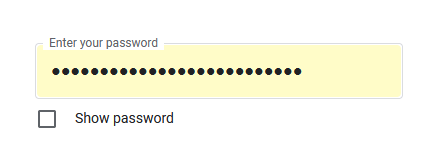
Now when I use my auto fill passwords the black dots on screen which is my password encrypted is now with a yellow fill I do not like it how do i get rid of it!
Now when I use my auto fill passwords the black dots on screen which is my password encrypted is now with a yellow fill I do not like it how do i get rid of it!
All Replies (2)
Gekose oplossing
Try to set layout.css.autofill.background = false on the about:config page.
You can open the about:config page via the location/address bar. You can click the button to "Accept the Risk and Continue".
It worked!!! Thank you!!!!
Gewysig op deur Faerie Caster