


generic icon in task bar after update

Hi, just noticed that after the update to TB 60.6.0 the usual and well known blue icon I had pinned to my task bar (Win10) was replaced by a generic one (see attachments). when I unpin this new, generic icon and re-pin TB from its install directory, the blue one is back. I know this is just a minor, cosmetic problem but did anyone else observe this? Thanks.


All Replies (3)
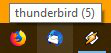
loosly related to my Q: why does the TB icon upon mouse-over display "Thunderbird (5)"? what does the number in brackets mean? Firefox for example doesn't do this. it just displays "Firefox"...
ph0nq said
Hi, just noticed that after the update to TB 60.6.0 the usual and well known blue icon I had pinned to my task bar (Win10) was replaced by a generic one (see attachments). when I unpin this new, generic icon and re-pin TB from its install directory, the blue one is back. I know this is just a minor, cosmetic problem but did anyone else observe this? Thanks.
That will be an issue with the windows icon cache, not Thunderbird's installer.
See https://www.thewindowsclub.com/rebuild-icon-clear-thumbnail-cache-windows-10
Thanks Matt. Will try it next time TB updates.