


Remove printer entry

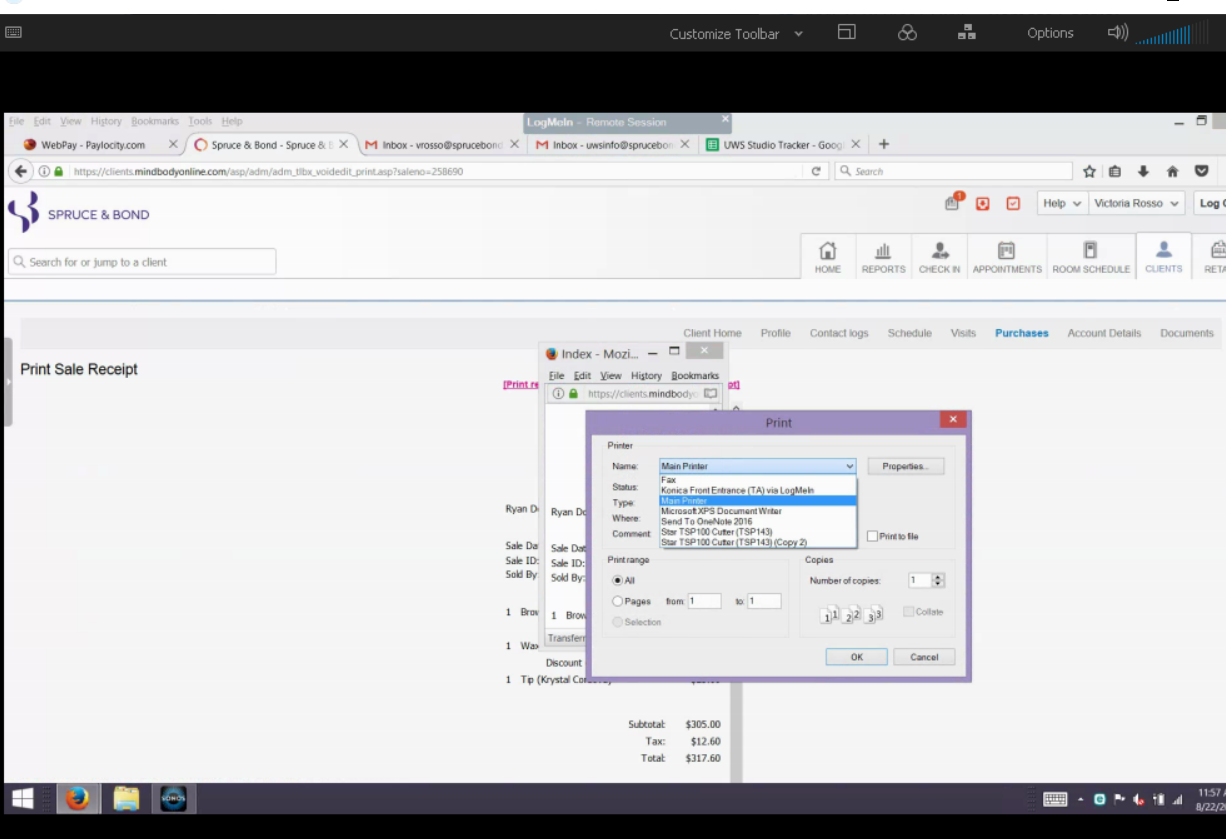
I have a user that has two entries for a single Star TSP 100 Cutter (TSP 143) receipt printer (see image) and I need to get rid of the one that shows "copy 2" at the end as that's not even listed anymore in Windows under devices and printers so when they choose that by accident, it doesn't print.
I've tried the Firefox refresh but that did not work and also I went into "about:config" and searched for printers but none came up with that name. There must be a way for me to delete that entry somehow?
All Replies (4)
Gekose oplossing
Hi !
Would you please take a look at this :
http://windowsreport.com/cant-remove-printer-windows-10/
Any good ?
Possibly. I'll have to try the registry suggestion but won't be able to until after hours. I'll post back my results.
pstoric said
Possibly. I'll have to try the registry suggestion but won't be able to until after hours. I'll post back my results.
Take all the time you need !
Yes it worked. from the run window I typed "printmanagement.msc" and found the (copy) printer that was not listed under devices and printers. I as able to empty the queue and delete it. Then in Firefox I went to about:config and typed "print_printer" and reset the value. Working as expected now. Tahanks1