


EMPTY JUNK Folder, Why is it so easy to empty trash and so hard to empyt junk?

Thunderbird up to date 49.0.2 Windows Vista Home Premium
Having to OPEN every junk email to delete/move to Trash might be dangerous?
Please impliment an easy to use EMPTY JUNK folder option, just like empty Trash, found on File drop down
Gekose oplossing
Icon is an orange "tear drop", on Junk and its 2 subfolders.
Not sure how subfolders got there. Think I did delete the junk folder once trying to empty it.
Thanks, happy to be able to empty junk emails w/o opening them.
All Replies (4)

My Junk folders have an Empty option.
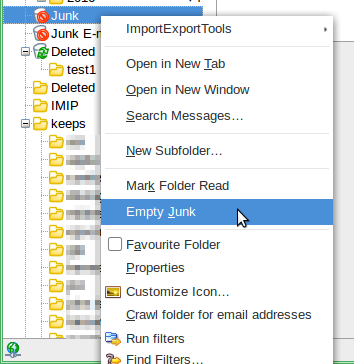
My Junk file has no empty junk in the drop down; only Open in a New Tab, Open in New Window, Delete, Rename, Favorites Folder, & Properties.
Tried Delete once, it eliminated the entire folder
BUT found an empty Junk in a sub folder of JUNK, named with my e-mail address, that worked, also Local Folders that is empty already.
Was rather hard to find.
There is still room for improvement, in some future update.
Thanks for the drop down picture, was hard to read, but got me to rexplore.
Does this Junk folder have the appropriate icon?
Given that you have found a deleted Junk folder, I wonder if the one you're now using is a hand-made replacement, and maybe doesn't have all the appropriate properties.
You could try to restore the deleted one and see if it works better. Or get yourself the FolderFlags add-on and use it to re-set your Junk folder's properties.
https://addons.mozilla.org/en-US/thunderbird/addon/folderflags/
Gekose oplossing
Icon is an orange "tear drop", on Junk and its 2 subfolders.
Not sure how subfolders got there. Think I did delete the junk folder once trying to empty it.
Thanks, happy to be able to empty junk emails w/o opening them.