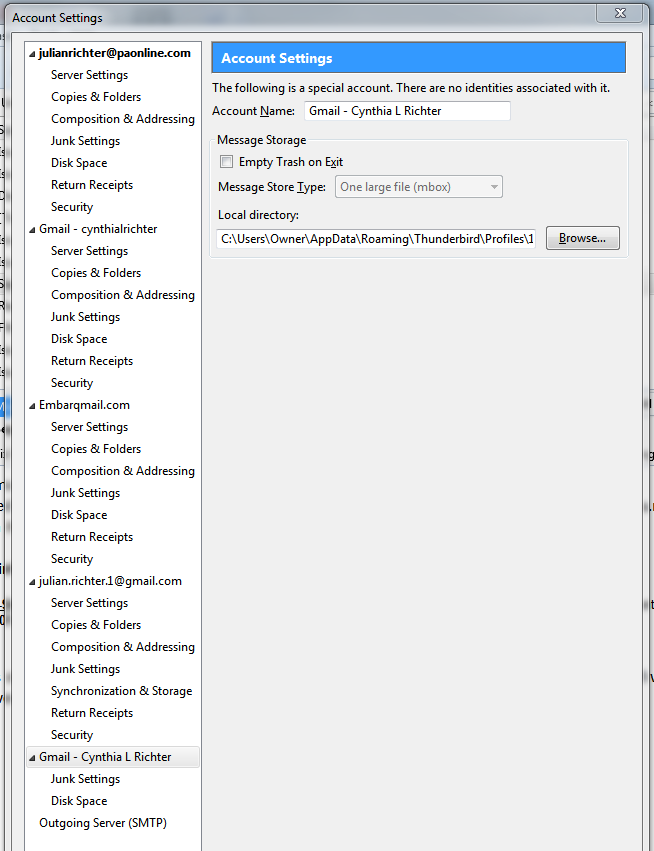
Account settings is missing most of the menu items.

This account is missing most of the Settings menu items. I have another gmail account in Thunderbird that contains all the menu items. The big problem is that when I create a new email, this account uses an email address in the "From" field that is an old account that no longer shows up on Thunderbird as an account.
All Replies (6)
Could we see your settings information please? I suspect you have re-named the "special" Local Folders account.
Help|Troubleshooting Information, clear "include account names", click "copy text to clipboard" and paste (ctrl +v) into your reply here.
The "paonline.com" domain is the one that went out of business.
Application Basics
   Name: Thunderbird
   Version: 38.3.0
   User Agent: Mozilla/5.0 (Windows NT 6.1; WOW64; rv:38.0) Gecko/20100101 Thunderbird/38.3.0
   Profile Folder: Show Folder
             (Local drive)
   Application Build ID: 20150928051427
   Enabled Plugins: about:plugins
   Build Configuration: about:buildconfig
   Memory Use: about:memory
 Mail and News Accounts
   account1:
     INCOMING: account1, , (none) Local Folders, plain, passwordCleartext
   account2:
     INCOMING: account2, , (pop3) pop.gmail.com:995, SSL, passwordCleartext
     OUTGOING: imap.gmail.com:993, trySTARTTLS, passwordEncrypted, true
   account3:
     INCOMING: account3, , (pop3) in.paonline.com:110, plain, passwordCleartext
     OUTGOING: imap.gmail.com:993, trySTARTTLS, passwordEncrypted, true
   account4:
     INCOMING: account4, , (pop3) pop.embarqmail.com:110, plain, passwordCleartext
     OUTGOING: imap.gmail.com:993, trySTARTTLS, passwordEncrypted, true
   account6:
     INCOMING: account6, , (imap) imap.gmail.com:993, SSL, OAuth2
     OUTGOING: smtp.gmail.com:465, SSL, OAuth2, true
Crash Reports
 Extensions
   Lightning, 4.0.3.1, true, {e2fda1a4-762b-4020-b5ad-a41df1933103}
Important Modified Preferences
Name: Value
     accessibility.typeaheadfind.flashBar: 0
     browser.cache.disk.capacity: 358400
     browser.cache.disk.smart_size_cached_value: 358400
     browser.cache.disk.smart_size.first_run: false
     browser.cache.disk.smart_size.use_old_max: false
     extensions.lastAppVersion: 38.3.0
     font.internaluseonly.changed: true
     font.name.monospace.el: Consolas
     font.name.monospace.tr: Consolas
     font.name.monospace.x-baltic: Consolas
     font.name.monospace.x-central-euro: Consolas
     font.name.monospace.x-cyrillic: Consolas
     font.name.monospace.x-unicode: Consolas
     font.name.monospace.x-western: Consolas
     font.name.sans-serif.el: Calibri
     font.name.sans-serif.tr: Calibri
     font.name.sans-serif.x-baltic: Calibri
     font.name.sans-serif.x-central-euro: Calibri
     font.name.sans-serif.x-cyrillic: Calibri
     font.name.sans-serif.x-unicode: Calibri
     font.name.sans-serif.x-western: Calibri
     font.name.serif.el: Cambria
     font.name.serif.tr: Cambria
     font.name.serif.x-baltic: Cambria
     font.name.serif.x-central-euro: Cambria
     font.name.serif.x-cyrillic: Cambria
     font.name.serif.x-unicode: Cambria
     font.name.serif.x-western: Cambria
     font.size.fixed.el: 14
     font.size.fixed.tr: 14
     font.size.fixed.x-baltic: 14
     font.size.fixed.x-central-euro: 14
     font.size.fixed.x-cyrillic: 14
     font.size.fixed.x-unicode: 14
     font.size.fixed.x-western: 14
     font.size.variable.el: 17
     font.size.variable.tr: 17
     font.size.variable.x-baltic: 17
     font.size.variable.x-central-euro: 17
     font.size.variable.x-cyrillic: 17
     font.size.variable.x-unicode: 17
     font.size.variable.x-western: 17
     gfx.blacklist.suggested-driver-version: 10.6
     gfx.direct3d.last_used_feature_level_idx: 0
     mail.openMessageBehavior.version: 1
     mail.winsearch.enable: true
     mail.winsearch.firstRunDone: true
     mail.winsearch.global_reindex_time: 1262104280
     mailnews.database.global.datastore.id: ae67cade-5e72-48e9-b231-6acd381b7c2
     mailnews.database.global.views.conversation.columns: {"threadCol":{"visible":true,"ordinal":"1"},"flaggedCol":{"visible":true,"ordinal":"21"},"attachmentCol":{"visible":fals…
     mailnews.database.global.views.global.columns: {"threadCol":{"visible":true,"ordinal":"1"},"flaggedCol":{"visible":true,"ordinal":"21"},"attachmentCol":{"visible":fals…
     network.cookie.prefsMigrated: true
     network.predictor.cleaned-up: true
     places.database.lastMaintenance: 1444859178
     places.history.expiration.transient_current_max_pages: 104858
     places.history.expiration.transient_optimal_database_size: 128771358
     plugin.importedState: true
     plugins.update.notifyUser: true
     print.print_printer: HP Photosmart D7300 series
     print.printer_HP_Photosmart_D7300_series.print_bgcolor: false
     print.printer_HP_Photosmart_D7300_series.print_bgimages: false
     print.printer_HP_Photosmart_D7300_series.print_colorspace:
     print.printer_HP_Photosmart_D7300_series.print_command:
     print.printer_HP_Photosmart_D7300_series.print_downloadfonts: true
     print.printer_HP_Photosmart_D7300_series.print_duplex: -2116026082
     print.printer_HP_Photosmart_D7300_series.print_edge_bottom: 0
     print.printer_HP_Photosmart_D7300_series.print_edge_left: 0
     print.printer_HP_Photosmart_D7300_series.print_edge_right: 0
     print.printer_HP_Photosmart_D7300_series.print_edge_top: 0
     print.printer_HP_Photosmart_D7300_series.print_evenpages: true
     print.printer_HP_Photosmart_D7300_series.print_footercenter:
     print.printer_HP_Photosmart_D7300_series.print_footerleft: &PT
     print.printer_HP_Photosmart_D7300_series.print_footerright: &D
     print.printer_HP_Photosmart_D7300_series.print_headercenter:
     print.printer_HP_Photosmart_D7300_series.print_headerleft: &T
     print.printer_HP_Photosmart_D7300_series.print_headerright: &U
     print.printer_HP_Photosmart_D7300_series.print_in_color: true
     print.printer_HP_Photosmart_D7300_series.print_margin_bottom: 0.5
     print.printer_HP_Photosmart_D7300_series.print_margin_left: 0.5
     print.printer_HP_Photosmart_D7300_series.print_margin_right: 0.5
     print.printer_HP_Photosmart_D7300_series.print_margin_top: 0.5
     print.printer_HP_Photosmart_D7300_series.print_oddpages: true
     print.printer_HP_Photosmart_D7300_series.print_orientation: 0
     print.printer_HP_Photosmart_D7300_series.print_page_delay: 50
     print.printer_HP_Photosmart_D7300_series.print_pagedelay: 500
     print.printer_HP_Photosmart_D7300_series.print_paper_data: 1
     print.printer_HP_Photosmart_D7300_series.print_paper_height: 11.00
     print.printer_HP_Photosmart_D7300_series.print_paper_name:
     print.printer_HP_Photosmart_D7300_series.print_paper_size: 84793864
     print.printer_HP_Photosmart_D7300_series.print_paper_size_type: 0
     print.printer_HP_Photosmart_D7300_series.print_paper_size_unit: 0
     print.printer_HP_Photosmart_D7300_series.print_paper_width: 8.50
     print.printer_HP_Photosmart_D7300_series.print_plex_name:
     print.printer_HP_Photosmart_D7300_series.print_resolution: -2131754641
     print.printer_HP_Photosmart_D7300_series.print_resolution_name:
     print.printer_HP_Photosmart_D7300_series.print_reversed: false
     print.printer_HP_Photosmart_D7300_series.print_scaling: 0.75
     print.printer_HP_Photosmart_D7300_series.print_shrink_to_fit: false
     print.printer_HP_Photosmart_D7300_series.print_to_file: false
     print.printer_HP_Photosmart_D7300_series.print_unwriteable_margin_bottom: 0
     print.printer_HP_Photosmart_D7300_series.print_unwriteable_margin_left: 0
     print.printer_HP_Photosmart_D7300_series.print_unwriteable_margin_right: 0
     print.printer_HP_Photosmart_D7300_series.print_unwriteable_margin_top: 0
Graphics
     Adapter Description: Intel(R) HD Graphics
     Vendor ID: 0x8086
     Device ID: 0x0152
     Adapter RAM: Unknown
     Adapter Drivers: igdumdim64 igd10iumd64 igd10iumd64 igdumdim32 igd10iumd32 igd10iumd32
     Driver Version: 10.18.10.3621
     Driver Date: 5-16-2014
     Adapter Description (GPU #2): AMD Radeon HD 6700 Series
     Vendor ID (GPU #2): 0x1002
     Device ID (GPU #2): 0x68bf
     Adapter RAM (GPU #2): 1024
     Adapter Drivers (GPU #2): aticfx64 aticfx64 aticfx64 aticfx32 aticfx32 aticfx32 atiumd64 atidxx64 atidxx64 atiumdag atidxx32 atidxx32 atiumdva atiumd6a atitmm64
     Driver Version (GPU #2): 8.850.0.0
     Driver Date (GPU #2): 4-19-2011
     Direct2D Enabled: false
     DirectWrite Enabled: false (6.2.9200.17461)
     ClearType Parameters: Gamma: 2200 Pixel Structure: R ClearType Level: 100 Enhanced Contrast: 400
     WebGL Renderer: false
     GPU Accelerated Windows: 0
     AzureCanvasBackend: skia
     AzureSkiaAccelerated: 0
     AzureFallbackCanvasBackend: cairo
     AzureContentBackend: cairo
JavaScript
Incremental GC: 1
Accessibility
   Activated: 0
   Prevent Accessibility: 0
Library Versions
     Expected minimum version
     Version in use
     NSPR
     4.10.8
     4.10.8
     NSS
     3.19.2 Basic ECC
     3.19.2 Basic ECC
     NSS Util
     3.19.2
     3.19.2
     NSS SSL
     3.19.2 Basic ECC
     3.19.2 Basic ECC
     NSS S/MIME
     3.19.2 Basic ECC
     3.19.2 Basic ECC
So it wasn't Local Folders under another name.
Can you give an example of the supposedly missing items?
Accounts 2, 3 and 4 can't send because their outgoing connections have settings for IMAP (incoming).
I can't tell you what settings they should be because I don't know your set-up and how you would want to send using accounts 3 and 4. But for account 2, you could copy the settings from account 6, substituting the email address for account 2.
Would it be easier if I saved my messages and reinstalled Thunderbird? I have Moz Backup from when I moved to a new computer.
…and your backup very likely has the same somewhat screwed up settings. :-(
Here is the screen shot of all my accounts. The top account with the domain PAOnline.com no longer exists. How do I get rid of it? The bottom account is a mystery. This is the one that I said does not have all the menu choices. What is a "special account"? I have set all the outgoing servers to SMTP.Gmail.com. Thanks for your help!