

Hierdie gesprek is in die argief.
Vra asseblief 'n nuwe vraag as jy hulp nodig het.

In die argief
Menu Bar Background Coloration

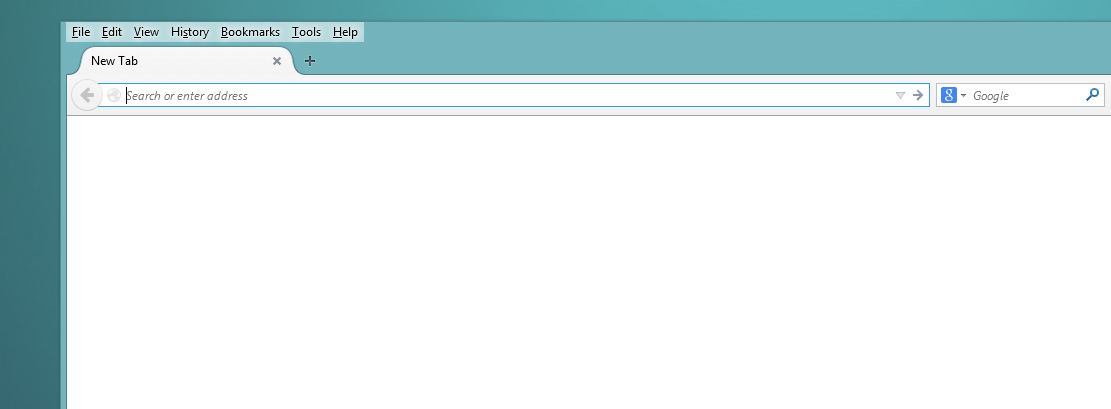
The menu bar for me has a slightly white tinted effect to it and by menu bar I mean the File | Edit | View | History | Bookmarks | Tools | Help. I am using firefox 32.0 on windows 8.1 and haven't been able to find a solution on how to edit the background of this to match the windows 8.1 automatic color adjustments.
The menu bar for me has a slightly white tinted effect to it and by menu bar I mean the File | Edit | View | History | Bookmarks | Tools | Help. I am using firefox 32.0 on windows 8.1 and haven't been able to find a solution on how to edit the background of this to match the windows 8.1 automatic color adjustments.
All Replies (2)
Can you attach a screenshot?
- http://en.wikipedia.org/wiki/Screenshot
- https://support.mozilla.org/kb/how-do-i-create-screenshot-my-problem
- Use a compressed image type like PNG or JPG to save the screenshot
- Make sure that you do not exceed the maximum size of 1 MB
Maybe look at a solid lightweight theme (Persona).
I've never used these forums, a bit confusing for me at first look. I've looked at the solid themes and they really don't blend well with my wallpapers and rainmeter program. I'm just curious if it's possible to get it to blend at all or if I'm stuck with it as it is.
Gewysig op deur Chrono