

Avoid support scams. We will never ask you to call or text a phone number or share personal information. Please report suspicious activity using the “Report Abuse” option.

Learn More
Open

Outlook.com SMTP error 535 – OAuth2 authentication fails in Thunderbird

sergio.sgambati

Hello Thunderbird Support Team,

I am experiencing a persistent SMTP authentication failure when sending emails from my personal Outlook.com account using Thunderbird.

My configuration:

Operating system: Windows 11 Pro (64-bit)

Thunderbird version: 159.0 (32-bit)

Account type: Personal Outlook.com account

What works:

Receiving emails via IMAP works correctly.

Sending and receiving emails through Outlook.com webmail works correctly.

My other Microsoft email account works in Thunderbird.

What does not work:

Sending emails from my new Outlook.com account through Thunderbird consistently fails.

The SMTP server returns:

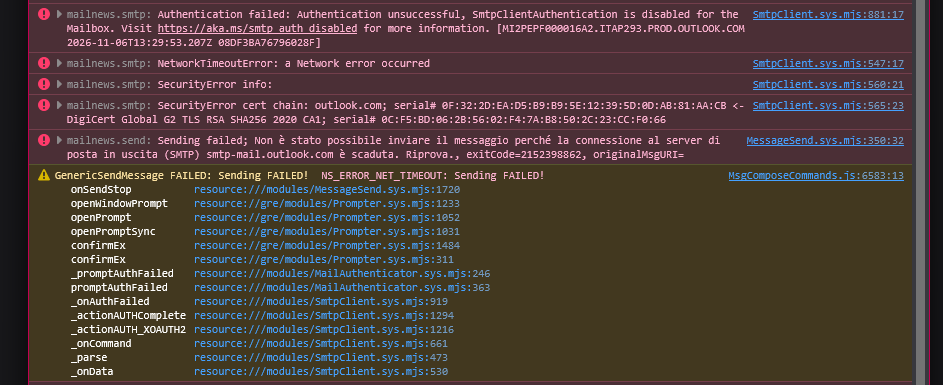
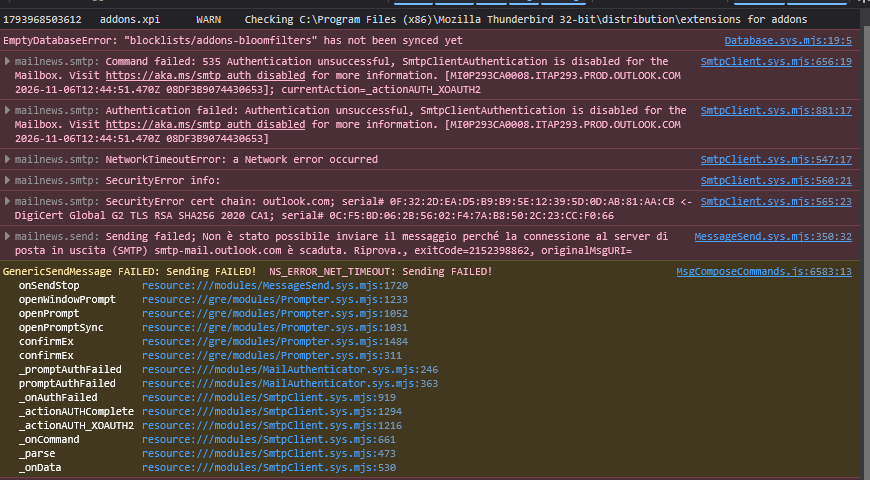
535 Authentication unsuccessful – SmtpClientAuthentication is disabled for the Mailbox.

Outgoing SMTP settings

Server: smtp-mail.outlook.com

Port: 587

Connection security: STARTTLS

Authentication method: OAuth2

Username: Full Outlook.com email address

Troubleshooting already performed

Checked all SMTP server settings.

Verified that OAuth2 is selected.

Removed previously saved authentication credentials.

Repeated Microsoft OAuth2 authentication successfully.

Retested sending messages. The same error persists.

Thunderbird's Error Console confirms that the failure occurs during the AUTH XOAUTH2 authentication exchange.

The server explicitly reports that SmtpClientAuthentication is disabled for the Mailbox.

Questions

Is this a known Thunderbird issue affecting SMTP OAuth2 authentication with personal Outlook.com accounts?

Could Thunderbird be generating an incorrect XOAUTH2 authentication request?

Can Thunderbird provide a more detailed SMTP diagnostic log to identify the cause?

Does this error indicate that Microsoft's SMTP service is rejecting an otherwise valid OAuth2 authentication request?

Is there any known workaround or can this issue be escalated to the Thunderbird developers?

I would appreciate a technical investigation rather than another general configuration guide, as the standard troubleshooting steps have already been completed.

Thank you for your help.
Hello Thunderbird Support Team, I am experiencing a persistent SMTP authentication failure when sending emails from my personal Outlook.com account using Thunderbird. My configuration: Operating system: Windows 11 Pro (64-bit) Thunderbird version: 159.0 (32-bit) Account type: Personal Outlook.com account What works: Receiving emails via IMAP works correctly. Sending and receiving emails through Outlook.com webmail works correctly. My other Microsoft email account works in Thunderbird. What does not work: Sending emails from my new Outlook.com account through Thunderbird consistently fails. The SMTP server returns: 535 Authentication unsuccessful – SmtpClientAuthentication is disabled for the Mailbox. Outgoing SMTP settings Server: smtp-mail.outlook.com Port: 587 Connection security: STARTTLS Authentication method: OAuth2 Username: Full Outlook.com email address Troubleshooting already performed Checked all SMTP server settings. Verified that OAuth2 is selected. Removed previously saved authentication credentials. Repeated Microsoft OAuth2 authentication successfully. Retested sending messages. The same error persists. Thunderbird's Error Console confirms that the failure occurs during the AUTH XOAUTH2 authentication exchange. The server explicitly reports that SmtpClientAuthentication is disabled for the Mailbox. Questions Is this a known Thunderbird issue affecting SMTP OAuth2 authentication with personal Outlook.com accounts? Could Thunderbird be generating an incorrect XOAUTH2 authentication request? Can Thunderbird provide a more detailed SMTP diagnostic log to identify the cause? Does this error indicate that Microsoft's SMTP service is rejecting an otherwise valid OAuth2 authentication request? Is there any known workaround or can this issue be escalated to the Thunderbird developers? I would appreciate a technical investigation rather than another general configuration guide, as the standard troubleshooting steps have already been completed. Thank you for your help.
Ama-screenshot ananyekiwe

You must log in to your account to reply to posts. Please start a new question, if you do not have an account yet.