


Two changes to spam filter

A couple of suggestions.
1) After opening an email marked as spam (by Thunderbird's spam filter), there is no option to confirm that this is, indeed spam. The email can be marked as "Not spam," but not confirmed to be spam. Unless I'm missing something, I have to go back to the inbox, mark it as spam manually, and then it is automatically sent to the spam box.
2) Assuming I understand the spam filtering correctly, once Thunderbird marks emails as spam, they remain in the inbox for at least 1 day (or longer if desired). I would like to have those emails sent IMMEDIATELY to the spam box, where I can still examine them to make sure they're spam before deleting them.
That way, the inbox will have only emails that either are not spam at all and those that haven't been marked as such.
As the system now works -- unless I'm misusing it somehow -- once the filter marks emails as spam, I still have to wade through them to sort out the good ones. In my view, that pretty much defeats the purpose of having the filter in the first place. I still have to "mark" them as spam again to get them sent to the spam box.
Perhaps I should note that this inbox gets dozens of spam emails every day and that I check it multiple times per day.
Isisombululo esikhethiwe
How about immediately? Is that quick enough for you?
If you're talking about the setting in Accounts Setting, uncheck the "older than x days" box and they'll go right away.
Funda le mpendulo ngokuhambisana nalesi sihloko 👍 0All Replies (10)

- The confirmation is the appearance of the "flame" icon. If it's red, it's spam. If uncolored, not spam. This is a column in the messages list. If you don't see it, you can set up the list columns up via the little icon to the right of the column headers. See attached image.
- See (in Windows) <Tools | Settings | Privacy & Security | Junk | "When messages are marked as junk: Move them to the account’s “Junk” folder">.
Sounds like you would benefit from a tour of Thunderbird's various settings - you might be able to tweak it to work better for you.
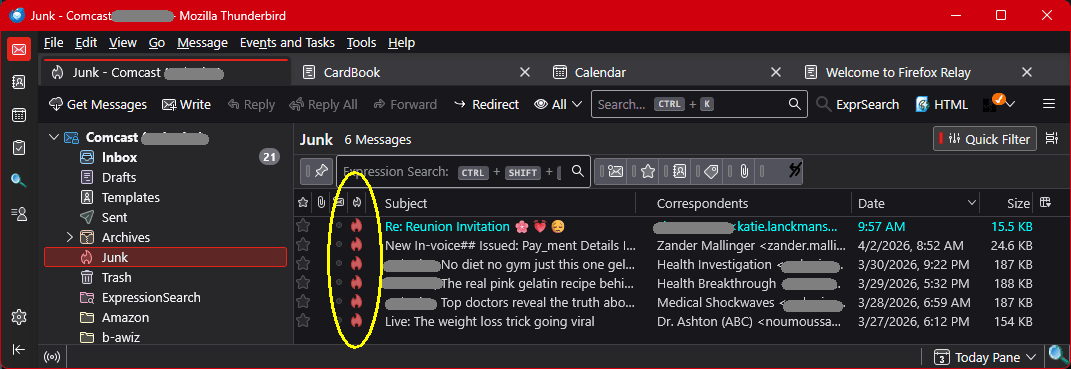
Yes, I did see the spam flag in the inbox. But that's my point. The messages marked as spam are still sitting in my inbox, so I either have to wait a day for them to be removed automatically, or remove them manually myself. If I leave them, I still have to wade through them because they are interspersed with unmarked messages. If I remove them myself, the spam filter hasn't saved me any time.
When you go to the "When messages are marked as junk: Move them to the account’s “Junk” folder", the options are all in days, so the least amount of time it offers is 1 day. I'm asking for 1 minute (or less).
Isisombululo Esikhethiwe
How about immediately? Is that quick enough for you?
If you're talking about the setting in Accounts Setting, uncheck the "older than x days" box and they'll go right away.
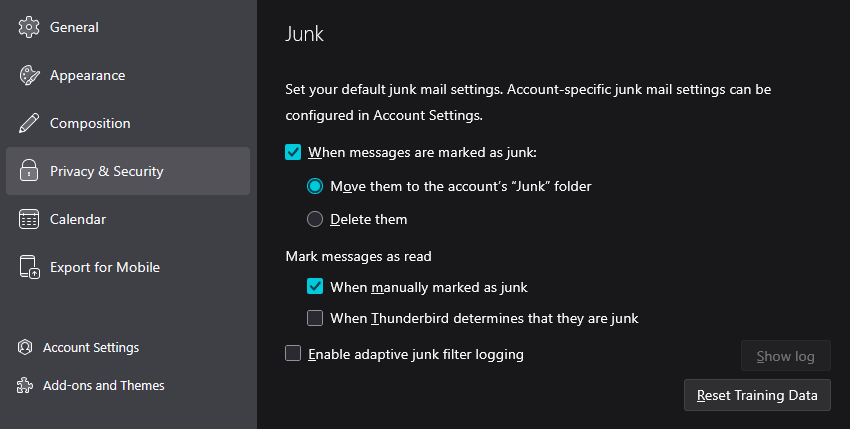
Thanks. That does solve the second problem. With that in place, the first problem is unlikely to arise.
No, actually it isn't.
The flag indicates that THUNDERBIRD thinks the message is spam. What if I'm not sure that it is? So I click on the message to see what it is and what's in it. I do so knowing what Thunderbird thinks, but I want to see what I think.
If the filter is not set to send messages to the spam box immediately (as it is now -- thanks to you) , and I can't mark it when it's open (which at present I can't), then when I close it, it goes back to the inbox. If I then confirm that it's spam, it will THEN be sent to the spam folder. Had I been able to mark it as spam when it was open (I CAN mark it as not spam -- that option is available), then I would have been able to skip this added step.
You can mark any message as spam or not-spam even when open. There's a "Junk" button available for every apparent Non-Junk message, and a "Not Junk" button in every Junk message. Also, you can use the keyboard shortcut "j" to classify a message as Junk and "J" (shift+j) to classify it as non-Junk.
When I open a non-marked message, there is a button for spam. That button is unhighlighted for a marked message (in other words, it's not an option). There is a message, partly in yellow, that says "Thunderbird thinks this message is spam." It gives me 2 options: "Learn more" and "Not spam."
However, shift +J does appear to work.
Why not just allow the spam button to be highlighted: it's clearly marked and doesn't require anyone to know the shortcuts?