


Possible certificate / MITM issue with iCloud contacts in Thunderbird (p123-contacts.icloud.com)

Hi,
I’m using Thunderbird on Windows and recently ran into a certificate warning that I can’t safely interpret, even after searching the web and using AI tools (which gave me inconsistent answers).
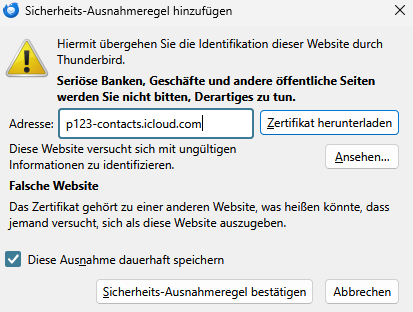
Thunderbird tries to connect to the iCloud contacts server p123-contacts.icloud.com (CardDAV). When it does, I get a “wrong site” certificate error. When I click “View certificate”, Thunderbird shows a valid certificate, but not for Apple/iCloud – it’s for login.kraftcom.de (issued by DigiCert / GeoTrust TLS RSA CA G1). I did not accept the exception.
From what I can see online, p123-contacts.icloud.com is a legitimate Apple domain, but it is also mentioned in some phishing / scareware contexts, which makes me even more unsure how to interpret this combination (Apple host + Kraftcom certificate). I’m also not sure whether this is simply a captive-portal / ISP login interception effect or something that should worry the wider community.
My questions:
Is this behavior expected in any scenario, or does it indicate a misconfiguration / MITM situation that Thunderbird should treat as a serious security issue?
Is there anything I should check or change on my side (Thunderbird config, network, ISP, certificates)?
Is there any additional diagnostic information I can provide (logs, screenshots) that would help you assess whether this is a Thunderbird issue or a network/ISP issue?
I specifically did not confirm the certificate exception and I would like to keep my setup secure, but I also want to make sure the community is aware if this is a broader problem.
Thanks in advance for any guidance
All Replies (1)
Is this behavior expected in any scenario, or does it indicate a misconfiguration / MITM situation that Thunderbird should treat as a serious security issue?
To me this looks very much like someone is intercepting your secure connection to the Apple server. Whether this is something malicious or a "service" of your ISP, I don't know. Does login.kraftcom.de ring a bell for you? Is it somehow related to your ISP?
Is there anything I should check or change on my side (Thunderbird config, network, ISP, certificates)?
Try to find out what and who kraftcom.de is. This is what Gemini knows about them:
"KraftCom GmbH is a German family-owned company that specializes in providing turnkey IT and telecommunications solutions for businesses, particularly in the hospitality (hotels) and healthcare (hospitals, clinics, nursing homes) sectors.
Who is KraftCom? Name: KraftCom GmbH Location: Oberostendorf, Germany Founded: 1999 Core Business: Specialist in the development, installation, and operation of complete, customized IT and telecommunications systems. Customers: Over 1,500 customers across Europe, focusing on hotels and medical facilities."
May be this is giving a hint? Are you currently traveling and staying at a hotel using their Wifi?
Okulungisiwe ngu christ1