


just loaded 140.4.0esr, suddenly folder list displays with overcompressed font

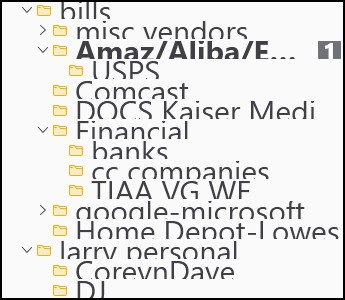
when I downloaded the update to 140.4.0esr from 140.3.0 the displayed folder list was compressed and partially unreadable . . see jpeg of list . . what do I do now ;) the update says: win 11, 32 bit, no error messages
Isisombululo esikhethiwe
Hmmm, somehow the update to 140.4.0esr changed the density of the folder list, so I changed it to relaxed and now everything is visible, before the bottom of all the folder names was partly truncated from the font . . this solved it, but I don't know why the update made this happen . . . ?????
Funda le mpendulo ngokuhambisana nalesi sihloko 👍 0All Replies (1)
Isisombululo Esikhethiwe
Hmmm, somehow the update to 140.4.0esr changed the density of the folder list, so I changed it to relaxed and now everything is visible, before the bottom of all the folder names was partly truncated from the font . . this solved it, but I don't know why the update made this happen . . . ?????