Thunderbird won't start after Windows 11 KB5065797 update overnight

It appears Windows 11 KB5065797 broke my Thunderbird. It will not start normally nor will it start in safe mode.
- I've updated to latest version 144.0 - I've tried starting in safe mode - I've tried running as administrator - Thunderbird shows in Processes, and displays suspended randomly - I've restarted Windows - I've cleared cache under users\x\appdata\local\thunderbird\profiles\x\cache2\entries\
All Replies (1)
Update: - Runs in Windows Safe Mode
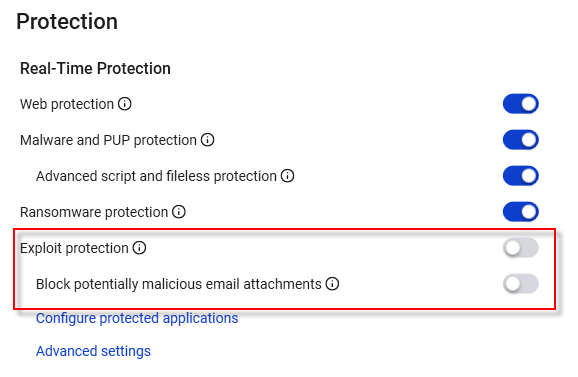
- Narrowed it down to Malware Bytes - Protection - Exploit Protection being enabled.
This worked a day ago so either Windows Update changed something that broke Malware Bytes or Malware Bytes changed something in it's latest update 5.4.1.215 Update package 1.0.103921.
I've opened a case with Malware Bytes and mark this as closed.