


Sorting Folders Alphabetically/Alphabetizing

Others have mentioned this but I'm not sure if there is a fix/anything is being done. The threads are all from previous Thunderbird versions.
I use Thunderbird for work. I have to find specific emails and folders - get to them quick. I am no longer able to do this. It's really distressing.
This is something really basic, that should be the default or else really easy to change.
I'm on a Windows machine and using Thunderbird 140.3.0esr. I've been using Thunderbird since 2003 and never had any problems. Now I'm panicking!

Isisombululo Esikhethiwe
Did you sort folders manually? To return to alphabetical sorting, right click on the account name and select "Reset folder order".
Did that work?
All Replies (15)
You have not described your problem. You want to sort folders alphabetically but you cannot? Thunderbird does sort folders alphabetically. Would you please post a screenshot so people can see what might be causing different behavior?
Yes, I want to sort alphabetically - the default since 2003. I can't post a picture because it's clients names and companies but an example is:
01 Tiger Amy B Ann K Piper press Steven B Shawn A University of You 2023 invoices Axis B Boris K Costas L Dorr Press Pyre Sage Press See Press
So it doesn't make any sense. Parts are alphabetical but then it just skips to some other random order. Interesting, all the sub folders of these folders are in alphabetical order. But the main first tier folders are unusable.
There's at least one other thread regarding this. I signed up for alerts for it but I don't have the URL :(
Isisombululo Esikhethiwe
Did you sort folders manually? To return to alphabetical sorting, right click on the account name and select "Reset folder order".
Did that work?
OOPS I marked solved by accident. No that did NOT solve the problem. I unfortunately do not have that option. I even searched in the account settings by right clicking and "reset" is no where in there.
Right click on the account name in the folder pane, above the folders that you want to sort. Is the option in the drop-down menu?
No I don't have that option in the drop down.
What version of Thunderbird are you using?
Would you please enter troubleshooting mode (help menu) and see if that option appears?
140.3.0esr (64-bit) Troubleshooting mode does not have resort folders either
This function came out with version 142. I did not know that until just now. Time to upgrade?
Except it says I am up to date. Released Sept 16 2025
- (
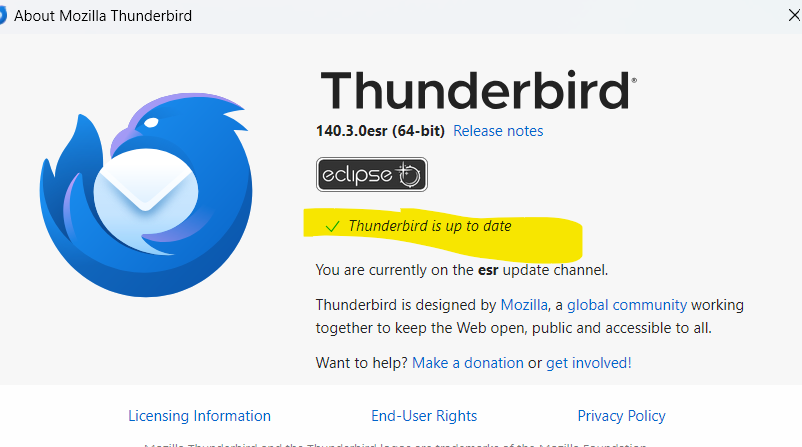
You are you up to date on the "esr channel", but not on the "release channel".
https://support.mozilla.org/en-US/kb/choosing-thunderbird-release-channel
Ok! Updated the release channel and have the "resort folders" option which worked. Damn, shouldn't have been so difficult LOL. Thank you!!!

My Thunderbird (running on Windows 10) says I am on version 144.0.1, on the Release update channel, and that I am up to date. And I have the same problem. It started earlier this year, so perhaps those that write that it came in with version 140 may be correct.
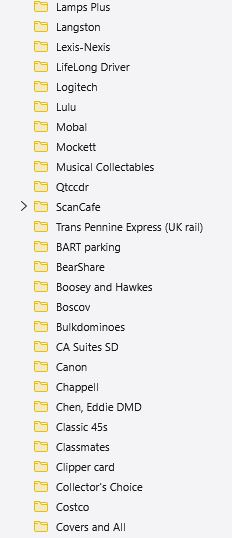
My problem is local to one subfolder (Web Vendors), but there are MANY subfolders in it. And most of those have been there for years; it's not a case of adding new folders at the end, as some have suggested.
The only folder which has a Reset Folder Order in its right click dropdown is Local Folders. Not even Thunderbird Mail under that has a Reset Folder Order. BTW, choosing RFO changes nothing. The right-click menu for all other folders includes (in this order): Open in new tab / Open in new window / Search messages... / New subfolder... / Delete / Rename / Move to > / Copy to > / Compact / Mark folder read / Favorite folder / Properties
I've attached a small section of the folders panel in Web Vendors as an illustration. It shows the discontinuity. What it doesn't show is that it is a merge issue, not a strict sort issue. The folders starting with BART should be interspersed with those above.
The folder structure is Local Folders->Thunderbird Mail->Web Vendors
It would be a monumental job to re-sort these folders manually. I would attempt it, except (as others have written), it may not survive a TBird restart or a system reboot.
It seems that "reset folder order" is designed to work only at the account level, that is, on the top level of the folder hierarchy, not sub-folders.
https://blog.thunderbird.net/2025/08/thunderbird-monthly-release-142-recap/
The menu option appears only when I right click on an account name. In the situation that you described, only "Local Folders" is an account.
"Merge issue": Are you saying that some sub-folders belong in different parent folders? And they got moved around on their own earlier this year?
In any case, your problem may be different from original poster's problem, so you may want to start a new discussion, which would put your problem in front of more people.

Sorting Folders Alphabetically/Alphabetizing is Resolved - - New Release Channel Thunderbird Required 1. Situation: Folders no longer sort by Alpha Numeric Order / Folders in strange order 2. Observation: Older Thunderbird (i.e. v140.x) has no "Reset Folder Order" 3. Fix Attempted: Check for updates on the Release Channel says your Thunderbird client 140.x is up to date (IT's A LIE) Don't believe it 4. Solution: Thunderbird 142.x or greater required to resolve. 5. Action: Download an updated version of Thunderbird (currently 147.x) from Thunderbird https://www.thunderbird.net/en-US/ 6. Action: Close any Thunderbird applications 7. Action: Run the self install program. ADMIN privileges will be required. 8. Result: Thunderbird 147.x or later (Release Channel) is installed (technically updates the older version) 9. Action: Start Thunderbird 10. Action: Mouse over the mail account (I have several in Thunderbird) and right click your mouse (assuming a right handed mouse) and select "Reset Folder Order" to sort folders using default alpha-numeric sort 11. Result: Folders are now resorted in alpha-numeric sequence