


Threading

I changed settings to no threading, but it continues to show the thread column in all the folders and do threading unless I manually remove the threading column from each folder - very time consuming. How do I get rid of the threading column globally?
All Replies (14)

Do this while on your Inbox and using Table View. First, change the view to Unthreaded:
- make sure the Thread column is removed
- r. click any Message list column header (From, Subject, etc.) > click 'Apply current view to...' > 'Folder and its children...'
- navigate back to the top level (Account name) and click it

This is one of the worst designs I have seen in quite a while...
Give me a global setting. I know the developers decided that threading was cool, and if you agree great. But I have been using email since the 1980s, and I don't want it to change. Yes, I'm that old - older than Google. Older than the Internet.
It wasn't broken, but someone decided to "fix" it. Fine. You do you
Okulungisiwe ngu DebraBk

Global settings for threading are in Settings > Appearance and can be applied to both existing and future folders.
I updated (or made sure it was set to my liking) that when I installed Thunderbird last week (this is a new PC.)
It had NO impact on the sent folder.
Try again.
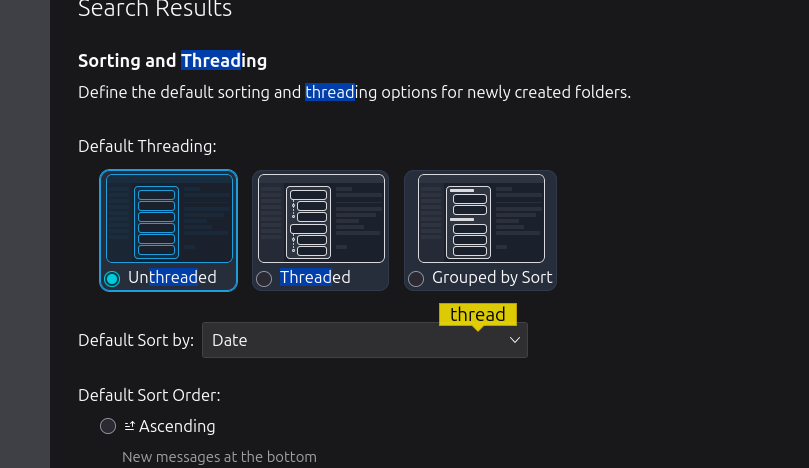
Giving me a "global setting" that doesn't impact the existing folders (because the individual folders have their own settings is NOT a GLOBAL setting. It is a "desire for future folders."
DebraBk said
Giving me a "global setting" that doesn't impact the existing folders (because the individual folders have their own settings is NOT a GLOBAL setting. It is a "desire for future folders."
As I said, global settings for threading are in Settings > Appearance and can be applied to both existing and future folders. I did not just make that up.
Do you see more settings below those in your screen image? "Propagate threading and sorting settings to:" See my screen image. If you have a recent version of Thunderbird, they are there.
The sent folder may have been created before you had a chance to set these settings because Thunderbird makes users set up an account before anything else.
I will not try again. I'm not going to offer more of my time to such an angry and argumentative person.
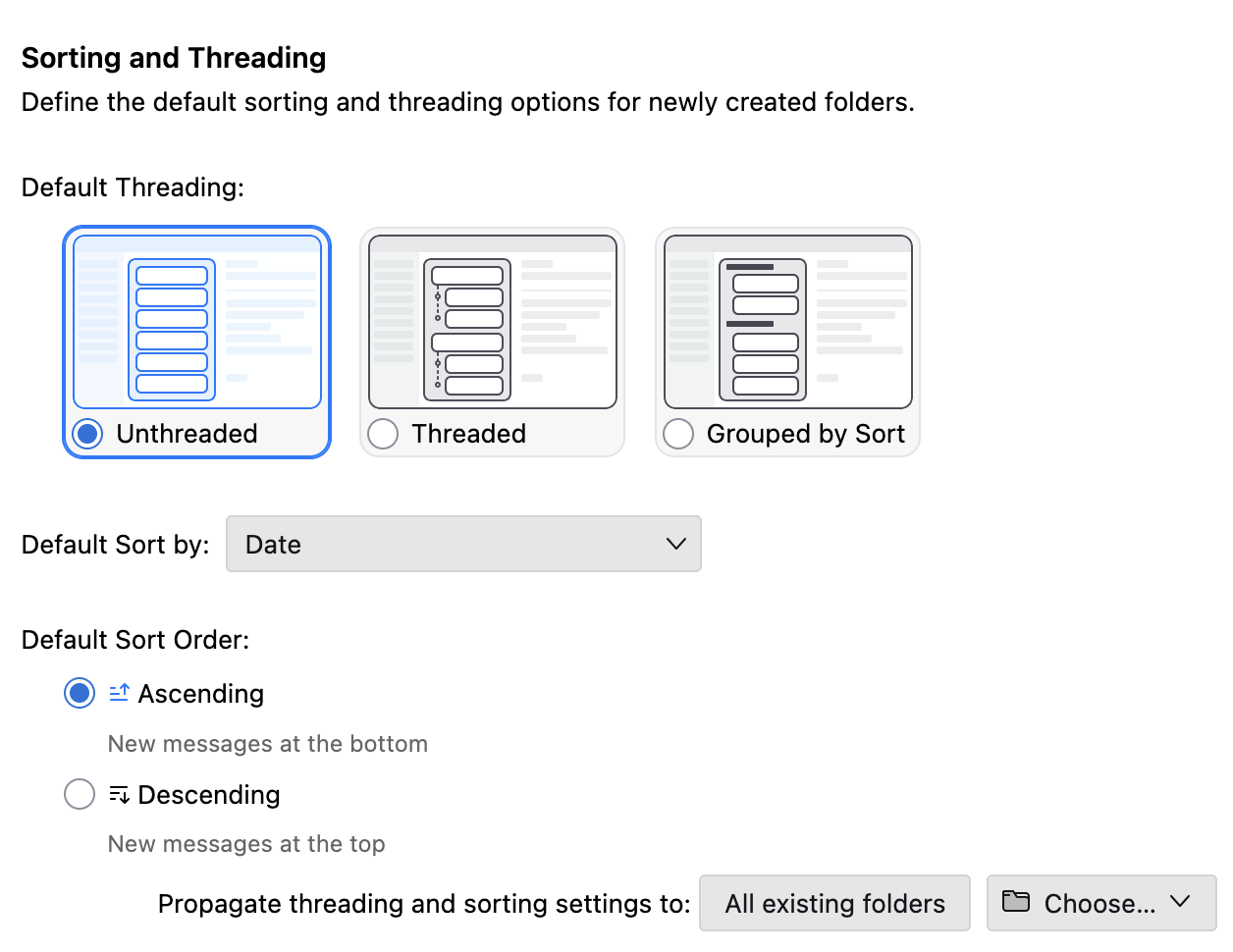
Obviously I did NOT see that.
And so I will go back to my original statement.
This is a bad design
Rick said
DebraBk said
Giving me a "global setting" that doesn't impact the existing folders (because the individual folders have their own settings is NOT a GLOBAL setting. It is a "desire for future folders."As I said, global settings for threading are in Settings > Appearance and can be applied to both existing and future folders. I did not just make that up.
Do you see more settings below those in your screen image? "Propagate threading and sorting settings to:" See my screen image. If you have a recent version of Thunderbird, they are there.
The sent folder may have been created before you had a chance to set these settings because Thunderbird makes users set up an account before anything else.
I will not try again. I'm not going to offer more of my time to such an angry and argumentative person.
I think you are missing the point = i have already changed this to no threading as i said when i started this. This issue isn't that threading is still on in any account. The issue is, when threading is off the threading column remains and i must remove it for every folder i have. One would reasonably think that if threading was turned off, it would also remove that column globally.
bill.ruggirello said
Rick said
DebraBk said
Giving me a "global setting" that doesn't impact the existing folders (because the individual folders have their own settings is NOT a GLOBAL setting. It is a "desire for future folders."As I said, global settings for threading are in Settings > Appearance and can be applied to both existing and future folders. I did not just make that up.
Do you see more settings below those in your screen image? "Propagate threading and sorting settings to:" See my screen image. If you have a recent version of Thunderbird, they are there.
The sent folder may have been created before you had a chance to set these settings because Thunderbird makes users set up an account before anything else.
I will not try again. I'm not going to offer more of my time to such an angry and argumentative person.
I think you are missing the point = i have already changed this to no threading as i said when i started this. This issue isn't that threading is still on in any account. The issue is, when threading is off the threading column remains and i must remove it for every folder i have. One would reasonably think that if threading was turned off, it would also remove that column globally.
I really do not understand why that is an issue. I have a star column I don't like, I have this honking great space as a lead into the Subject column and 6you are taking exception to something that is almost invisible. It does not really affect my use of the product. It just is. I would be far happier if the product did not keep deciding I wanted a correspondents column instead of from and to. The threading column just makes a convenient space on the left of the list to space it out from the folder pane so I do not accidentally click into the folder when I am selecting mail. But I love whitespace in my interface.
Bill, Ed told you how to do that.
I was responding to Debra. Now that I re-read the discussion, it's not clear to me if she had the same issue as yours, in which case I misunderstood, or a different issue. Her last response suggests that her issue was different.
Okulungisiwe ngu Rick
Rick said
Bill, Ed told you how to do that. I was responding to Debra. Now that I re-read the discussion, it's not clear to me if she had the same issue as yours, in which case I misunderstood, or a different issue. Her last response suggests that her issue was different.
You are right, Ed did, but if I didn't mention it b4, it didn't work.Turning off threading works globally, but it doesn't remove the thread column. Changing items in the pref.js file doesn't work either. Each folder must be done individually to remove the thread column.
Matt said
</blockquote> I really do not understand why that is an issue. I have a star column I don't like, I have this honking great space as a lead into the Subject column and 6you are taking exception to something that is almost invisible. It does not really affect my use of the product. It just is. I would be far happier if the product did not keep deciding I wanted a correspondents column instead of from and to. The threading column just makes a convenient space on the left of the list to space it out from the folder pane so I do not accidentally click into the folder when I am selecting mail. But I love whitespace in my interface. </blockquote>
I am glad it works for you. I just think turning off threading should also remove the threading column. Maybe the answer is to make setting columns global. At least, I would only have to do it once for any columns I preferred. My use is to have the email on the right with the nav pane on the left so that i can see most of the email when i select it. Extra columns in the nave pane just limits what i see in the email. Whitespace is not what i need.
bill.ruggirello said
Rick said
I didn't mention it b4, it didn't work.Turning off threading works globally, but it doesn't remove the thread column. Changing items in the pref.js file doesn't work either. Each folder must be done individually to remove the thread column.Just to be sure, did you take the steps that Ed suggested?—
- Go to your inbox.
- Change the view to unthreaded. (Do this in View menu > Sort by or in Film roll button > Sort by.)
- Make sure the thread column is removed. (You know how to do that.)
- Right click on any message list column header (From, Subject, etc.) > click 'Apply current view to...' > 'Folder and its children...'
- Still in that drop-down menu, navigate to the top level (account name) and select it.
That has alwasy worked for me.
There is an add-on that provides default column view settings. It adds a menu option to the drop-down list that appears after you right click on a column header. You can get it here: https://www.ggbs.de/extensions/DefaultColumns.html
I would not mess with prefs.js.
bill.ruggirello said
Rick said
Bill, Ed told you how to do that. I was responding to Debra. Now that I re-read the discussion, it's not clear to me if she had the same issue as yours, in which case I misunderstood, or a different issue. Her last response suggests that her issue was different.You are right, Ed did, but if I didn't mention it b4, it didn't work.Turning off threading works globally, but it doesn't remove the thread column. Changing items in the pref.js file doesn't work either. Each folder must be done individually to remove the thread column.
To remove the thread column and apply current view (sort options, etc.) everywhere:
- r. click any Message list column header (From, Subject, etc.) > click 'Apply current view to...' > 'Folder and its children...'
- navigate back to the top level (Account name) and click it