autocomplete addresses in Thunderbird 140 mac

I just installed Thunderbird 140 for mac and it seems that it does not see the macos address book. Therefore the addresses do not auto complete when writing a new email.
Isisombululo esikhethiwe
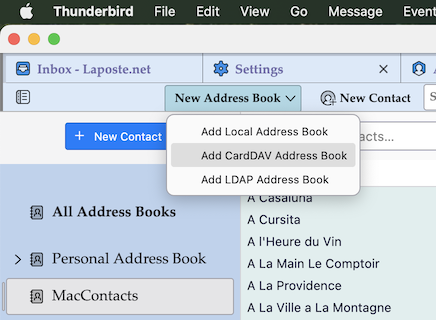
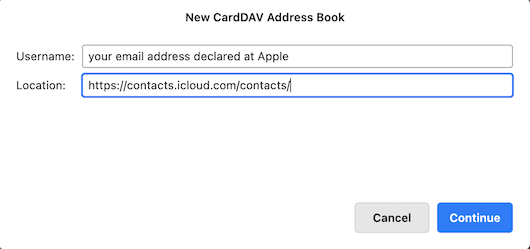
If you have activated iCloud and the two factor authentication for TB on your Mac you may create a CardDav address book to synchronise your macOS "Contacts" with TB. In the Address Book tab toolbar click on "New Address Book" and choose "Add CardDav Address Book" (image 1) This opens a new address book wizard (image 2): As "Username" fill in the email address which you have declared for your Apple account. In the second line "Location" fill in the following URL https://contacts.icloud.com/contacts/
and click "Continue".
In the next dialogue box you'll have to fill in the password received by Apple when you activated the two factor authentication, ....etc and at the end you can give a name for your new address book
Funda le mpendulo ngokuhambisana nalesi sihloko 👍 0All Replies (2)
I just found the answer: you have to check Thunderbird in System preferences/Privacy and confidentiality/contacts
Isisombululo Esikhethiwe
If you have activated iCloud and the two factor authentication for TB on your Mac you may create a CardDav address book to synchronise your macOS "Contacts" with TB. In the Address Book tab toolbar click on "New Address Book" and choose "Add CardDav Address Book" (image 1) This opens a new address book wizard (image 2): As "Username" fill in the email address which you have declared for your Apple account. In the second line "Location" fill in the following URL https://contacts.icloud.com/contacts/
and click "Continue".
In the next dialogue box you'll have to fill in the password received by Apple when you activated the two factor authentication, ....etc and at the end you can give a name for your new address book