


Windows 10 reached EOS (end of support) on October 14, 2025. If you are on Windows 10, see this article.

Search Support

Avoid support scams. We will never ask you to call or text a phone number or share personal information. Please report suspicious activity using the “Report Abuse” option.

Learn More

Lolu chungechunge lwabekwa kunqolobane. Uyacelwa ubuze umbuzo omusha uma udinga usizo.

Thunderbird Broken!

  • 1 baphendule
  • 0 zinale nkinga
  • 84 views
  • Igcine ukuphendulwa ngu MikeA01730
  • Okugcinwe kunqolobane

Hi,

I used Thunderbird this morning with no problems. Now when I start it there are no folders or anything else visible(see image). Clicking on Get Messages, Address Book, and any button except Write does nothing. Clicking Write lets me send a message normally (apparently) and the list of address to send to works normally. Clicking on the search box shows the expected suggestions (e.g. type John and I get email addresses with John) but the search returns no results. Clicking on the hamburger icon does nothing.

I have NO idea why this happened. Nothing else is malfunctioning yet no for no apparent reason years worth of emails appear to be gone. How can I fix this?

Thanks, Mike
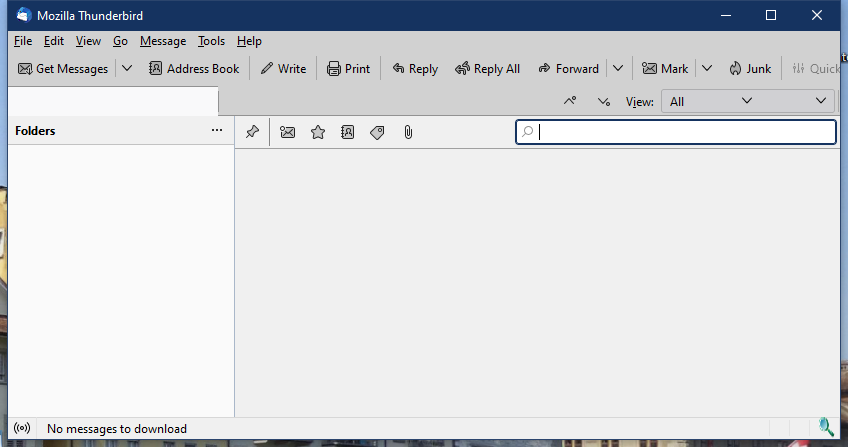
Hi, I used Thunderbird this morning with no problems. Now when I start it there are no folders or anything else visible(see image). Clicking on Get Messages, Address Book, and any button except Write does nothing. Clicking Write lets me send a message normally (apparently) and the list of address to send to works normally. Clicking on the search box shows the expected suggestions (e.g. type John and I get email addresses with John) but the search returns no results. Clicking on the hamburger icon does nothing. I have NO idea why this happened. Nothing else is malfunctioning yet no for no apparent reason years worth of emails appear to be gone. How can I fix this? Thanks, Mike
Ama-screenshot ananyekiwe

All Replies (1)

Never mind. I hadn't noticed that I had a Thunderbird new message window open. When I closed it and closed Thunderbird, and then reopened Thunderbird, it was fine.

Absolutely no idea why it would work this way: seems like a bug to me. But I can stop panicking and do some work now.